
Fireflies publishes the longest list of the seven tools here, 100+ languages on its supported-languages page, and Otter the shortest, six. Those totals are not comparable, because each vendor counts a different thing: Fireflies includes regional variants, Granola publishes two lists split by platform and no headline number at all, and Fathom's 38 sit on a page that never says which version of the product they belong to.
This is a comparison of AI note taker languages, and every vendor cell below was read off that vendor's own help, docs or pricing page on 3 September 2026. Nothing here comes from a listicle or a review. The seven are Otter.ai, Fireflies.ai, Granola, Fathom, tl;dv, Notion AI Meeting Notes and Routines, which we build, and our own row is read off the shipping Mac app at version 1.4.0 rather than a marketing page.
| Tool | Transcription languages | Auto-detect or pick | Notes come back in the meeting language? | Translation | Platforms | Plan |
|---|---|---|---|---|---|---|
| Otter.ai | Six, named, two in beta | Pick, before recording | not published | Via Otter Chat only | Mac, Windows, iOS, Android, bot or bot-free desktop | Free Basic plan |
| Fireflies.ai | 100+, 115 rows listed | Both | Yes, the dominant language spoken, per its Multi-Language Mode page | not published | Web, Mac, Windows, iOS, Android, Chrome extension, bot | Free; Multi-Language Mode on Business and Enterprise |
| Granola | Lists 32 on desktop, 17 on mobile | Auto on mobile, mode picked on desktop | Desktop setting, English or Auto; mobile follows the majority language | Via Granola chat, quotes only | macOS, Windows, iOS, Android, no bot | Free Basic plan |
| Fathom | 38, no version qualifier | not published | Only for the six translated summary languages | Summaries into six languages | Mac, Windows, bot for Zoom, Meet and Teams | Transcripts ungated; summary translation on Premium and Team Edition |
| tl;dv | Over 30, 42 entries listed | Pick by default, auto-detect on Whisper | Yes, the detected language | Two pages disagree | Mac, Windows, iOS, web, bot or bot-free desktop | Whisper on Business and Enterprise |
| Notion AI Meeting Notes | 16 named on help, 19 claimed on product | not published | not published | not published | Mac, Windows, mobile app, browser, no bot | Business or Enterprise |
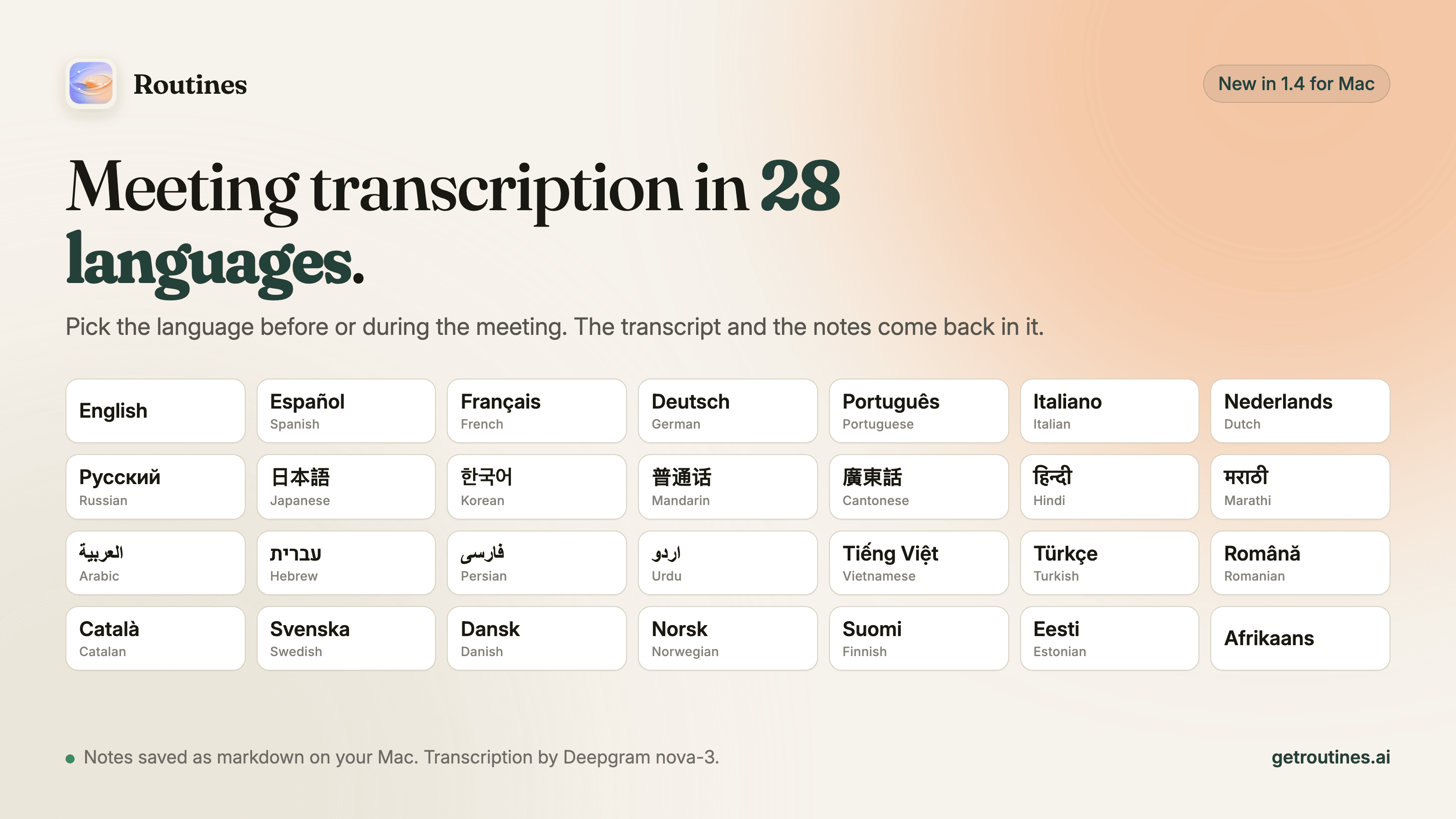
| Routines | 28 in the meeting language picker | Auto-detect hears 10, pick from 28 | Yes, the language you picked | No translation feature | Mac app | Picker is not plan-gated |
Checked 3 September 2026 against each vendor's own help, docs and pricing pages. Links in each section below.
Otter.ai
Otter's help article on transcription languages states: "Otter supports transcribing a conversation in English, Spanish, French, German, Japanese, or Chinese (Simplified)." The same page notes that German and Chinese (Simplified) are still in beta, that Otter can only transcribe in one language at a time, and that you select the language before the meeting. French is the single published exception, switching to English when English is detected. The interface stays in English whatever you pick. Otter does not publish which language its summaries come back in. Multi-language support is listed on the free Basic plan, and capture runs either through a bot in Zoom, Meet and Teams or bot-free on the desktop app. We also read where Otter's audio goes, from its own policies.
Fireflies.ai
Three Fireflies pages give three numbers. The supported-languages guide says "Fireflies supports transcription and summaries in 100+ languages, including regional variants" and carries a table of 115 language rows. The Multi-Language Mode page says 60+ and lists exactly 60, for meetings where several languages are spoken at once, on Business and Enterprise plans. The API language-codes page lists 37 codes with no headline number. A fourth page, the pricing FAQ, still says "Currently English is the primarily language that is supported. We also support Spanish, French, Portuguese, Italian, and 100+ other languages in beta", quoted as written, and it links to a help article that now returns a 403. Fireflies offers a default language, per-meeting overrides and auto-detect, and, on its Multi-Language Mode page, states that the summary is generated in the dominant language spoken. Our audit of Fireflies' published security and data pages covers the rest.
Granola
Granola states no headline number anywhere. Its multi-language help article instead publishes two lists, and we counted 32 languages on desktop, macOS and Windows, against 17 on iOS and Android. Desktop is a mode you choose in Settings, either English for best quality or Multi-language, which the page says "seamlessly transcribes all the desktop languages listed above, even if multiple languages are spoken in the same meeting". Mobile needs no setup and picks a single language from the transcript itself. The summary language on desktop is a separate control with two values, English or Auto; on mobile there is no manual setting. There is no dedicated translation feature: the same article says you cannot translate old transcripts, "although you can ask the chat in Granola to generate translations of quotes from the transcript". No bot joins, and multi-language support starts on the free Basic tier. Our audit of Granola's data handling and our side-by-side comparison go further.
Fathom
Fathom's transcription languages article is the bluntest of the seven: "We currently support transcripts in 38 languages!" We counted 38 rows in its table. Two Fathom pages then pull in different directions: that list carries no version qualifier, while the Fathom 3.0 article says "Right now, Fathom 3.0+ is only available for Mac users with English-language meetings". Neither page reconciles the two. Fathom publishes no transcription-language picker or auto-detect setting. It does translate summaries automatically when a call is detected in Spanish, Portuguese, German, French, Italian or Dutch, for Premium and Team Edition users. Recording is Mac and Windows only, with mobile listed as unsupported, while a separate page announces Fathom for iOS as coming soon on a waitlist. Our Fathom audit covers its data flows.
tl;dv
tl;dv's transcript-language help article says the company "currently support over 30 different languages for transcription" and then lists 42 entries, six of them Arabic regional variants and three of them English variants. On the default model you pick the language from a dropdown. On the Whisper model, which the Whisper article puts on the Business and Enterprise plans, the language is auto-detected and several languages can be spoken in one meeting. Notes come back in the detected language. On translation, two tl;dv pages disagree: the preferences article says the setting "will not translate from the language spoken in a meeting", while a marketing page advertises sharing a translated transcript. See our tl;dv audit for where the recordings sit.
Notion AI Meeting Notes
Notion also gives two numbers. The AI Meeting Notes help page answers the language question by naming 16: English, Chinese, Spanish, French, German, Japanese, Korean, Portuguese, Russian, Thai, Vietnamese, Danish, Finnish, Norwegian, Dutch and Swedish. The product page says AI Meeting Notes "supports 19 languages including English, French, Japanese and more, with three additional languages in Beta", without naming the full set. Neither page says whether the transcription language is detected or chosen, and neither says which language the summary comes back in. Capture is bot-free from system audio on the desktop app, plus a mobile app and a browser path that records only the microphone. AI Meeting Notes needs a Business or Enterprise plan. Our Notion AI audit has the data-handling detail.
Routines
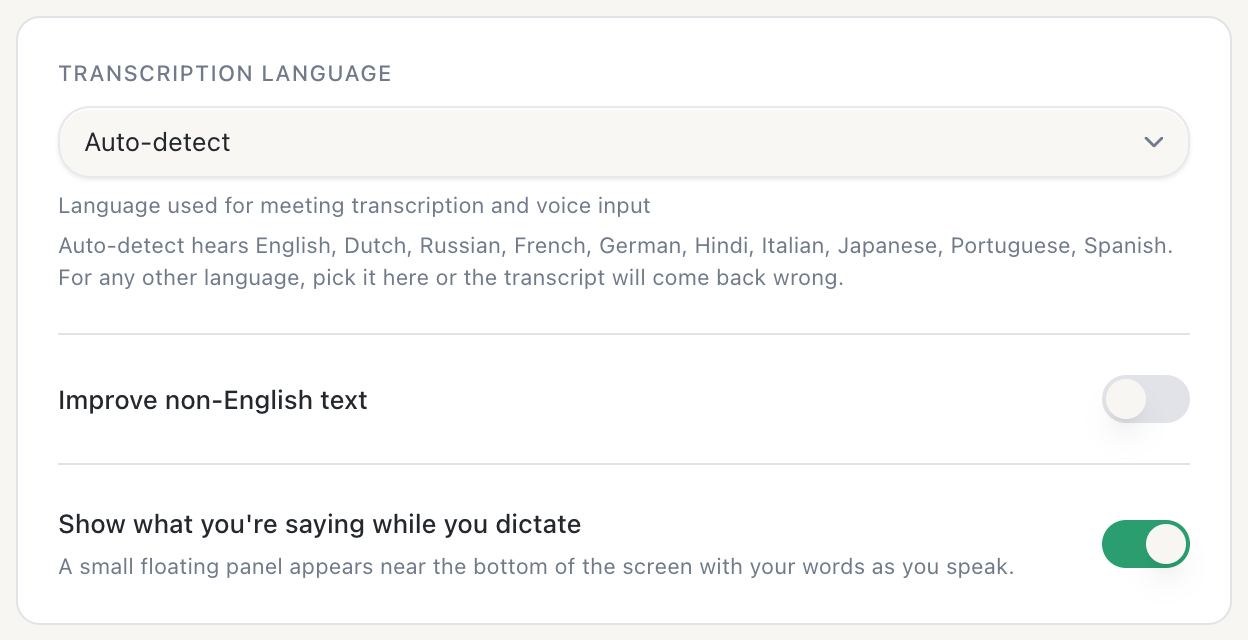
Routines is our Mac app, so read this row as a disclosure rather than a recommendation. Version 1.4 puts 28 languages in the meeting language picker, in Settings or in the recording bar during a call, and you can switch mid-meeting. Auto-detect hears 10 of the 28: English, Spanish, French, German, Hindi, Russian, Portuguese, Japanese, Italian and Dutch. For any other language you pick it yourself. Notes come back in the language you picked, with Cantonese written in Traditional Chinese and Mandarin in Simplified Chinese. Transcription runs on Deepgram nova-3: meeting audio streams to Deepgram for transcription, on the key we manage if you are on Pro or in the free trial, and on your own Deepgram key on the Free plan. Notes and transcripts are saved as markdown and SQLite on the Mac. The picker is not plan-gated, and there is no translation feature.
Routines records live meetings from the Mac's microphone and system audio, with no bot in the call, and it does not transcribe uploaded audio files. The dictation shortcuts carry their own language list with three options, Auto-detect, English and Romanian, so the 28 above are the meeting list. This is the Mac app; iPhone and Apple Watch companions exist, but the picker is a Mac claim. See the meetings feature page and the meeting notes routine.

How to choose
Pick the language or let it auto-detect
Auto-detect saves you a step and costs you a meeting when it mishears. Picking costs one click and only works if you remember before the call starts. Otter picks only. Fireflies does both, with a default, a per-meeting override and auto-detect. Granola auto-detects on mobile and asks you to choose a mode on desktop. tl;dv picks on the default model and auto-detects only on Whisper, which needs a Business or Enterprise plan. Fathom publishes no setting. Routines auto-detects 10 languages and lets you pick from 28.
Which language the notes come back in
The transcript follows the language that was spoken, or the one you picked in the tools that ask you to pick. The summary is the part that surprises people, and only four of the seven publish an answer. Fireflies says on its Multi-Language Mode page that the summary is generated in the dominant language spoken. tl;dv uses the detected language. Granola gives desktop users a choice between English and Auto and gives mobile users the majority language. Routines uses the language you picked. Otter does not publish it, Notion does not publish it, and Fathom publishes it only for the six languages whose summaries it translates on Premium and Team Edition.
Where the transcript lives
Three capture designs sit behind these seven. A joined bot dials into the call as a visible participant and records through the vendor's service, which Otter and Fireflies both offer. Local capture runs as an app that reads the microphone and system audio on your own machine, which is what Granola, Notion AI Meeting Notes and Routines do, and what Otter, Fireflies and tl;dv also offer as a desktop mode. Native platform hooks, where Zoom or Teams transcribes itself, are not in this table. Dropping the bot changes who is visible in the call, not where the audio is processed: a local recorder can still send the audio to a cloud transcription service, which is what Routines does with Deepgram. Our round-up of the best AI note takers covers that fork in more detail.
FAQ
Can Otter transcribe in Spanish?
Yes. Otter's help article on transcription languages says: "Otter supports transcribing a conversation in English, Spanish, French, German, Japanese, or Chinese (Simplified)." German and Chinese (Simplified) are marked as still in beta there. Otter transcribes one language at a time and you select it before recording starts, so set Spanish first rather than afterwards. The one exception Otter publishes is French: set your default to French and it switches to English when it hears English. Checked 3 September 2026.
Does Otter.ai have a translation feature?
No dedicated translation feature appears on Otter's help pages. Its supported-languages help article says you can translate your conversations into other languages using Otter Chat, and that Otter Chat also answers questions in other languages, which is an ad hoc chat capability rather than a translate control on a transcript. AI Chat is listed on Otter's free Basic plan, and no Otter page states a separate plan requirement for translating with it. Checked 3 September 2026.
Which AI note taker supports multiple languages?
All seven compared here do, to very different degrees. Fireflies says 100+ languages, tl;dv says over 30 and lists 42 entries including regional variants, Fathom says 38, Granola lists 32 on desktop and 17 on mobile with no headline number, Routines offers 28 in its Mac meeting language picker, Notion's help page names 16 while its product page says 19, and Otter supports six. Those totals are not comparable, because vendors count regional variants, betas and per-platform lists differently, so the safest read is the vendor's own list page rather than any single number.
Does the transcript come back in the meeting's language or in English?
The transcript follows the language that was spoken, or the one you picked in the tools that ask you to pick. The notes differ. Fireflies says on its Multi-Language Mode page that the summary is generated in the dominant language spoken in the meeting. tl;dv uses the language detected for the transcript. Granola's desktop app has a summary-language setting with two values, English or Auto, while its iOS and Android apps use the majority language detected. Routines writes the notes in the language you picked in its Mac app. Otter and Notion do not publish an answer for their summaries. Fathom publishes one only for Spanish, Portuguese, German, French, Italian and Dutch, where summaries are translated for Premium and Team Edition users.
Which AI note taker supports Hebrew?
Four of the seven list Hebrew on their own pages: Granola's desktop language list, tl;dv's transcription language list, the Fireflies supported-languages table, and the meeting language picker in Routines on the Mac. Otter does not, since its six languages are English, Spanish, French, German, Japanese and Chinese (Simplified). Fathom's 38-language list contains no Hebrew. Notion's help page names 16 languages and Hebrew is not one of them, although its product page claims 19 without naming them all. Checked 3 September 2026.
Does an AI note taker need a bot in the call to transcribe other languages?
No. Language support and capture design are independent: Otter and Fireflies can send a bot into the call and both also record without one, while Granola, Notion AI Meeting Notes and Routines capture locally from the computer's microphone and system audio. A recorder with no bot can still send the audio to a cloud transcription service, which is what Routines does with Deepgram, so the absence of a bot tells you nothing about where the transcription happens.
If your meetings run in a language that is not English, the fastest test is to record one real call in it and read what comes back, both the transcript and the notes. Download Routines and try it on your next call in your own language. If a vendor has changed a list since we checked, or we have a count wrong, tell us at hello@getroutines.ai and we will fix the row.
Sources
- Otter.ai: Transcribe conversations in English, Spanish, French, German, Japanese or Chinese (Simplified), Supported languages and pricing, checked 3 September 2026. A February 2026 snapshot of that supported-languages page listed four languages where the live page now lists six, so anything written from a cached copy under-counts Otter by two.
- Fireflies.ai: Supported languages, Multi-Language Mode, set your transcription language, API language codes and pricing, checked 3 September 2026.
- Granola: Multi-language and pricing, checked 3 September 2026.
- Fathom: Transcription languages, supported devices, Fathom 3.0 and Team Edition summaries, checked 3 September 2026.
- tl;dv: How to change transcript language, why choose Whisper, understanding your preferences and the desktop app page, checked 3 September 2026.
- Notion AI Meeting Notes: help page and product page, checked 3 September 2026.
- Routines: the Mac app at version 1.4.0, its meeting language picker and its transcription settings panel, checked 3 September 2026.