
Flows run on this Mac only
The graph, the schedule, and the run history sit on your disk. They are not synced to your iPhone or your second Mac. If you want the same chain on another machine, you build it there.
Compare / n8n
n8n is very good at what it is: a workflow engine with hundreds of app nodes, a real self-hosting story, and a community that has automated almost anything you can name. It is also a thing you operate. Routines Flows starts from the other end: the steps are AI routines that already read your inbox, your calendar, and your notes, chained on your Mac with a daily schedule. Nothing to host, no execution meter, and the branch between two steps is a sentence you type.
n8n
Pick nodes, wire the auth, map the fields, write the expression that decides the branch, then choose whether you pay for executions on Cloud or run the container yourself. Enormous reach, in exchange for owning the machinery.
Routines Flows
Drag in the routines you already trust, connect them, and type when the next one is allowed to run. The context is already attached, the schedule is local, and there is no quota to buy or server to keep up.
What replaces the node canvas
The palette on the left is your routine list, not a node library. Drop one on the canvas, drag from one port to the next, and the upstream result is handed into the downstream prompt. After a run, the canvas paints itself with what finished, what stopped for approval, and what was skipped.
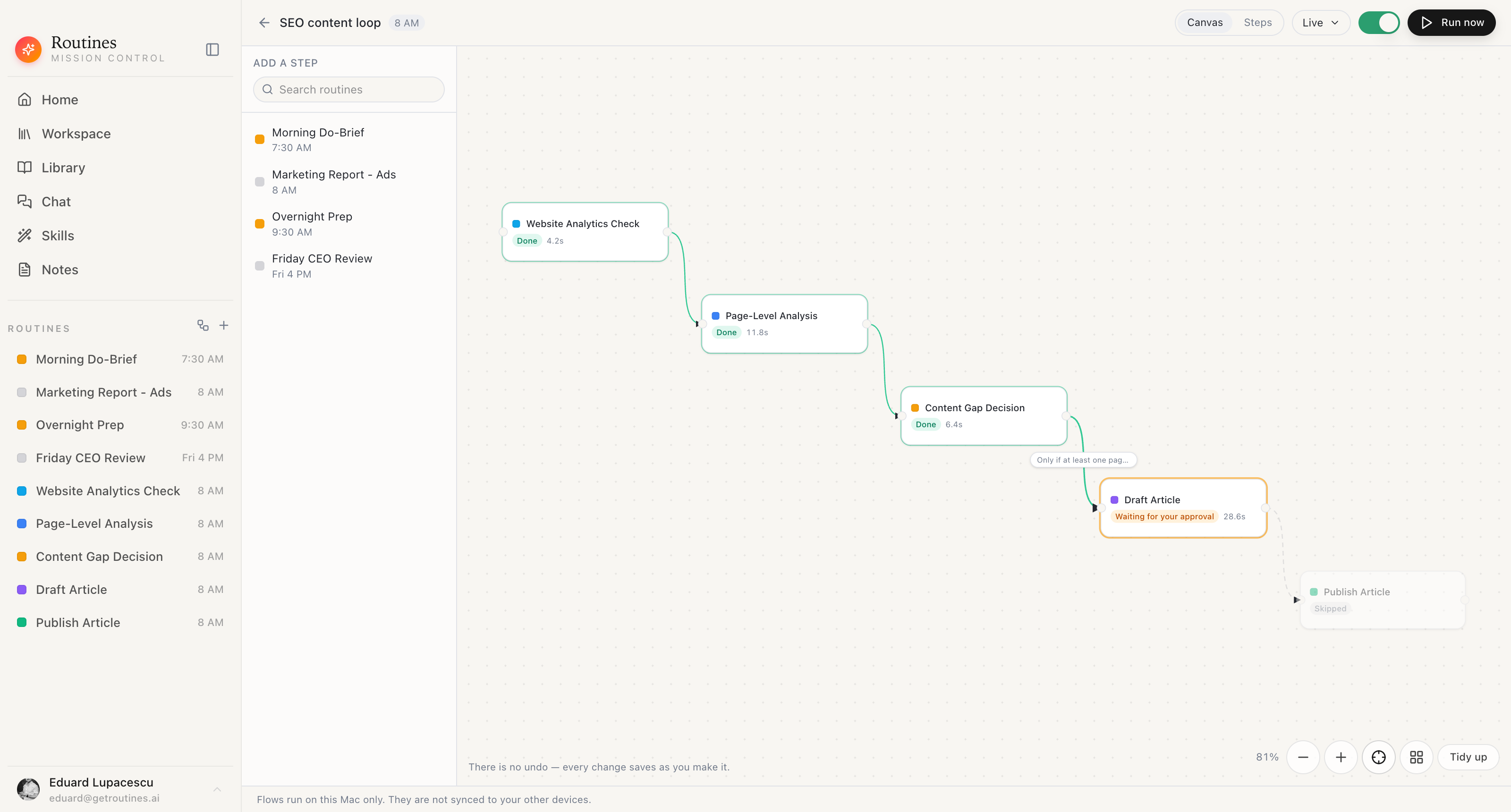
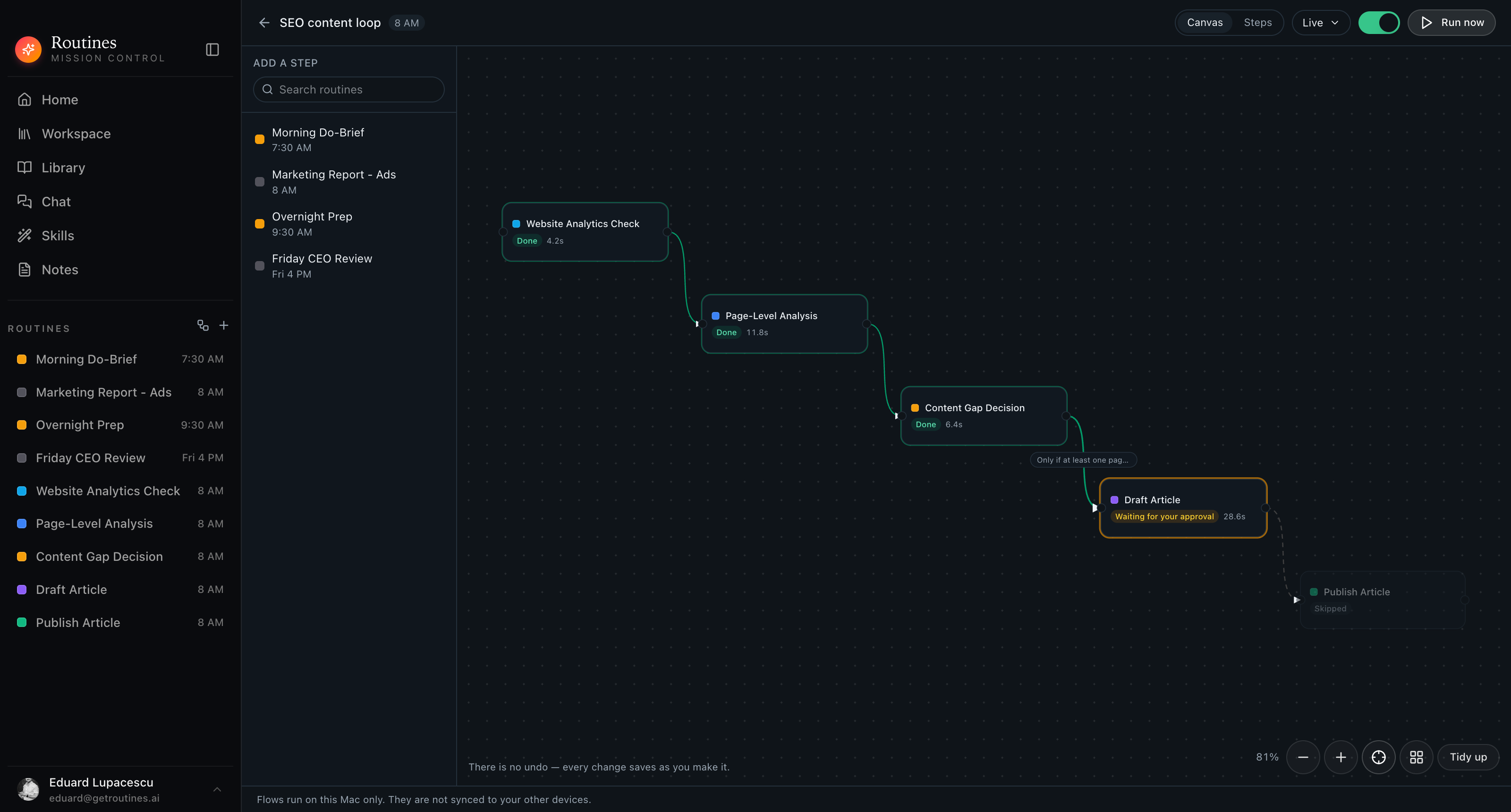
Real app · your routines as steps · runs on this Mac only
Side by side
Checkmarks both ways. n8n plans, limits, licensing, and node counts in this table are as published on n8n.io and in the n8n repository in July 2026, and both products change, so check the current pricing pages before you commit.
Instead of an expression editor
Click a connection and write when the next step is allowed to run, in the words you would use out loud. The check reads the first ~12,000 characters of the previous step's result, so keep the question about something that shows up near the top of it.
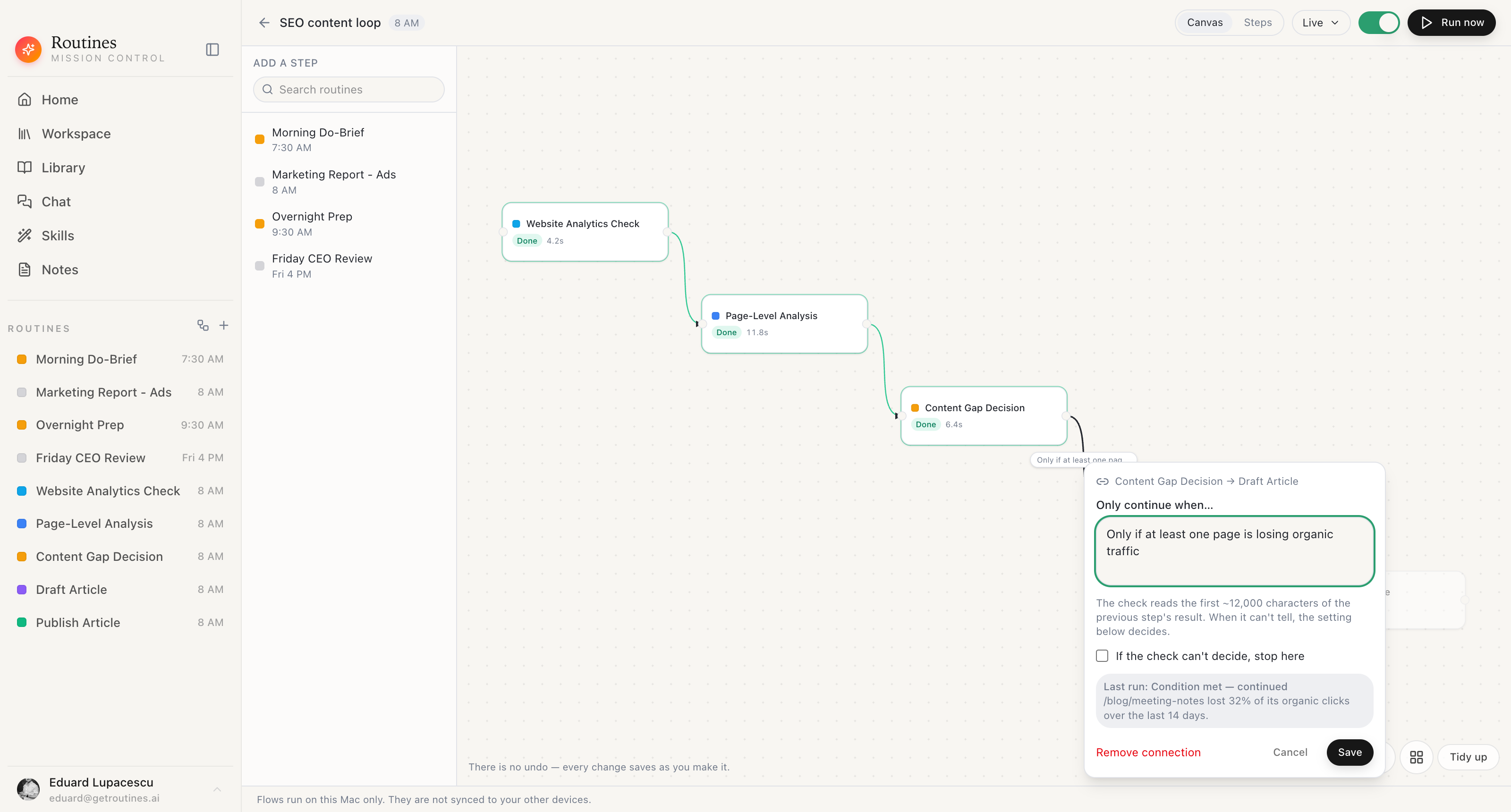
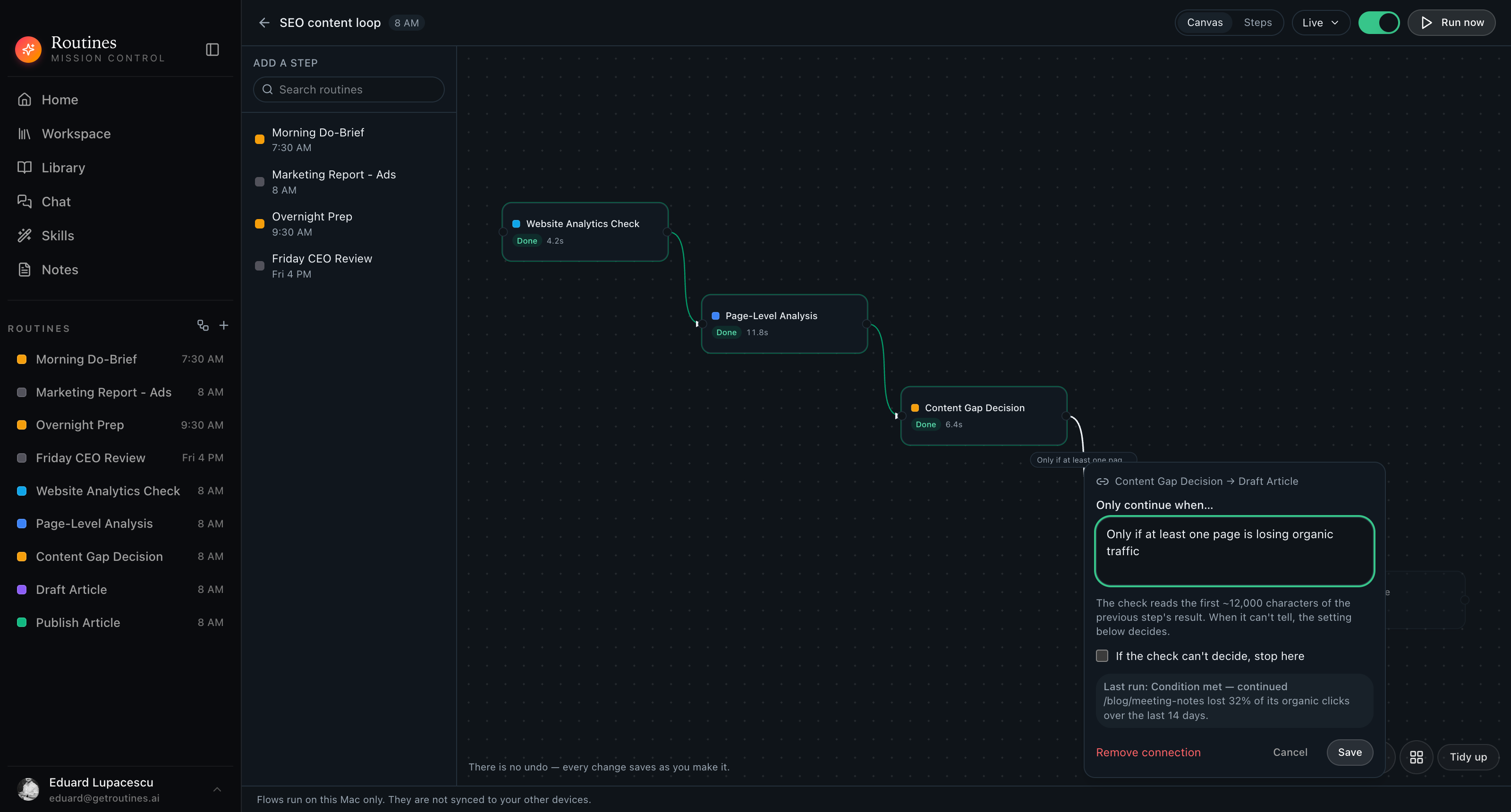
Type it in English · set the undecided policy · save
Before you switch
Flows run on this Mac only
The graph, the schedule, and the run history sit on your disk. They are not synced to your iPhone or your second Mac. If you want the same chain on another machine, you build it there.
A condition is a model call
The check on a connection is a small model call, not a rule engine, so it can come back met, not met, or could not tell. You set what undecided does for each connection, and the verdict is recorded on the run.
No undo on the canvas
Every change saves the moment you make it. That means what you are looking at is what runs tonight, and it also means there is nothing to roll back to. Build deliberately.
Instead of an execution log
Pick a dated run and scrub through it. Every step carries its status and duration, the condition verdicts carry the model's one-line reason, and the run reports what the checks cost. Why there is no article this morning takes one look.
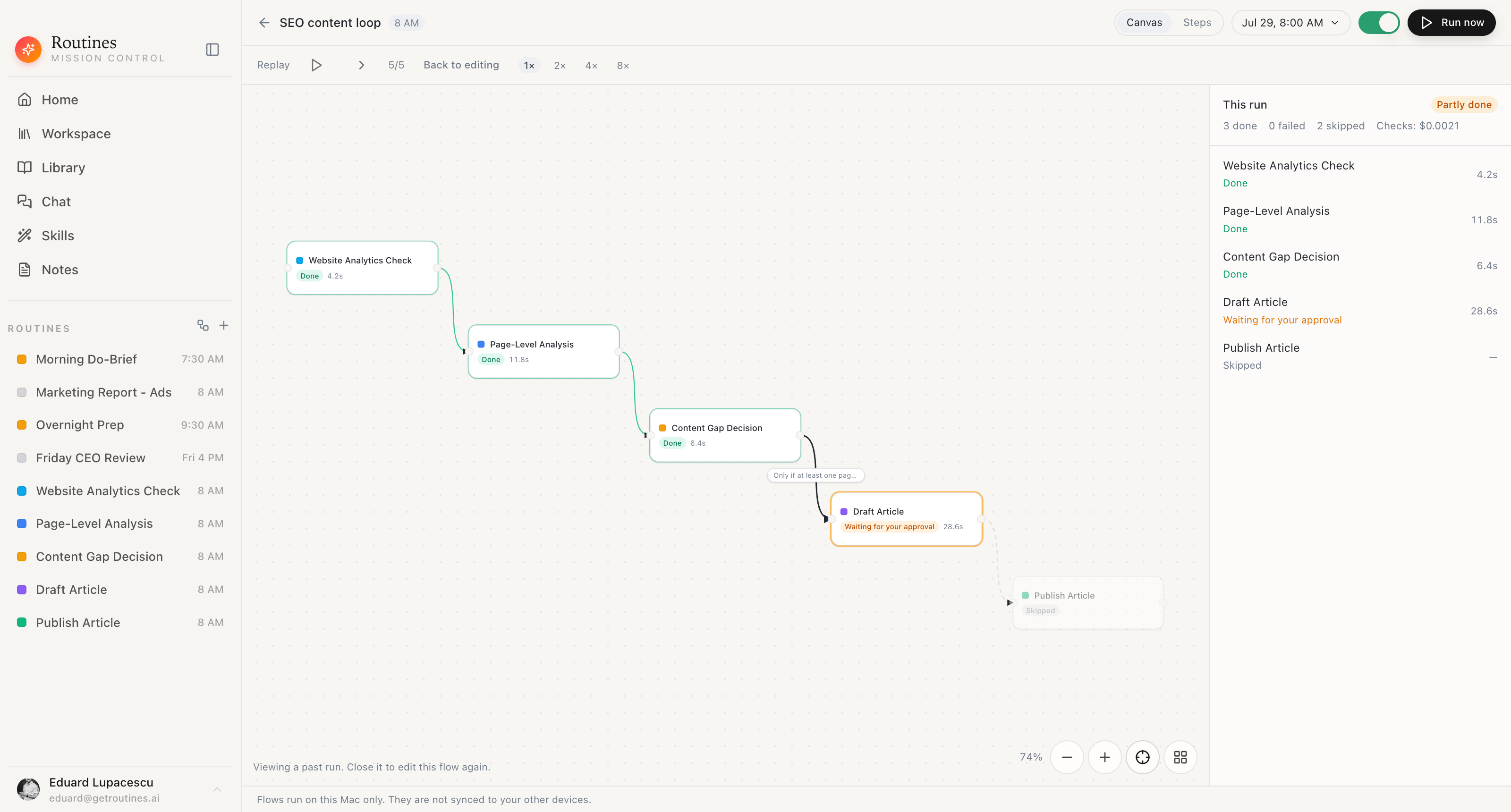
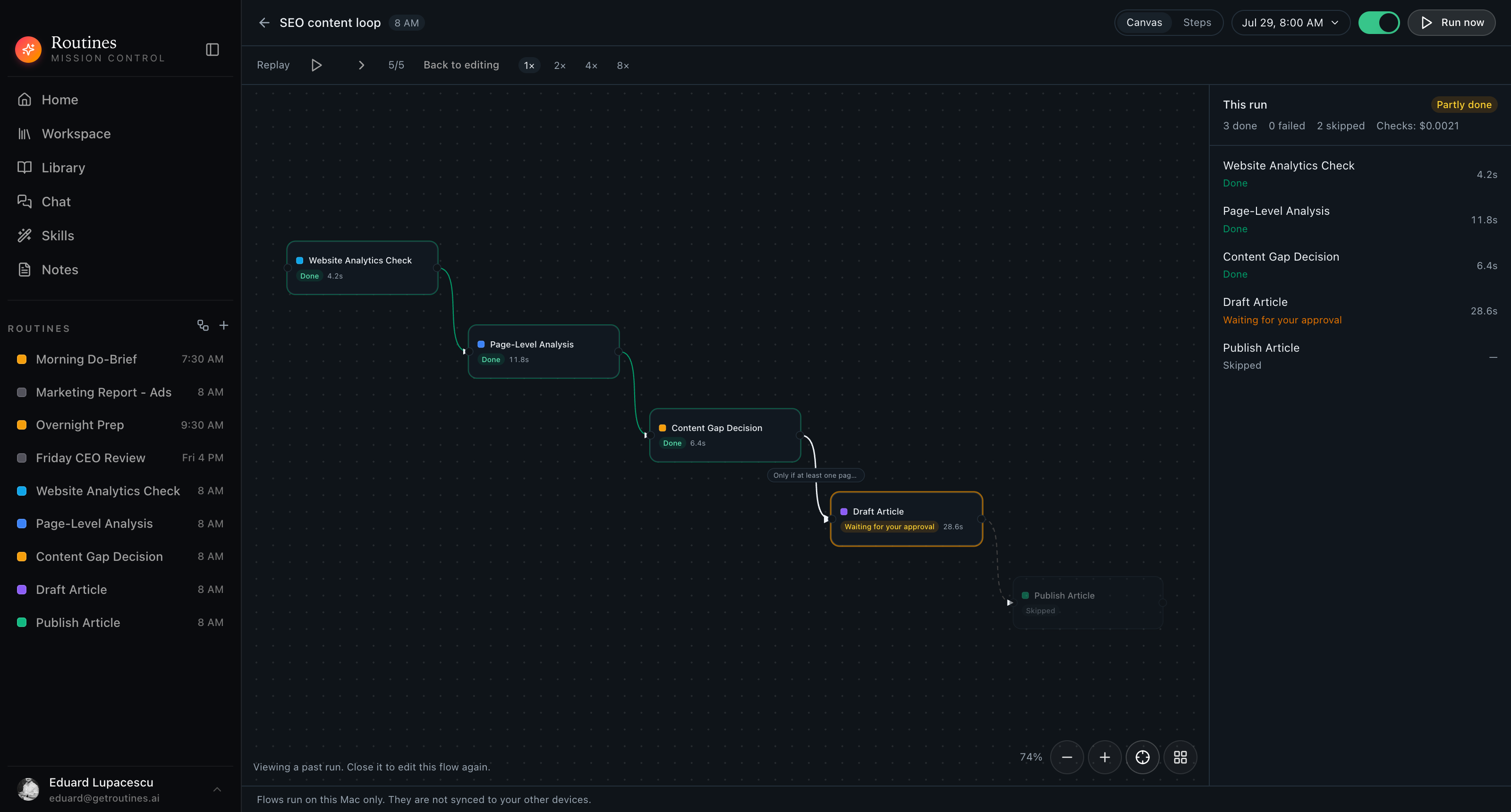
Per-step status · duration · check cost · kept on your disk
FAQ
It depends on the job. If you need to move records between SaaS APIs on a webhook, n8n is the right tool and Routines is not. If what you actually want is a handful of AI assistants that already read your inbox, calendar, and notes, running in order every morning without you hosting anything, Routines Flows covers that with far less setup. Most people searching for n8n alternatives want the second thing and end up shopping for the first.
n8n is a workflow automation platform. You drag nodes onto a canvas, each node is an API call or a piece of logic, and the workflow runs on n8n Cloud or on infrastructure you host yourself. Its own homepage calls it the world’s most popular workflow automation platform for technical teams (n8n.io, checked July 2026). Routines is a native Mac app where the equivalent of a node is one of your own scheduled AI routines, already carrying its prompt, its connectors, and your memory, so there is no endpoint or field mapping to configure.
n8n’s source is public on GitHub and the self-hosted Community Edition is free with no execution cap, but it ships under the Sustainable Use License, which n8n describes as fair-code rather than OSI open source: free to self-host for internal business or non-commercial use, and not resellable or offerable as a competing hosted service without an Enterprise license (LICENSE.md on GitHub and n8n.io/legal, checked July 2026). Routines is not open source. It has a free plan that includes AI credit and also accepts your own model key, and a 7-day trial of Pro with no credit card.
As listed on n8n.io/pricing in July 2026, the two tiers hosted by n8n are Starter at €20/mo billed annually for 2,500 workflow executions a month and Pro at €50/mo billed annually for 10,000 executions. Business, at €667/mo billed annually for 40,000 executions, is listed as self-hosted, so it is a licence for an instance you run yourself rather than an n8n Cloud tier, and Enterprise is custom on either hosting. Self-hosting the Community Edition costs nothing beyond your own server. Routines is €19/mo, or €16/mo billed yearly, with a 7-day trial and no execution meter at all, since flows run on your Mac on their own schedule. Model usage is separate from both subscriptions: on Routines it comes out of your AI credit, or out of your own provider bill if you configure your own key. Check both pricing pages before you decide, because tiers move.
You can run n8n on a Mac through Docker and drive it in a browser, but you are still operating a server and a browser UI. Routines is a native macOS app: the canvas, the schedule, and the run history are on your Mac, and the flow fires locally without anything to keep online. The tradeoff is that flows run on this Mac only and are not synced to your other devices.
No, and we are not going to claim it does. n8n markets 500+ prebuilt nodes plus generic HTTP nodes for anything not natively covered (n8n.io, checked July 2026). Routines connects Gmail, Google Calendar, Slack, Jira, and any MCP server, and a flow chains your own AI routines rather than raw API calls. If your work is arbitrary API plumbing between many services, stay on n8n. If your work is judgement over data you already have connected, that is what Flows is for.
The n8n vs Zapier and n8n vs Make arguments are mostly about where the same node canvas runs and what it costs per task. Routines is a different shape entirely: there is no node library to learn, each step is an assistant with your context already attached, the branch is a sentence rather than an expression, and the whole thing runs locally on a flat license. If you are shopping for a Zapier alternative to sync records between two apps, Routines is not that. If you want the reasoning steps between those records, it is.
7-day free trial, no credit card. See how the chain is built on the Flows feature page, or read the rest of the comparisons. Flows run on this Mac only.
Download for Mac