
Routines 1.0 shipped this week. The number deserves the backstory.
Routines started as an app for people who already had an API key. You pasted it in, and a Mac app ran your mornings on it: the briefing, the meeting notes, the routines, with your work stored as markdown and SQLite on your own machine.
That key is now one path among several. The app has two modes under "Where your AI comes from". On "My own AI" you sign in with a ChatGPT or Claude plan, connect Claude Code, or paste an Anthropic or OpenRouter key, and requests go straight from your Mac to that provider, with Routines charging nothing for them. On "Routines AI", the default for a signed-in account with no key of its own, requests travel through Routines servers and every call is paid from your Routines balance.
Between those two points sits the 0.9x run, a dozen releases in under two weeks, and most of what 1.0 actually is shipped inside it: a command palette, a sidebar that folds, connectors that sign in like a normal app, a recording that checks whether anyone is still there, and, in the 1.0 release itself, an account that gets created inside the app.
Press Cmd+K, go anywhere
Press Cmd+K in the main window and a palette opens over whatever you were doing. Type a few letters and it matches your routines, flows, titled library items, pages and settings sections; press Enter and you are there. A query is never a dead end either, because whatever you typed can go straight into a new chat, so "why is my briefing empty" turns from a search into a question.
Matching is by title, on purpose. The palette is a way to jump, and it does not index the contents of your meeting notes or your memory files.
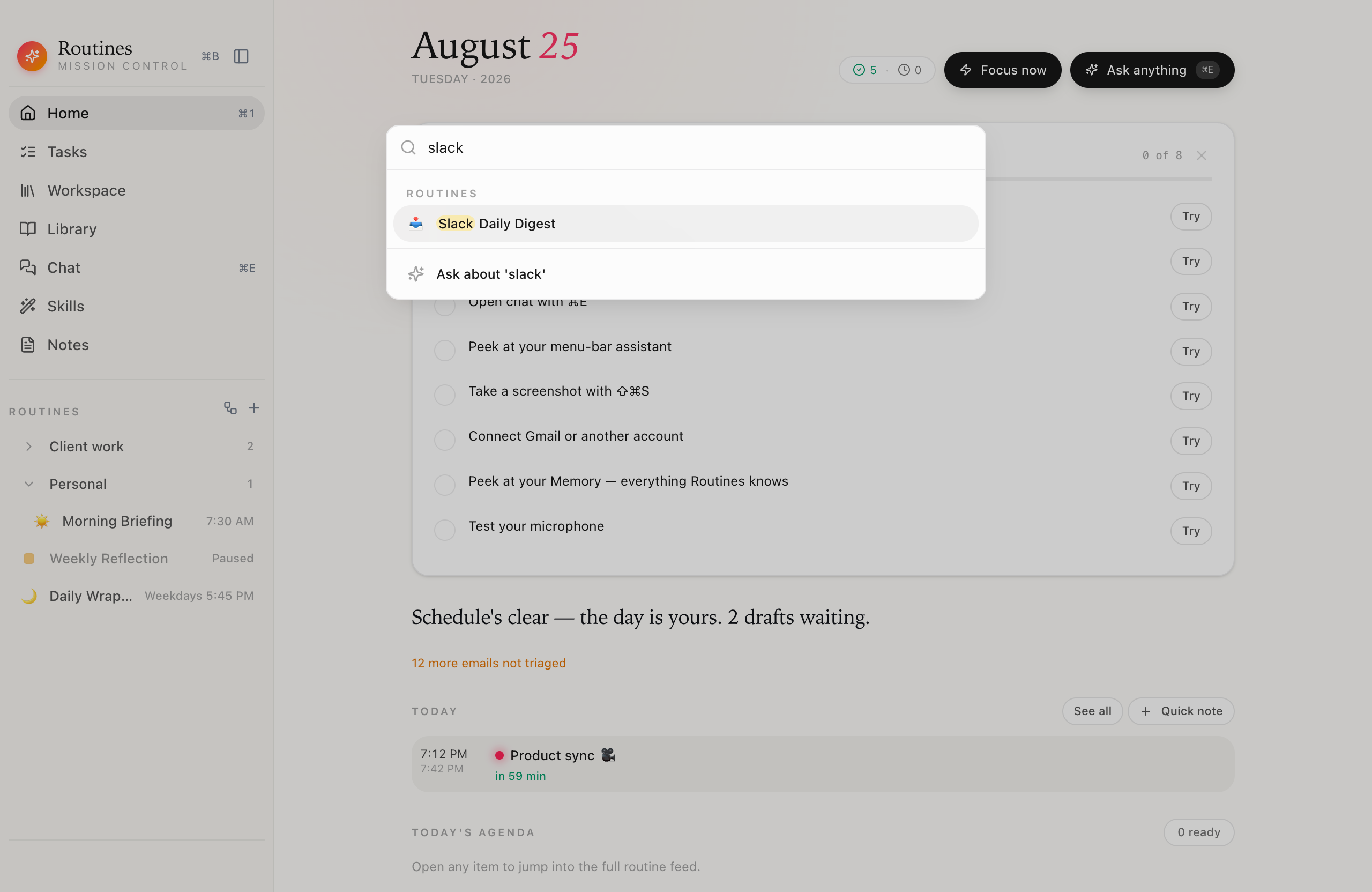 Type, Enter, done. The last row sends whatever you typed into a new chat.
The sidebar learned to fold
Routines pile up, and the sidebar's Routines section now folds. Right-click a routine to start a group with it, drag routines into a group and between groups, drag group headers to reorder them, and collapse the ones you are not working in. Deleting a group never deletes its routines; they just lose the grouping. Groups arrived in v0.98.0 with right-click, and v0.99.0 made the whole thing drag and drop.
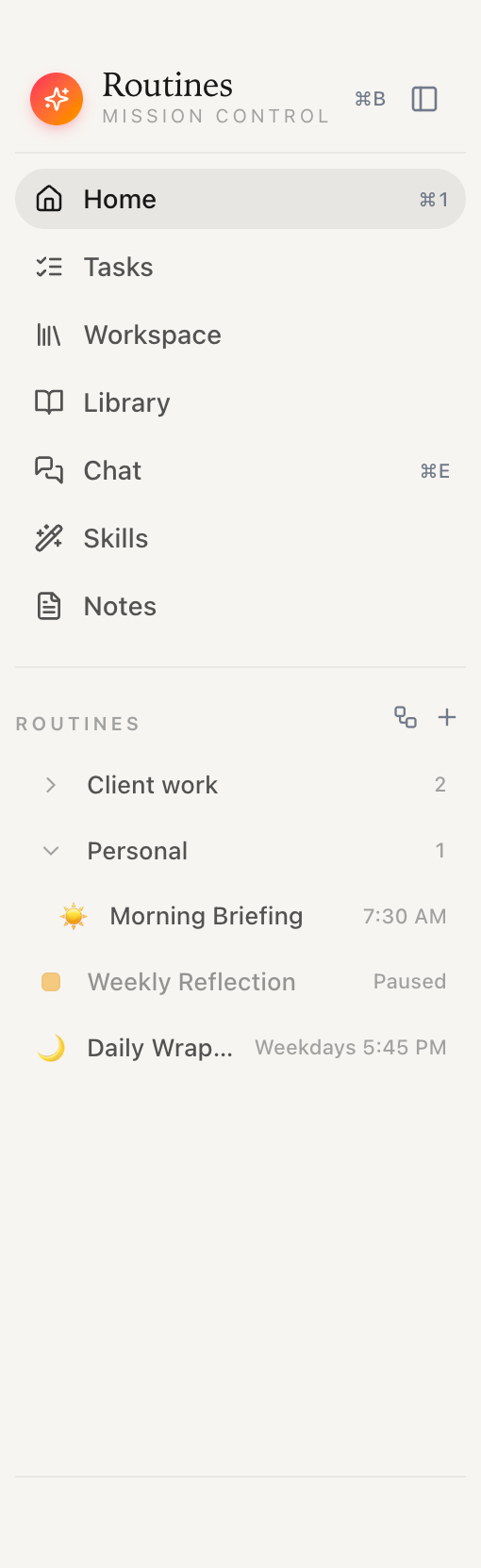 Groups collapse, reorder and take drops. Nothing inside a collapsed group is deleted.
Flows kept their reviewer, and gained a terminal
Mid-run, in v0.94.0, flows got the refine loop: a check that sits on the connection between two steps, written in plain language, graded by its own model call, with a retry that feeds the critique back into the writer's prompt. We wrote that one up in depth, attempts, budgets and traces included, in the Jira review-loop article, so this post will not re-explain it.
What the 0.9x run added around it is the terminal. You can now create a flow, wire its steps, set its checks and read its run trace from the routines CLI, with the app doing the work, and snippets became fully manageable from the terminal too. The CLI reference documents all 67 commands.
Connectors sign in like a normal app
MCP servers used to mean pasting access keys. Since v0.97.0, a server that supports OAuth gets a real sign-in: the flow opens in your browser, Routines never sees your password, and tokens are exchanged directly, never pasted into a field or passed around in links. If a server's address already carries an embedded key, the app notices and suggests moving it somewhere safer.
Next to that sits a Check connection button. It runs the same path a routine run uses and comes back with a verdict you can act on, like working, sign-in needed, unreachable, or timed out, each stamped with when it was checked.
The Slack bot got stricter in the same release. You pick the people it answers and the channels where it listens, and in a channel the channel list and the people list (you always count) both have to say yes before it replies.
A recording that checks in on you
Meeting recording got its safety net across v0.95.0 and v0.96.0. Start a recording, walk away, and after about an hour of captured audio Routines asks whether it should keep going, with exactly two answers: Keep recording or Stop recording. It waits for a quiet moment before asking, so the check-in never lands in the middle of someone's sentence, and past three hours of captured audio it asks even through continuous talk. Leave the question unanswered for about ten minutes and the recording stops itself, finishing the transcript and meeting notes the same way a deliberate stop would.
This is a net for you, the person who started the recording. Routines ships no disclosure watermark, no automatic announcement, and no consent prompt today; telling the people in the meeting is your responsibility, and we recommend saying you record.
Ended meetings also gained a Regenerate button for the AI notes. It re-runs only the summary on the transcript you already have, which means it can rewrite the notes but not repair a transcription error; the audio the transcript came from is gone once the meeting finalizes.
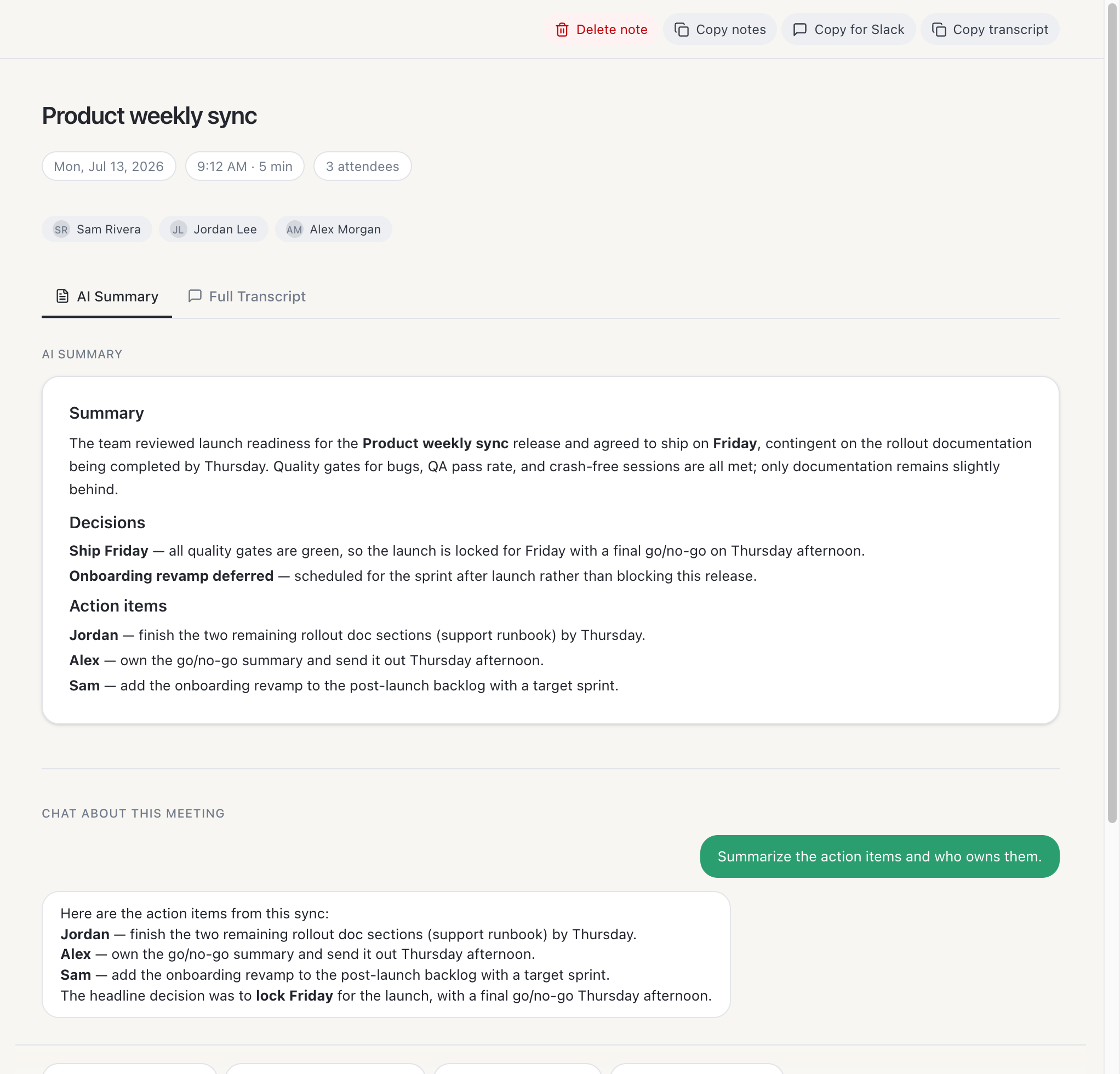 The one-pager a recording turns into, and the chat that answers questions about it.
What 1.0 itself changes: the account moves into the app
Routines has asked you to sign in since well before this release; the account is what tracks your trial and your license. What 1.0 changes is how that account comes to exist. You can now sign up or sign in with email and password directly on the welcome step, as a first-class option next to Google.
Google's role got smaller on purpose. Signing in with Google now asks only for your identity, your name, email and profile, and nothing more. The extra Google Calendar consent screen that used to launch right after sign-in is gone; the calendar connects only when you choose to connect it, from Settings.
None of this changes where your work lives. Cloud Sync and Backup is off by default; turn it on and your vault, your meeting transcripts and your notes are copied to your Routines account so your devices share them.
Free to start
Routines is a free download for macOS. The free tier needs no credit card and no subscription, and the trial does not ask for a card either. If you want to see what a finished routine looks like before building one, the Daily Overview recipe is the founder's own morning routine, ready to import.
FAQ
Do I need an account to use Routines?
Yes. Routines has asked you to sign in since before 1.0; the account is what tracks your trial and your license. What 1.0 changes is that the account is created fully inside the app: you can sign up with email and password, or with Google, and Google is asked only for your identity. The free tier needs no credit card and no subscription, and the trial does not ask for a card either. Cloud Sync and Backup is off by default; turn it on and your vault, your meeting transcripts and your notes are copied to your Routines account so your devices share them.
What changed about sign-in in Routines 1.0?
Sign-up and sign-in now happen inside the app, with email and password as a first-class option next to Google. Google sign-in asks only for your identity, meaning your name, email and profile. The extra Google Calendar consent screen that used to open right after signing in is gone, and the calendar connects only when you choose to connect it from Settings.
What happens if I forget a meeting recording running?
After about an hour of recorded audio, Routines checks in with exactly two answers, Keep recording or Stop recording. It waits for a quiet moment before asking, so the question never lands in the middle of someone's sentence, and past three hours of recorded audio it asks even through continuous talk. Leave the check-in unanswered for about ten minutes and the recording stops itself, finishing the transcript and notes the same way a deliberate stop would. The check-in is a safety net for the person who started the recording. Routines ships no disclosure watermark, no automatic announcement, and no consent prompt today; telling the people in the meeting is your responsibility, and we recommend saying you record.
Does Routines add to my AI bill?
That depends on which of the two modes under "Where your AI comes from" you use. On "My own AI", requests go straight from your Mac to the service you connected, a ChatGPT or Claude plan, Claude Code, or an Anthropic or OpenRouter API key, and Routines charges you nothing for them. On "Routines AI", the default for a signed-in account with no key of its own, requests travel through Routines servers and every call is paid from your Routines balance.