Compare / WakaTime

A WakaTime alternative for teams. Where the hours went, and what came out of them.

WakaTime answers one question very well: how many hours went into code, per developer, without anyone starting a timer. Routines answers a wider one. It sorts the day on your Mac into app usage categories, coding time per repo included, with no editor plugin to install, and it shows what the team actually finished: routine runs, meetings recorded and to-dos completed, inside an assistant that also does some of that work. This page puts both side by side, adds four other automatic time trackers, and says where WakaTime is still the better tool. Every other comparison is on the compare hub.

Two different questions

WakaTime measures typing. Routines measures the day, and what came out of it.

WakaTime installs an open source plugin in your editor, IDE or terminal, and those plugins send heartbeat events while you type. What comes back is coding time per developer, broken down by project, language, file and branch. That is a real number, and nothing on this page argues otherwise.

Routines is an AI assistant that runs on the Mac. It runs scheduled routines against Gmail, Google Calendar, Slack and any MCP server, records and transcribes meetings, keeps a local markdown memory, and holds a shared to-do list. Since version 0.79 it also sorts the day into eight app usage categories on the device itself, coding, communication, browsing, meetings, design, email, writing and other, and lifts a repo name out of IDE and terminal window titles so coding time lands per project without a plugin. On the Teams plan the owner gets one dashboard for both halves: how many routines ran, how many meetings were recorded, how many to-dos were finished, and where the hours went, per member and per day.

What Routines does not do, stated plainly so nobody buys the wrong tool: there are no editor plugins, so there are no per language, per file or per branch coding stats, no keystroke level detail and no coding leaderboards. A repo name is only a label lifted from a window title, and an ambiguous title gets no label rather than a guess. There are no timesheets, no billable hours and no idle detection, and the app is macOS only. If coding minutes per language is the number you need, WakaTime is the right purchase. The meeting side of Routines is covered in more detail on the AI meeting notes page.

What the team view can and cannot see

  • Four kinds of event are shared: a routine run, a meeting recorded, a to-do completed, and an hour of app usage.
  • A work event carries a title, its kind, a timestamp, a duration, and whether it ended ok or with an error.
  • An app usage event carries a category, the app name, an optional repo name, a number of seconds and an hour. Nothing else.
  • Window titles, the pages you visit and browser domains stay on the Mac. The category is decided there, and the event has no field one could ride in.
  • Routine output, meeting transcripts and to-do text are never sent, for the same reason: the event has no field for them.
  • The dashboard is visible to the team owner only, over ranges of up to 92 days, with times in UTC.
  • Two switches, both per machine, both in the teammate's own copy of the app: sharing at all, and app usage inside it. Off stops sending and clears whatever is queued, and turning it on starts counting from that moment instead of backfilling the weeks before.

The team activity dashboard

Hours by category and work finished, per member.

These are real screens from the Teams console, seeded with a demo team. The owner sees counts, where the hours went, a shape for the day or the range, and who was active. No screenshots of anyone, no keystrokes, no window titles.

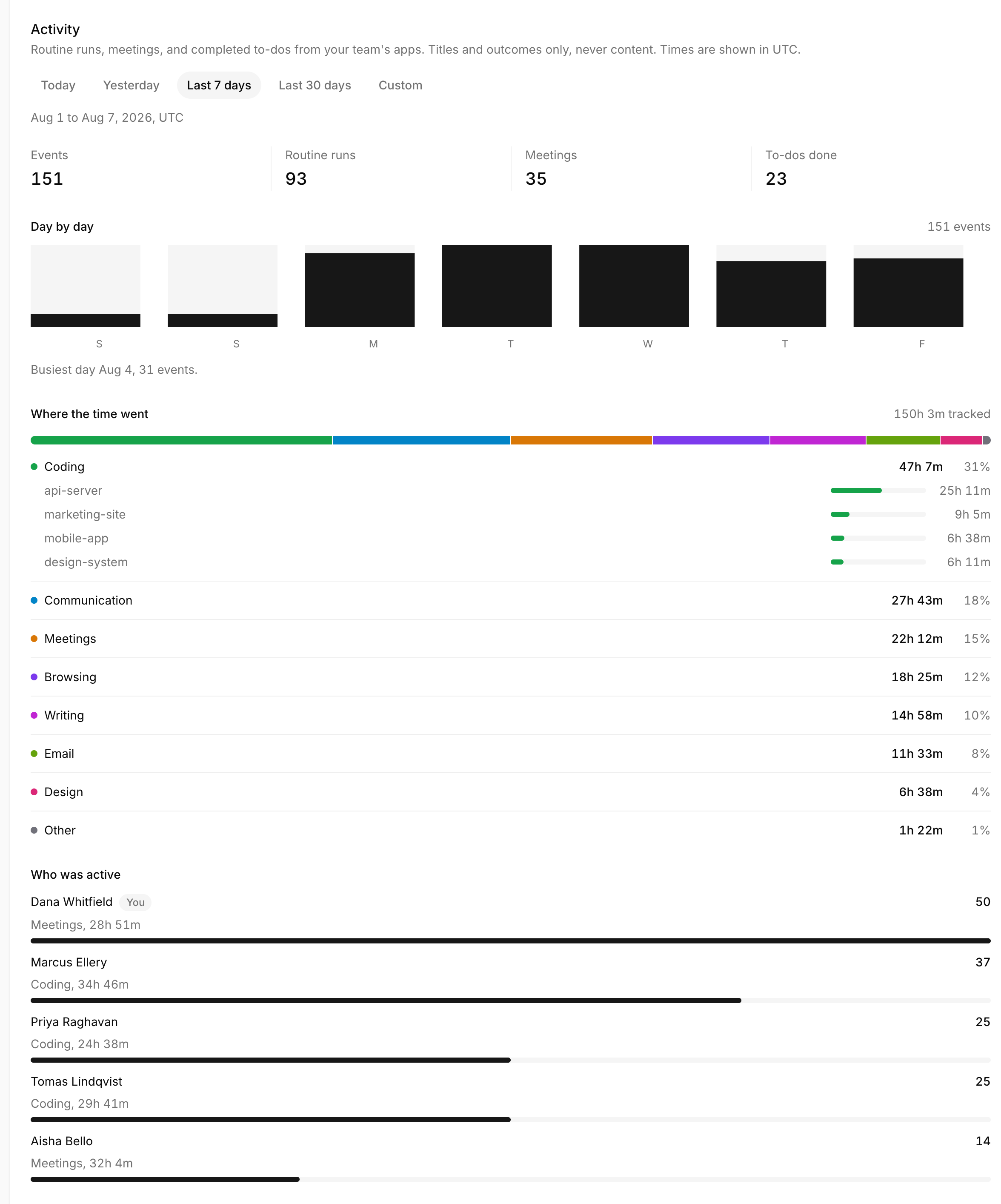
Routines team activity dashboard for Aug 1 to Aug 7, showing 151 events, 93 routine runs, 35 meetings and 23 to-dos done, a day by day bar chart with Aug 4 as the busiest day, a Where the time went panel reading 150h 3m tracked with Coding at 47h 7m, and a who was active list with the owner row first
Range view · counts, hours by category, who was active
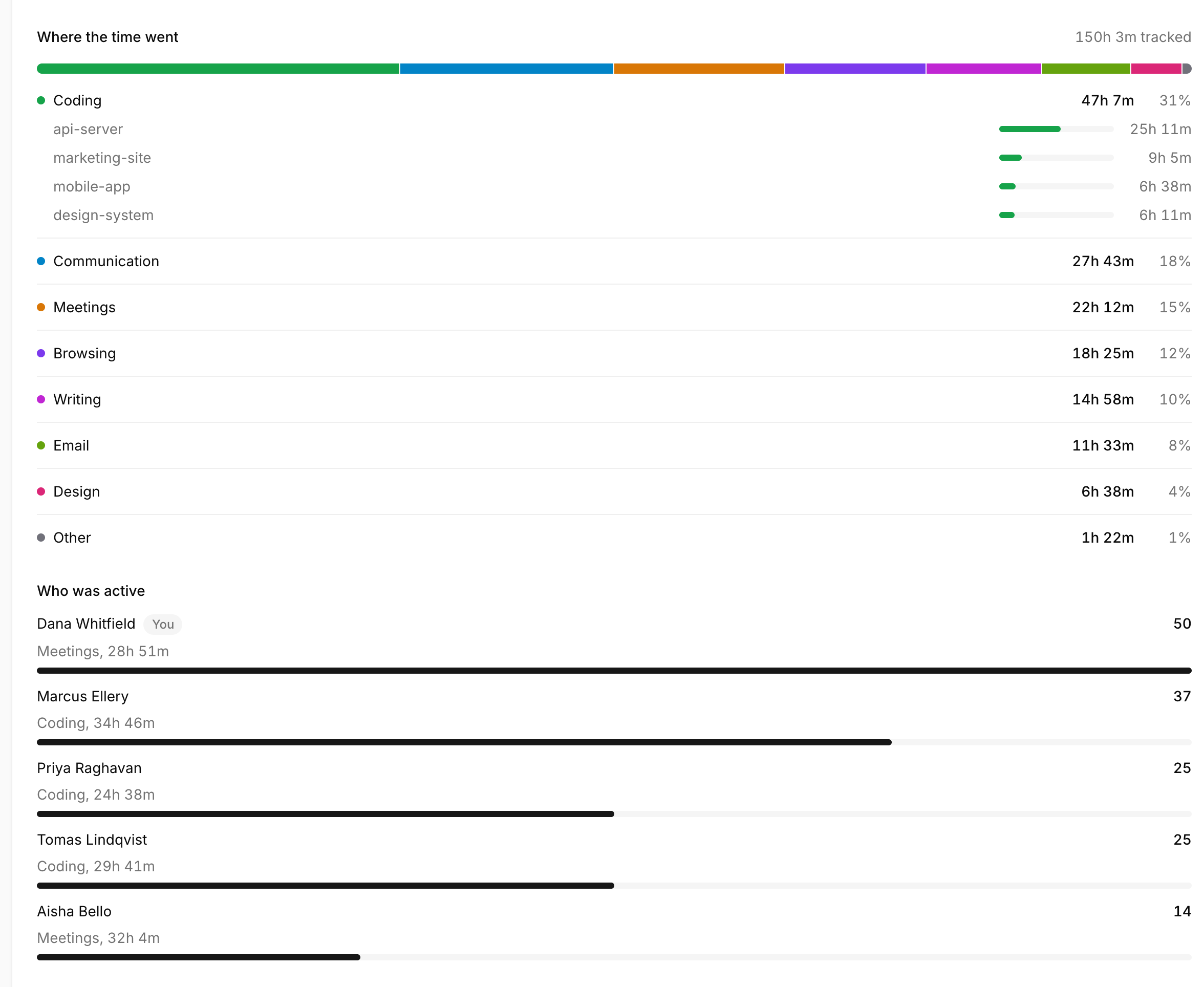
Close-up of the Where the time went panel: a stacked bar over eight categories, Coding 47h 7m at 31 percent with api-server, marketing-site, mobile-app and design-system listed under it, then Communication, Meetings, Browsing, Writing, Email, Design and Other, and below it each member with their top category and total hours
Categories · eight buckets, coding time per repo, no editor plugin
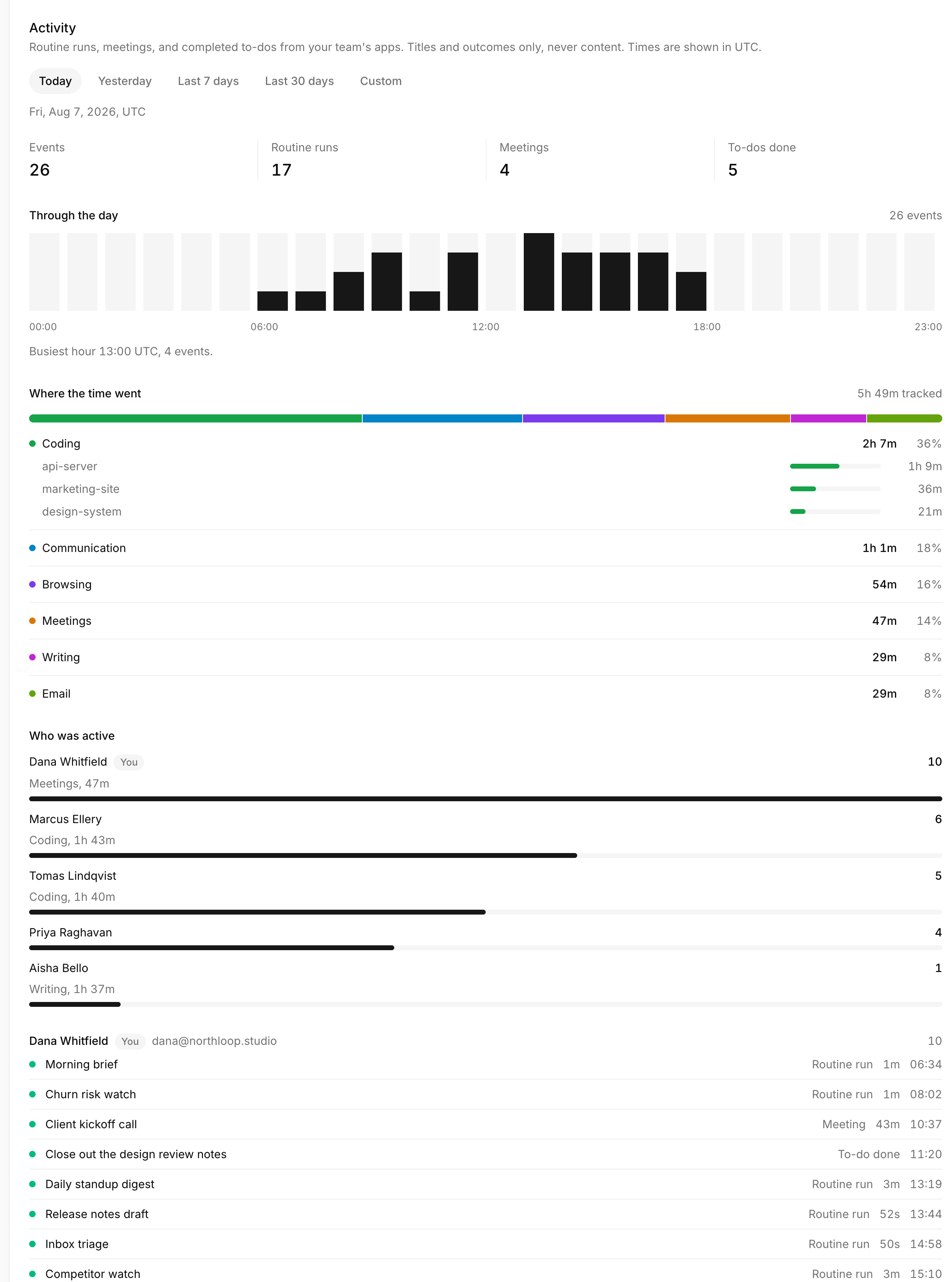
Routines owner-only team activity dashboard for a single day, showing an hourly histogram peaking at 13:00 UTC, 5h 49m of tracked app usage by category, and a feed of events grouped by member with titles, kinds, durations and times
Day view · titles, durations and outcomes only
Feature
Routines
WakaTime
What the dashboard measures
Hours by category plus work finished: routine runs, meetings, to-dos done
Coding time per developer, straight from the editor
Automatic app and category time tracking
Yes. Eight categories across the whole Mac, decided on the device
Supported coding tools only, through the plugins
Coding time per project
Per repo, read from IDE and terminal window titles, no plugin to install
Per project, and also per language, per file and per branch
Editor and IDE plugins
None to install, and none available
Open source plugins for 100+ editors, IDEs and terminals
Per language, per file and per branch stats
Not tracked
Yes, that is what the heartbeats carry
AI coding analytics
Not tracked
AI adoption, models and spend per developer
Coding leaderboards
None
Public leaderboard on Free, private ones on paid
Free plan for one developer
Free plan that runs on your own AI plan or key
Free plan, unlimited projects, one week of dashboard history
Meetings
Recorded on the Mac and transcribed with speaker separation
Shown on the dashboard if you connect a calendar integration
Runs the work, not only the measurement
Scheduled AI routines against Gmail, Calendar, Slack and MCP servers
Analytics product, no assistant
To-dos
Shared list, completed items count as team activity
Not part of the product
Memory and notes
Local markdown vault the assistant can search
Not part of the product
Who can open the team view
Owner only. Each member switches sharing off from their own app
Team dashboards cover every developer; their site describes no per-member limit
What the team view stores
Titles, kinds, times, durations, a category and a repo name. Never window titles, URLs or output
Coding activity captured by the editor plugins
Price
Teams 20 euro per seat per month, or 160 euro per seat per year, tax included
Free tier; Team 21 USD per developer per month (as of August 2026)

Checkmarks both ways · an honest comparison

The wider field

Five automatic time trackers, and where Routines sits.

Read left to right on a phone. Every cell comes from the vendor's own site, checked on August 7, 2026. Where a vendor does not state something, this table says so instead of guessing.

CriterionRoutinesWakaTimeRescueTimeTimingActivityWatchToggl Track
How it tracksApp usage plus work events, from the Mac appEditor plugins, heartbeats while you typeAutomatic apps and websitesAutomatic apps, websites and documentsAutomatic apps and windowsManual timer plus optional background tracking
Automatic app and category time trackingYes, eight categoriesCoding tools onlyYesYesYesOptional background tracking
Coding time per projectPer repo, no pluginPer project, file and languageNot advertisedBy document and file pathNot advertisedProjects you pick yourself
Editor and IDE pluginsNoYes, 100+ editors, IDEs and terminalsNone listedNone listedNone listedNone listed
Team viewHours and work output per member, owner onlyCoding time and AI usage per developerTeam productivity and daily pattern reportsConnect tier only, aggregate project timesNone advertisedTimesheets, approvals, profitability
Where the data livesYour Mac; shared event metadata goes to our serversHeartbeats sent to their serviceSent to their servers, in their own wordingYour Mac, with team reports in their web appOn your own device, never sent to any serverTheir cloud
Mac appNative Mac app, macOS onlyTray app plus the editor pluginsDesktop app, OS list not enumerated on their siteNative Mac app, web app alongside itWindows, macOS, Linux and AndroidDesktop, web, mobile and browser extensions
PriceTeams 20 EUR per seat per month, tax includedFree tier; Team 21 USD per developer per monthFree Lite tier; Team Focus 12 USD per user per monthProfessional 10 EUR per month; Connect 20 EUR per user per monthFree and open source, MPL-2.0Free tier; Starter 9 USD per license per month

Prices and features as of August 2026, from each vendor's own site

When WakaTime is the better choice

  • You are a solo developer who wants keystroke level coding stats, hours per project and per language, straight out of the editor with nothing to start or stop.
  • The question you are actually asking is how much time went into code, per developer, and you want it answered without adding a habit to anyone's day.
  • You want to measure AI coding adoption: which models the team uses, what they cost, and how often AI written code gets rewritten.
  • Your team is not all on Macs, or you want per file and per branch detail that only an editor plugin can see.

When Routines fits

  • You want the hours without asking anyone to install a plugin in their editor. Eight categories, coding time per repo, decided on the Mac.
  • You want to see what the team finished as well as how the day was spent: routines that ran, meetings recorded, to-dos closed.
  • You want the tool to do part of the work, not only report on it. Scheduled AI routines run against Gmail, Google Calendar, Slack and any MCP server.
  • The work is not only code. Meetings, notes and follow-ups count, and they land as markdown on the Mac.
  • You want a team view that is metadata only and owner only, with every teammate able to switch sharing off from their own copy of the app.

FAQ

WakaTime alternatives, time tracking, and what Routines does.

What is WakaTime?

WakaTime is a coding analytics service for developers. You install an open source plugin in your editor, IDE or terminal, and it sends heartbeat events while you are typing, which build dashboards of coding time. Its current positioning adds AI coding analytics: which models a team uses, what they cost, and how often AI written code gets rewritten. Facts here were read from wakatime.com on August 7, 2026.

Is WakaTime free?

There is a free plan with unlimited projects, weekly reports and one week of dashboard history. Paid individual plans start at 9 USD per month, and the Team plan is 21 USD per developer per month with a 14-day trial and no card required. Those are the figures on wakatime.com/pricing as of August 2026.

What is automatic time tracking?

Automatic time tracking means the tool records what you worked on without anyone starting a timer. What differs is the scope of what it watches. WakaTime watches supported editors through plugins. RescueTime, Timing and ActivityWatch watch apps and windows across the whole machine. Toggl Track pairs a manual timer with optional background tracking. Routines watches the frontmost app on the Mac and files it into one of eight categories on the device.

Does Routines track coding time?

Yes, with limits worth knowing before you switch. Since desktop version 0.79 the Mac app sorts the day into eight app usage categories, and coding time is broken out per repo, which it reads from IDE and terminal window titles. What it does not produce is per language, per file or per branch stats, keystroke level detail or leaderboards, because there are no editor plugins to produce them. If coding minutes per language is the number you need, WakaTime is the right tool for that job and this page is not arguing otherwise.

Do I need an editor plugin for Routines to see coding time?

No. There is nothing to install in your editor, and no plugin exists. The Mac app already knows which app is in front of you, and it reads a repo name out of IDE and terminal window titles locally. An ambiguous title gets no repo label rather than a guessed one, so a category still reports its hours even when it cannot name the project. This also means the labels stop at the repo: there is no file, branch or language underneath them.

Can my team see my screen or what I wrote?

No. A shared work event carries a title, its kind, a timestamp, a duration and whether it ended ok or with an error. A shared usage event carries a category, an app name, an optional repo name, a number of seconds and an hour. Window titles, the pages you visit and browser domains never leave the Mac, because the category is decided there and the event has no field they could ride in. Routine output, meeting transcripts and to-do text are never sent either. The dashboard is visible to the team owner only. Each teammate holds two switches in their own copy of the app, per machine: sharing at all, and app usage inside it. Off stops sending and clears anything queued, and turning it on starts counting from that moment rather than backfilling.

How much does Routines Teams cost?

Teams is 20 euro per seat per month, or 160 euro per seat per year, which works out to 13.33 euro per seat per month. Prices include tax. The minimum is 2 seats, there is a 14-day free trial, and every seat adds 50 hours of managed transcription to one pool the whole team shares.

Which of these keeps the data on my own machine?

ActivityWatch. It is free and open source under MPL-2.0, and its own FAQ says all your time tracking data is stored on your own device and is never sent to any server. Routines is not the same thing: your notes, transcripts and memory sit on your Mac, and so do the window titles and domains behind the categories, but the team activity view works by sending event metadata to our servers once a teammate turns sharing on, which is what lets the owner dashboard exist at all.

See where the week went, and what came out of it.

Routines runs on the Mac, records the meetings, runs the routines, sorts the hours into categories on the device, and gives the owner a metadata-only view of all of it. Seat pricing and the 14-day Teams trial are on the pricing page.

Download