
Otter.ai privacy audit
Is Otter.ai safe? A privacy audit built from Otter's own documents.
The short answer
Last verified 2026-08-03
Otter.ai is a cloud transcription service. Every recording is uploaded to Otter's servers, transcribed there, and stored on AWS in the United States. Its Privacy Policy says Otter trains its own AI on de-identified recordings and transcripts, and outside the Enterprise plan no way to opt out of that training is documented. At the same time, Otter publishes real security work: a SOC 2 Type 2 report, encryption at rest, consent-gated support access, and two-factor authentication on every plan. Whether that trade is acceptable depends on what you record and for whom. [1][2][17][14][24]
What Otter.ai does well
- Support staff need your explicit consent, plus an admin's approval, before they can open your content to troubleshoot, and those accesses are logged.
- Human review of audio recordings by Otter personnel or its third parties requires explicit customer consent.
- Deleting a conversation unshares it immediately, the Trash purges after 30 days, and Otter states permanently deleted content cannot be recreated by the service.
- Two-factor authentication is available on every plan, stored data is encrypted with AES-256, and Otter holds a SOC 2 Type 2 report and EU-U.S. Data Privacy Framework certification.
- Otter says it will not turn over customer information to law enforcement without legal process compelling it to.
What deserves caution
- Training Otter's own AI on your de-identified recordings and transcripts is the default, and no opt-out is documented for Free, Pro, or Business accounts. The policy itself notes those transcriptions may contain Personal Information.
- There is no on-device transcription path and no end-to-end encryption claim in any primary document. Otter processes audio in its cloud and holds the encryption keys.
- The settings run wide: the Notetaker bot can auto-join every calendar event that has a meeting link, and auto-share can send notes to every invitee at the start of the meeting. Both are account settings, so your exposure follows whatever values yours are set to.
- You keep ownership of your content, but the Terms grant Otter a worldwide, royalty-free, sublicensable license to host, modify, and distribute it.
- A consolidated class action over recording consent and AI training is pending in federal court. Those are filed allegations, not findings, and as of August 3, 2026 no court has ruled either way.
Training on your recordings
On by default [1]
Encryption
In transit + at rest [4]
2FA
All plans [4]
Certifications
SOC 2 Type 2 [4]
Quick facts
The privacy facts, at a glance.
- How audio is captured
- Bot-based by default: Otter Notetaker auto-joins Zoom, Google Meet, and Microsoft Teams meetings from your synced calendar. Botless recording exists too, via the Record button. OtterPilot may also take automatic screenshots in virtual meetings. [7][4][1]
- Where transcription happens
- In Otter's cloud. "Audio is processed in cloud infrastructure," per Otter's own data-processing description. No on-device transcription path is described in any primary document. [2]
- Where your data is stored
- AWS in the United States; a help article names the US-West region. The Terms' security appendix (Appendix 3) also says AWS data centers sit throughout the world, and no storage region is contractually committed. [1][22][2]
- AI training defaults
- Otter trains its own models on de-identified recordings and transcripts. Enterprise workspaces are opted out by default; no opt-out is documented for Free, Pro, or Business. [1][4][17]
- Retention
- No fixed period: personal information is kept "as long as necessary". Deleted conversations sit in Trash for 30 days, then are permanently deleted. Custom retention policies are Enterprise-only. [1][4][16]
- Subprocessors
- 17 listed, including AWS, Anthropic, OpenAI, Google Cloud, Stripe, and a human annotation vendor, Research Transcriptions. List effective March 31, 2026. [3]
- Encryption
- AES-256 server-side at rest, HTTPS in transit. No end-to-end encryption is claimed anywhere; Otter holds the keys. [4][2]
- Certifications
- SOC 2 Type 2 report; EU-U.S., UK, and Swiss Data Privacy Framework certified. "We follow HIPAA requirements" is a claim, not a certification, and security policies are "based on the ISO 27001/2 framework", not certified against it. [4][1]
- Consent features
- The Notetaker joins as a named participant and posts a chat notice. Pre-recording emails exist; workspace-wide enforcement is Enterprise-only. True click-through consent exists only for Teams via the Outlook extension. Compliance with recording-consent law is the customer's responsibility, per Otter. [8][9][4]
Data flows
What leaves your Mac.
Step 02
Automatic OtterPilot screenshots
In virtual meetings, OtterPilot may take automatic screenshots, which become part of the meeting transcript on Otter's servers. [1]
Step 04
Calendar, contacts, and profile data
Connecting Google, Microsoft, or Zoom accounts gives Otter your username, profile picture, email address, time, location, calendar information, and contact information from those platforms. [1]
Step 05
Usage data and telemetry
Technical logs, metadata, and telemetry about how you use the product. The DPA lets Otter use this in de-identified, aggregated form during and after your contract. Usage data excludes your content itself. [2]
Step 06
Email interaction data
Otter's emails may carry tracking pixels that record when you open them, what you click, how long you read, and whether you forward them and to whom. [1]
AI training
Training defaults, in Otter.ai’s own words.
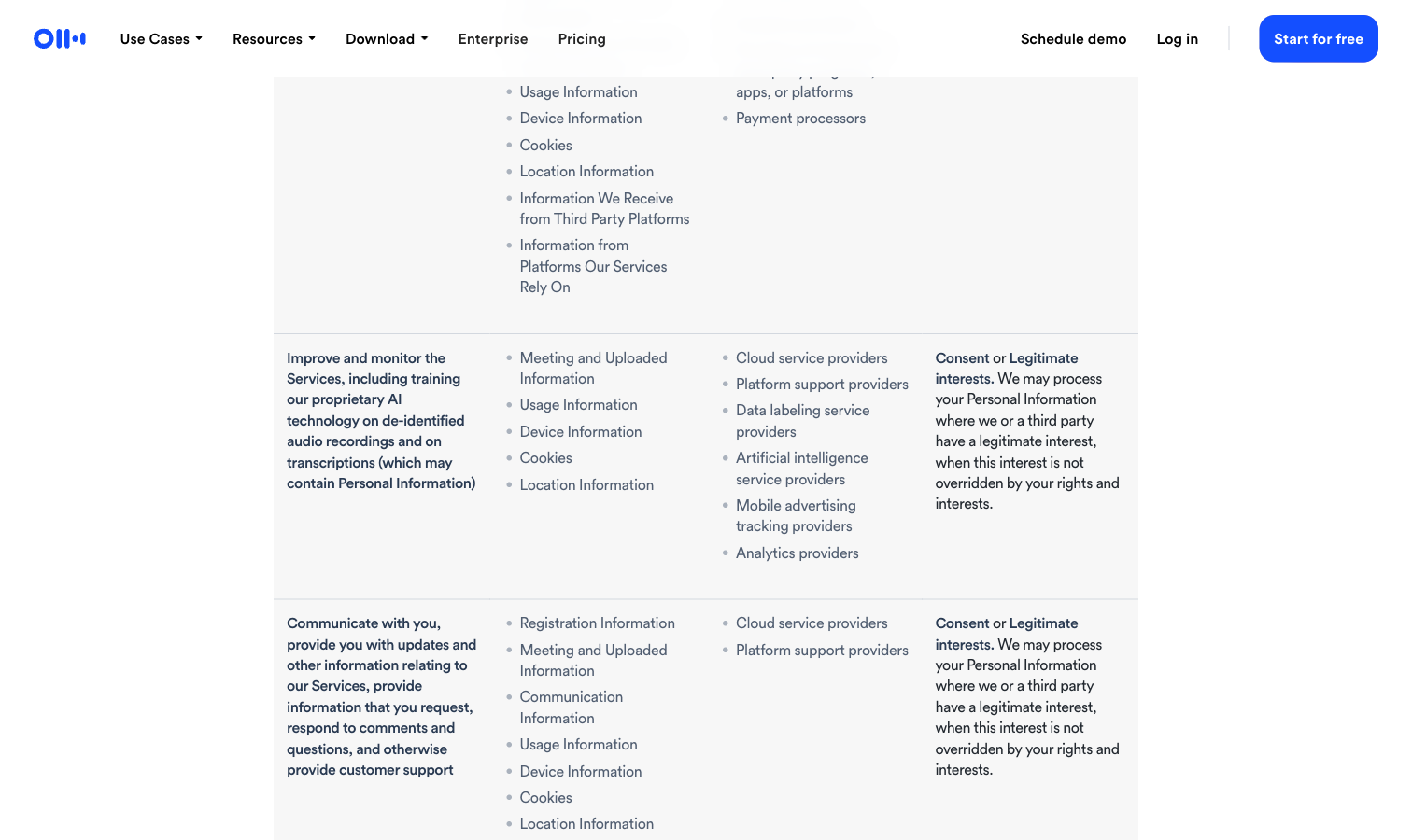
By default, Otter uses your recordings and transcripts to train its own AI models, after applying what it describes as a proprietary, automatic de-identification method. Enterprise workspaces are the exception: they are opted out of model training by default, enforced by contract and configuration. No equivalent default, and no opt-out switch, is documented for Free, Pro, or Business plans. [20][17][3][4]
Improve and monitor the Services, including training our proprietary AI technology on de-identified audio recordings and on transcriptions (which may contain Personal Information)
Otter uses a proprietary method to de-identify user data before training our models so that an individual user cannot be identified. This training method is automatic and as such audio recordings and transcripts are not manually reviewed by a human. Additionally our training data is encrypted.
You acknowledge and agree that Otter.ai may collect, create, process, transmit, store, use, and disclose aggregated and/or deidentified data derived from Data or use of the Services ("Aggregated Data") for its business purposes, including for machine learning and training, industry analysis, benchmarking, and analytics.
Can you opt out?
The only documented, training-adjacent opt-out covers the AI Chat feature alone. It works at workspace level only, not per user, and requires submitting a support request form. Enterprise workspaces are excluded from training by default, and opting an Enterprise workspace back in requires contacting Otter. Nothing else is published: if an individual opt-out exists for Free, Pro, or Business accounts, Otter has not documented it.
Third-party AI providers
Otter states that its third-party AI providers, which its subprocessor list names as Anthropic and OpenAI, do not train on customer data and do not store data sent through their APIs. Imported documents, such as files from Google Workspace, are also excluded from Otter's training, per Otter.
Sharing defaults
Who can see your notes.
Private by default, per Otter
Otter's stated baseline is that conversations belong to you and the people you pick. [4]
Your conversations are always private, accessible to only you and the people you choose to share with.
Auto-share can override that in practice
The "Default audience for shared notes" setting has four values: All event guests, Same domain guests, Workspace members, and Don't Share. On "All event guests", notes go to everyone on the calendar invite, at the start of the meeting, not after it. Same-domain sharing reaches guests with a matching email domain even if they have no Otter account. Which of the four a new account starts on is not documented. [10][11]
Collaborators and public links
Shared-note recipients get Viewer or Collaborator permission. Collaborators can edit and export, and can re-share the conversation if the owner enables "Allow Collaborators to share". Every conversation can also carry a public share link, which the owner can revoke or change at any time. [10][13]
Workspaces change who owns your notes
Joining a workspace or organization account transfers ownership of all data under your account to the organization, including data that predates the join, and its admins can access, disclose, restrict, and remove it. Otter states Enterprise workspace content is not broadly visible across the organization by default, and that individual content remains private to authorized users while admins manage conversations centrally. [2][18]
Acknowledge that all the data under your account is owned by the Workspace or Organization and the Workspace or Organization administrators have the right to access, disclose, restrict and remove information in your account. This includes the data that predates when you joined the Workspace or Organization account.
Otter staff access is consent-gated
To troubleshoot an issue, Otter's support team must obtain explicit permission from the customer and approval from the appropriate administrators before accessing the specific content involved, and those accesses are logged. [2]
In-meeting AI Chat posts to everyone
When you use the AI Chat Q&A during a meeting, both your question and Otter's answer are posted into the meeting chat for all participants to see, with a link to the Otter conversation. [21]
Hardening checklist
Settings that make Otter.ai more private.
If you use Otter.ai and want to keep it, these are the settings worth changing, straight from the vendor’s own documentation.
Step 01
Stop the bot from auto-joining every meeting
Where
Integrations > Meetings > Default auto-join settings > "Meetings I manually select".
The broadest option, "Meetings with a video link", sends Otter Notetaker into every calendar event that has a Zoom, Google Meet, or Teams URL. Otter's docs do not state which value a new account or workspace ships with, so check yours. Two catches from Otter's own docs: events you previously adjusted by hand keep their old setting, and changes need at least 30 minutes before the meeting to apply reliably. [6][8][5]
Step 02
Turn off auto-share, then check old events
Where
Account Settings > Meetings > Default audience for shared notes > "Don't Share" (keep meeting notes private).
This is the one switch that stops notes leaving the moment a meeting starts. The trap is what it does not reach: changing the default leaves calendar events whose sharing you previously adjusted by hand on their old setting, and Otter runs a dedicated troubleshooting article because users keep getting caught by exactly that. [10][11][12]
Step 03
Keep the consent signals on, and layer them
Where
Account Settings > Meetings: leave "Notetaker chat messages" on and turn on "Send pre-recording emails".
Otter puts the legal duty to get recording consent on you, not on the product. Its own recommended practice is to layer signals: the pre-recording email, the Notetaker join announcement in the meeting chat, and, for Teams with the Outlook extension, a true click-through permissions page. [4][8][9]
Step 04
Turn on two-factor authentication
Where
Available on all Otter plans.
Your transcripts are only as private as your account. Two-factor authentication is one of the controls Otter ships on every tier, so use it. [4]
Step 05
Delete what you would not want retained
Where
Conversation menu > Delete. The Trash lives at otter.ai/deleted-notes, with "Empty Trash Now" for immediate permanent deletion.
Otter keeps personal information "as long as necessary", with no fixed retention period published for non-Enterprise plans. Deletion unshares the conversation immediately, the Trash purges after 30 days, and Otter states permanently deleted content cannot be recreated. One caveat it also states: after account deletion, your email address is retained for administrative purposes. [1][14][2][15]
Step 06
On Enterprise, actually use the admin controls
Where
Manage Workspace > Settings, plus requests through your Otter account manager.
Enterprise is where Otter's strongest controls live: workspaces are opted out of AI training by default, admins can strip stored audio from all conversations, block the bot from meetings with chosen keywords in the title, disable voice-profile speaker learning, restrict sharing to your email domain, and set a custom retention policy down to a 24-hour minimum. [17][19][16]
Policy changelog
What changed, and when.
Each entry records a dated re-verification of this audit against the vendor’s documents. Policy changes land here as dated diffs.
2026-08-03
Re-verified every load-bearing claim on this page against the vendor's live documents.
Two vendor-side label changes since the last check, both corrected here: the broadest Notetaker auto-join option now reads "Meetings with a video link", and the private auto-share option now reads "Don't Share", described as "Keep meeting notes private." The Privacy Policy, Terms of Service, subprocessor list and every quoted sentence are unchanged, and as of August 3, 2026 the docket still shows no ruling on the motion to dismiss.
2026-08-02
Audit created. Verified against the Privacy Policy (effective June 16, 2026), the Terms of Service (effective September 19, 2025), the subprocessor list (effective March 31, 2026), the undated Privacy & Security page, 18 help-center articles, and the public court docket. Litigation status at verification: motion to dismiss pending, no merits ruling.
FAQ
Questions people ask.
Is Otter.ai safe to use?
It depends on what you record. Otter publishes real security work (SOC 2 Type 2, encryption, 2FA). But every recording is processed and stored in Otter's cloud, training its own AI on de-identified recordings and transcripts is the default outside Enterprise, and Otter leaves recording-consent compliance to the account holder. For routine work meetings many teams accept that trade. For confidential conversations, treat it as the cloud service it is. [4][1][2]
Does Otter.ai train its AI on my conversations?
Yes, by default on non-Enterprise plans. The Privacy Policy says Otter trains its proprietary AI technology on de-identified audio recordings and on transcriptions, and notes those transcriptions may contain Personal Information. Otter says the de-identification is automatic, that training data is encrypted, and that recordings are not manually reviewed by a human during training. Enterprise workspaces are opted out of model training by default. [1][4][17]
Can I opt out of Otter.ai's AI training?
On Free, Pro, or Business plans, no opt-out is documented in any of Otter's public documents. The only documented, training-adjacent opt-out covers the AI Chat feature, works at workspace level only, and requires a support request. Enterprise workspaces are excluded from training by default. If an individual opt-out exists, Otter has not published it. [20][17][4]
Is Otter.ai being sued over privacy?
There is pending litigation. In August 2025 a federal lawsuit seeking class-action status was filed in the Northern District of California, alleging Otter recorded private conversations without all participants' consent and used them to train its AI. Several suits were consolidated as In re Otter.AI Privacy Litigation, Otter moved to dismiss in January 2026, and as of the docket's last visible update in July 2026 no ruling on that motion appears. These are allegations, not findings. NPR also noted that Otter's policy openly discloses AI training and describes a consent checkbox. [24][23]
Has Otter.ai had a data breach?
No breach of Otter's own systems is publicly documented in any reliable source we found, which is not the same as proof that none occurred. The closest documented incident is from 2022, when a Politico reporter received a survey email naming a sensitive interview recording. Otter acknowledged sending it, said it was not monitoring the account or its content, and discontinued the survey over concerns that recording titles can contain sensitive information. [25]
Does Otter.ai sell my data?
Otter's own documents point in two directions, so this audit quotes both. The Privacy & Security page says Otter does not sell personal information to third parties and shares no personally identifiable information for advertising. The Privacy Policy says disclosures of device, cookie, and location data to advertising and analytics providers may broadly be considered a "sale" of Personal Information under U.S. state privacy laws. Meeting content is not described as sold anywhere. The tension between the two pages is unresolved in Otter's primary sources. [4][1]
Is Otter.ai HIPAA compliant?
Otter's Privacy & Security page says "We follow HIPAA requirements". Read that wording precisely: it is a statement about Otter's own practice, not an audited certification, and no third-party attestation against HIPAA appears anywhere in Otter's public documents. Otter draws the same distinction itself elsewhere on that page, where its security policies are "based on the ISO 27001/2 framework" rather than certified against it. Where it does hold independently checked credentials it names them: a SOC 2 Type 2 report, and EU-U.S., UK, and Swiss Data Privacy Framework certification. If HIPAA applies to what you record, treat the self-claim as the start of a contract conversation with Otter, not as a compliance answer. [4][1]
Who can see my Otter.ai transcripts?
By default, you and the people you share with, per Otter. Three things to watch: auto-share can send notes to every calendar invitee at the start of the meeting; if you join a workspace, the organization owns all data under your account, including data from before you joined, and its admins can access it; and Otter support can access your content to troubleshoot, but only with your explicit consent and an admin's approval, with access logged. [4][10][2]
Sources
Every claim, receipted.
Every claim on this page maps to one of these documents. Dates are when we last read each one.
[1]
[2]
Otter.ai Terms of Serviceaccessed 2026-08-02Effective September 19, 2025. Includes the Data Processing Agreement (Appendix 1) and Security Measures (Appendix 3); Otter publishes no separate public DPA page.
[3]
[4]
Otter.ai Privacy & Security pageaccessed 2026-08-02The page carries no effective or last-updated date, so its claims cannot be dated from the page itself.
[5]
Otter Help Center: Manage your Otter Notetaker settingsaccessed 2026-08-02[6]
Otter Help Center: Choose which meetings Otter Notetaker recordsaccessed 2026-08-03Re-fetched August 3, 2026: the broadest auto-join option is labelled "Meetings with a video link". The article does not state which value a new account or workspace starts on.
[7]
[8]
Otter Help Center: Recording Permissions with Otteraccessed 2026-08-02[9]
Otter Help Center: Enforce pre-meeting recording notificationsaccessed 2026-08-02[12]
[13]
Otter Help Center: Stop or change conversation sharing permissionsaccessed 2026-08-02[14]
Otter Help Center: Delete a conversationaccessed 2026-08-02[15]
Otter Help Center: Delete your Otter accountaccessed 2026-08-02[16]
Otter Help Center: Set a custom Data Retention policyaccessed 2026-08-02[17]
Otter Help Center: Enterprise Admin Controls Overviewaccessed 2026-08-02[18]
Otter Help Center: How Privacy and Data Control Work in Otter Enterpriseaccessed 2026-08-02[19]
Otter Help Center: Control recording and sharing permissionsaccessed 2026-08-02[20]
Otter Help Center: Opt out of Otter AI Chataccessed 2026-08-02[21]
Otter Help Center: Otter Notetaker chat messagesaccessed 2026-08-02[22]
Otter Help Center: Data security and privacy policiesaccessed 2026-08-02[23]
[24]
CourtListener docket: In re Otter.AI Privacy Litigation, No. 5:25-cv-06911 (N.D. Cal.)accessed 2026-08-02Last visible filing on the free docket: July 14, 2026.
[25]
This audit quotes Otter.ai’s own public documents and reputable public records. It is not legal advice, and filed lawsuits are allegations, not findings.
Related audits
How Routines handles the same data
Routines, the app behind this audit, handles the same job differently: meetings are recorded without a bot joining the call, and your notes are markdown files on your Mac that open in any editor. Pro includes transcription hours, your own Deepgram key is billed by Deepgram, and the AI notes run on your own key or your Routines AI credit. All transparency audits