
Granola privacy audit
Is Granola AI safe? A privacy audit built from Granola's own documents.
The short answer
Last verified 2026-08-08
Granola is a desktop AI notepad that captures meeting audio on your computer, and no bot joins the call. Processing is another matter: transcription and summarization run in Granola's cloud, on AWS in the United States, through five model vendors and two transcription vendors. Its Platform Terms turn Granola's own model training on by default outside Enterprise, though the opt-out is one self-serve toggle, and Granola publishes four security write-ups of its own. Against that sit no built-in two-factor authentication, indefinite retention, and a proposed class action filed July 30, 2026, not yet answered and with no ruling on any claim as of August 8, 2026. [1][2][5][10][13][17][9][29][30][31][32][33][35]
What Granola does well
- No meeting bot. Granola captures your microphone and system audio on your own computer, so nobody in the call sees an extra participant join. In Granola's words: "No bot joins your meeting".
- Audio is not kept. The Privacy Policy states: "We do not retain or store such recordings once the transcription is created." On mobile, Granola states audio is temporarily cached on the device during the meeting and deleted once transcription completes.
- The training opt-out is self-serve and takes one toggle, on every plan, with no support ticket and no sales call.
- Transcript auto-deletion is self-serve for individual users too, from 1 day to 1 year, and Granola documents the costs of turning it on honestly: deletion is permanent, note regeneration stops working, and Chat answers degrade.
- Granola publishes its own security write-ups, four of them: three post-mortems and one disclosure report, each carrying a timeline, a root cause and an impact statement, and three of them naming the researcher. Alongside them sits a vulnerability disclosure policy that promises safe harbor and a 72-hour acknowledgement.
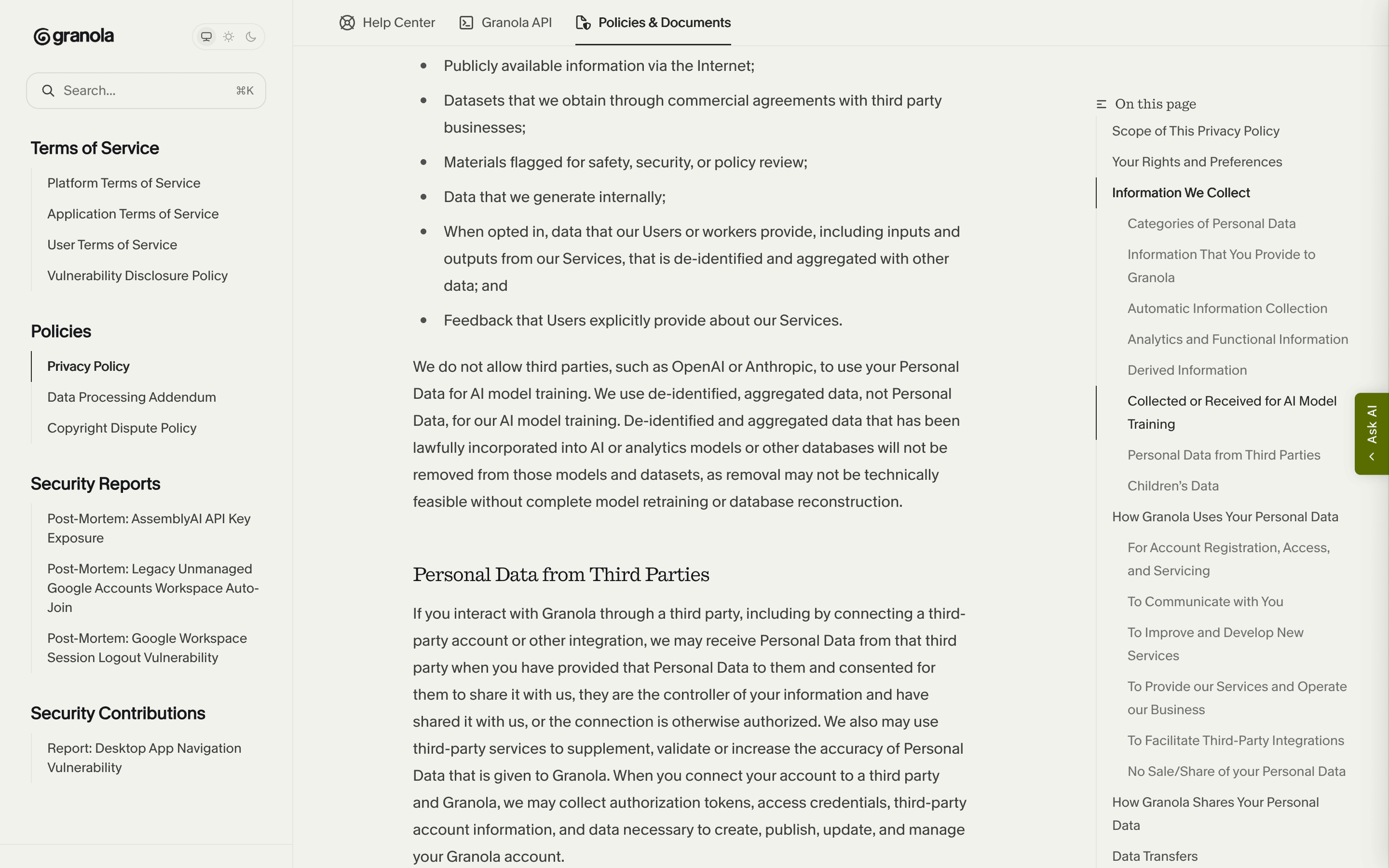
- The third-party promise is specific and repeated across five documents: "We do not allow third parties, such as OpenAI or Anthropic, to use your Personal Data for AI model training."
What deserves caution
- Training on your meetings is on by default for the free tier and for Business, and off by default only for Enterprise. The opt-out is prospective: Granola states it "cannot guarantee that anonymised data wasn't used before you changed the setting", and its Privacy Policy says data already incorporated into a model may be retained indefinitely.
- The training license in the Platform Terms is non-exclusive, royalty-free, worldwide, sublicensable and perpetual, and Section 6 is listed among the clauses that survive termination. Ownership of your content stays with you; the license over the derived corpus does not end when your subscription does.
- Capture is local but processing is not. Granola states it tried on-device transcription and moved it to the cloud for quality. All data sits on AWS in the United States and Granola states it does not offer EU, UK or other regional data residency at this time.
- There is no two-factor authentication inside Granola at all: "Granola does not have a built-in 2FA or MFA feature." Authentication is delegated to your identity provider, and SSO is Enterprise-only for organizations with 50 or more seats.
- Defaults lean toward retention and reach: notes and transcripts are "stored indefinitely by default", new spaces ship with "Allow Granola API access" turned on for non-expiring workspace API keys, and both in-meeting consent features are off until someone sets them up.
- A proposed class action over recording consent and training defaults was filed in federal court on July 30, 2026. Those are filed allegations. As of August 8, 2026 the public docket runs through August 5, 2026: a summons issued August 3, then four pro hac vice applications and three orders granting admission, on August 4 and 5. No answer or responsive pleading from Granola appears on the docket, and no court has ruled on any claim.
2FA
None in Granola [10]
Quick facts
The privacy facts, at a glance.
- How audio is captured
- No bot. Granola runs on your computer and captures your microphone plus your system audio, so other participants see no extra attendee. Capture starts on a click, per meeting, with one documented exception: if you open a note before the meeting, Granola starts transcribing by itself at the scheduled start time. System audio is captured whole, not per app, so anything else playing lands in the transcript. [18][10][5]
- Where transcription happens
- In Granola's cloud. The vendor is direct about the trade: "For transcription and AI summarization, we process this in the cloud to provide the best quality - we initially tried doing these locally on device, but the computation was too much and it slowed down your computer." AssemblyAI and Deepgram are the listed transcription subprocessors. [5][9]
- Where your data is stored
- AWS in the United States, in Granola's virtual private cloud, encrypted in transit and at rest and backed up daily. Notes are also cached on your device so they open offline. Granola states it does not offer EU, UK, Canadian or Australian data residency at this time. [10][5][1]
- AI training defaults
- On by default on the free tier and on Business, opt-in only on Enterprise, per Platform Terms 6.2.2. Mind the naming drift: the Platform Terms call the free tier "Basic Services", the help center calls it "Free", and the pricing page calls it Basic. One self-serve toggle turns training off on any plan; only Enterprise admins can enforce it for a whole team, and on Business each user has to do it individually. [2][10][7]
- Retention
- Indefinite unless you change it: "Notes & transcripts are stored indefinitely by default in Granola's secure cloud, unless deleted by the user." Individuals can set transcript auto-deletion from 1 day to 1 year, after a one-week cooldown; trashed notes purge after 30 days. The Platform Terms also let Granola delete accounts inactive for more than thirty days after reasonable efforts to notify. You can pull your own copy out at Settings > Profile > Generate CSV, emailed within a few hours. [5][13][19][2][21]
- Subprocessors
- 16 on the Trust Center list, every one US-hosted except a UK customer-support vendor. Five are model or inference vendors (Anthropic, OpenAI, xAI, Google Cloud, Fireworks.ai), two are transcription vendors (AssemblyAI, Deepgram), one is an evaluation vendor and one is a web-search enrichment vendor. The list carries no printed date. Granola gives at least 10 days notice before adding a subprocessor and a 30-day objection window. [9][4]
- Encryption
- Encrypted in transit and at rest on AWS, by Granola's account, with backups encrypted too. No end-to-end encryption is claimed anywhere; Granola holds the keys. Worth noting the hedge: the DPA's security annex, which is the one place it should not be qualified, promises "Encryption of Personal Data in transit and at rest, where appropriate". [1][5][4]
- Certifications
- SOC 2 Type II, achieved July 2025 per Granola, with the report itself behind a Trust Center access request, so the auditor, the observation period and the in-scope criteria are not public. Granola states plainly that it does not hold ISO 27001, is not HIPAA compliant and cannot sign BAAs, and is not FERPA compliant. GDPR and UK GDPR compliance is a self-claim, backed by a DPA carrying EU Standard Contractual Clauses and the UK Addendum. No Data Privacy Framework claim appears in any Granola document. [10][8][25][4][5]
- Consent features
- Two features exist and both are off until someone sets them up: an automated chat message posted into Zoom or Google Meet, and Granola Watermark, a badge on your camera feed. Enterprise admins can enforce either workspace-wide. Of the platform-level notice settings in Zoom and Microsoft Teams, Granola writes: "Granola does not configure these settings on behalf of customers, and customers remain responsible for determining what notice or consent is required for their use case and jurisdiction." The duty stays with the customer either way, and the User Terms put the same obligation in capital letters. [26][27][28][3]
- Sharing defaults
- Notes are private by default and nothing is sent to attendees automatically: "Granola prioritizes your privacy, and does not auto-share your notes to attendees." What no Granola document states is the shipped value of "Default link sharing", the setting that decides how wide a link reaches once you do share. The Verge reported in April 2026 that the app's own settings screen read "By default, your notes are viewable to anyone with the link"; Granola has not published the default either way. [15][14][37]
Data flows
What leaves your Mac.
Step 01
Meeting audio
Captured on your computer from the microphone and system audio, then sent to a cloud transcription subprocessor. Granola states the audio is not kept: "We do not retain or store such recordings once the transcription is created." Its transparency page goes further, saying audio is "never stored, on our servers or anyone else's", while the Privacy Policy still lists "Recordings and transcriptions of communications captured through our Services" among the categories it collects and shares with Service Providers, and the help center describes audio as "temporarily cached during the meeting for transcription only". Transient is not the same as never. [1][10][6][18]
Step 03
Calendar, contacts and profile data
Connecting Google Calendar or Microsoft Outlook gives Granola meeting invitations, body text, senders and recipients, attendees, plus your name and email. Deleting your Granola account removes that calendar access, and Granola documents how to verify the revocation at your provider. [1][20]
Step 04
Device and app telemetry
IP address and IP-based location, device ID, device, operating system and browser type, system statistics, web page interactions and, in the Privacy Policy's own wording, "Other applications that utilize the microphone function". Granola also states it may draw inferences about you from the information it holds. [1]
Step 05
Model and transcription vendors
Meeting content is processed by third-party vendors to produce the transcript and the summary. The Trust Center lists Anthropic, OpenAI, xAI, Google Cloud and Fireworks.ai for AI processing and AssemblyAI and Deepgram for transcription, all US-hosted. Granola states its agreements bar every one of them from training on your data; those agreements are not published. Retention at those vendors is documented in one case. For Claude Fable 5, the thinking model Business workspaces can select in Chat, Granola writes: "Fable 5 is not subject to zero data retention, and Anthropic retains agent input-output logs for 30 days for trust and safety purposes." No Granola document we found prints a retention period for the other six vendors, and the Anthropic figure appears only in the help center, not in the Privacy Policy. [9][11][1][23][24]
Step 06
Search and retrieval infrastructure
Two subprocessors sit downstream of your notes: Parallel Web Systems for "Web search and data enrichment to retrieve external context for AI features", meaning meeting-derived queries can reach an outside search vendor, and Turbopuffer for "Vector search and embeddings storage to enable semantic search and retrieval". No Granola document states whether those embeddings are deleted when a note, a transcript or an account is deleted. [9]
Step 07
Training data
On the free tier and on Business, aggregated and de-identified data derived from Customer Data flows into Granola's own model training unless the account turns the setting off. Enterprise workspaces are opted out by default. Granola states this data is never sent to third parties for their training. [2][10][11]
AI training
Training defaults, in Granola’s own words.
The default depends on your plan, and the Platform Terms set it in one clause: on Basic (the free tier) and Business, Customer Data may be used for Granola's own model training unless the customer affirmatively opts out; on Enterprise it may be used only if the customer affirmatively opts in. Granola describes the training input as aggregated and de-identified data derived from Customer Data, and repeats across its help center and security page that Enterprise is off by default while everyone else is on. One tension worth reading twice: the Data Processing Addendum says both things in adjacent paragraphs. Section 9.B reads "Unless opted out through Granola’s Product, Granola may use information provided by the User to Granola for the development and improvement of its Services and applicable artificial intelligence functionalities, where such information has been aggregated and de-identified." Section 9.C reads "Where Users choose to opt in through the Services, Granola may use aggregated, de-identified data for AI model training." The Platform Terms resolve it in practice; the DPA does not say so. [2][10][11][1][12][4][23]
For Customers of Basic Services or Business Services, Customer Data may be used by Granola for the purposes described below unless the Customer affirmatively opts out through the applicable Service. For Customers of Enterprise Services, Customer Data may be used by Granola for the purposes described below only if the Customer affirmatively opts in through the applicable Service.
We cannot guarantee that anonymised data wasn't used before you changed the setting. However, once you opt out, none of your data will be used for any future model training.
De-identified and aggregated data that has been lawfully incorporated into AI or analytics models or other databases will not be removed from those models and datasets, as removal may not be technically feasible without complete model retraining or database reconstruction.
Can you opt out?
One toggle, self-serve, on every plan: Settings > Preferences > Data & sharing, then turn off "Use my data to improve models for everyone." The same switch lives in Settings on iOS, where Granola states it is disabled automatically for Enterprise users because they are already opted out. Org-wide enforcement is Enterprise-only, at Settings > Workspace > General under Data security; on Business, Granola states each user needs to opt out individually, so a Business admin cannot cover the team. Two limits to understand before you count on it. The opt-out is prospective, by Granola's own admission about data used beforehand. And the same Platform Terms clause that carries the default also carries the license: a "non-exclusive, royalty-free, worldwide, sublicensable, perpetual right and license to access and use Customer Data provided to Granola in connection with the Services to generate aggregated and de-identified data derived from Customer Data", with Section 6 among the provisions that survive termination.
Third-party AI providers
This is where Granola is strongest, and it says the same thing in five separate documents, including the Privacy Policy: "We do not allow third parties, such as OpenAI or Anthropic, to use your Personal Data for AI model training." The help center describes the mechanism: "We have enterprise agreements with all of our service providers that prevent your data from being used in their model training." Read it for what it is. It is a contractual assurance covering the subprocessors, the agreements behind it are not published, and a customer cannot inspect it. That is normal industry practice, and it is still a contract rather than a control. One scope limit: the promise covers training, not retention. Granola discloses one vendor-side retention period, for the Claude model Business workspaces can select in Chat: "Fable 5 is not subject to zero data retention, and Anthropic retains agent input-output logs for 30 days for trust and safety purposes." Granola does not contradict itself here, but a ban on training is not a ban on retention.
Sharing defaults
Who can see your notes.
Private by default, per Granola
Granola's stated baseline is that a note is yours until you decide otherwise, on every plan including the free tier. [10][5]
Your notes are private by default. No one in your workspace can see your notes unless you explicitly share them.
Nothing is sent to attendees automatically
There is no auto-share feature to turn off. Sharing is an action you take: a link you generate, or a note you add to a team-space folder. [15]
Granola prioritizes your privacy, and does not auto-share your notes to attendees.
The shipped default link scope is undocumented
The "Sharing controls" article lists three values for Default link sharing at Settings > Preferences > Data & sharing, "Anyone with the link can view", "Only for my company" and "Private", and no Granola document states which one a new account ships with. The Verge reported in April 2026 that the app's settings screen read "By default, your notes are viewable to anyone with the link", and that its reporter opened her own note while signed out. Granola co-founder Sam Stephenson responded to The Verge on the record: "We designed Granola's share links to balance security, control, and ease-of-use. They work the same as a Dropbox link: links are unlisted, meaning they're only created when you choose to share, and are invisible to search engines. Full transcripts are never accessible to anyone you haven't explicitly shared a note with." [14][37]
Sharing a folder is wider than sharing a note
Recipients of a shared note get Viewer access by default, and Granola states link recipients on the web see the summarized notes, not the transcript. The Verge observed that selecting bullet points in a shared note surfaced excerpts of the underlying transcript, and the AI context behind them, to a signed-out viewer, so that separation is not absolute. Collaborators who open the same note or folder inside the desktop app do get the full transcript, so moving a note into a shared folder hands over more than sending a link does. Folder permissions do not carry over automatically, and Granola can offer to auto-add every future instance of a recurring meeting to the same folder. [15][16][37]
New spaces are readable by workspace API keys
Workspace API keys, which only workspace admins can create and manage, are available on Business and Enterprise, do not expire and are not tied to anyone's account, so they keep working after that person leaves. The space-level switch that exposes notes to them is on when a space is created. [17][16]
Allow Granola API access is turned on by default when you create a new space. If you don't want a space's notes to be readable by workspace API keys, turn it off when creating the space (or later in Settings → Spaces).
Admins cannot read private notes, but there are edges
Granola states that admins cannot see individual notes and that Enterprise admins can cap sharing permissions without viewing private content. Three edges sit around that. Workspace admins are automatically owners of every team-space folder. Removing a member takes away their access to everything that lived in the workspace, including their own notes there, unless an admin re-adds them long enough to export. And the Privacy Policy allows Granola to share Personal Data "With the company with which you are affiliated, where such requests are authenticated and verified to our satisfaction (such as by the use of company-owned domain for your account login)". [10][22][16][1]
What Granola does not document: its own staff
No Granola document we found states whether Granola employees can read customer notes or transcripts, under what approval, whether such access is logged, or whether a customer would be told. The DPA commits only to generic language: access "limited to authorized personnel subject to confidentiality obligations and appropriate security training", plus Trust Center controls for restricted database access and revocation on termination. That is a gap in the documentation, not a finding about behavior. [4][8]
Hardening checklist
Settings that make Granola more private.
If you use Granola and want to keep it, these are the settings worth changing, straight from the vendor’s own documentation.
Step 01
Turn off model training
Where
Settings > Preferences > Data & sharing > turn off "Use my data to improve models for everyone."
On the free tier and on Business the switch ships on: the Platform Terms say Customer Data may be used for training unless you affirmatively opt out. It takes one click on any plan, but it only works forward. Granola states it cannot guarantee anonymised data was not used before you changed the setting, and its Privacy Policy says data already incorporated into a model may be retained indefinitely. On Business every user has to do this individually; only Enterprise admins can enforce it for the team, at Settings > Workspace > General under Data security. [10][2][1][12]
Step 02
Set the link-sharing default before you share anything
Where
Settings > Preferences > Data & sharing > Default link sharing > "Only for my company" or "Private".
Granola never states which value a new account starts on, so set it deliberately rather than assume it. On the free tier and Business the change is not retroactive: Granola states it "only applies to notes created after the change", so existing notes keep whatever scope they were created with. On Enterprise the retroactive control is a different, admin-only one: when an admin sets the workspace sharing permission at Settings > Workspace > General, Granola states that change applies retroactively to all existing notes and folders in the workspace. Your own Default link sharing preference stays forward-only. iPhone cannot change this setting; use the Mac or Windows app. [14][37]
Step 03
Set a transcript auto-deletion period
Where
Settings > Preferences > Data & sharing > Auto deletion period for transcripts > 1 day, 1 week, 1 month, 3 months, 6 months or 1 year.
Left alone, notes and transcripts are stored indefinitely by default. The setting is self-serve, individual users included, and Granola is honest about what it costs: deletion is permanent and irreversible, you can no longer regenerate notes for those meetings, and Chat answers fall back to whatever is in the notes. A one-week cooldown runs before the first deletion, and workspace-level Enterprise policies override individual settings with no cooldown at all. [13][5][10]
Step 04
Turn on an in-meeting notice
Where
Settings > Preferences > Transparency > "Automated chat message" (the rows read "Automated chat message in Zoom" and "Notify in Google Meet") and "Granola Watermark". Admins: Settings > Workspace > General > Transparency.
Both features exist and both are off until someone sets them up, and Granola puts the duty of getting notice or consent right on the customer, not the product. Test them before relying on them: the Zoom message only posts once someone else has spoken and the Zoom window is in focus, macOS setup needs Accessibility permission, Google Meet needs a Chrome extension, and neither feature covers the iOS phone-calls feature at all. [26][27][28]
Step 05
Close the API side door on every space you create
Where
Settings > Spaces > turn off "Allow Granola API access", then audit Settings > Connectors > API keys and Settings > Connectors > Workspace API keys.
Granola states the setting is turned on by default when you create a new space, and that workspace API keys do not expire and are not tied to anyone's account, so they keep working even after the admin who created them leaves. Any workspace member on Business or Enterprise can create personal API keys; only admins can create the non-expiring workspace API keys that read spaces. Enterprise admins can also restrict which note scopes members may use, and can limit MCP access, at Settings > Workspace > General. [17][16]
Step 06
Add MFA at your identity provider, because Granola has none
Where
Not a Granola setting: enable two-factor authentication on the Google, Microsoft or SSO account you sign into Granola with.
Granola states it "does not have a built-in 2FA or MFA feature" and delegates all authentication, and all password policy, to your identity provider. SSO is Enterprise-only and only for organizations with 50 or more seats. Your transcripts are exactly as private as the identity account behind them, and Granola has already published one incident where sessions outlived the Google Workspace accounts they were tied to. [10][31]
Policy changelog
What changed, and when.
Each entry records a dated re-verification of this audit against the vendor’s documents. Policy changes land here as dated diffs.
2026-08-08
Added a vendor-side retention disclosure found in Granola's help center, and refreshed the litigation status against a fresh pull of the public docket.
Retention: the page described the model vendors only through Granola's assurance that none of them may train on your data, and printed no retention period for any of them. Granola's help center states that when Claude Fable 5 is used in Chat, "Fable 5 is not subject to zero data retention, and Anthropic retains agent input-output logs for 30 days for trust and safety purposes." That sentence now appears in the vendor data-flow entry and in the third-party training section, which also notes that the no-training promise covers training and not retention. The Privacy Policy quote behind that promise was re-checked and is unchanged. Litigation: the page previously said that as of August 3, 2026 the last docket activity was July 31, 2026, that Granola had not appeared or responded, and that no court had ruled. As of August 8, 2026 the docket runs through August 5, 2026, adding a summons issued August 3 and four pro hac vice applications and three orders granting admission, on August 4 and 5. Because those orders are administrative, the page now says no court has ruled on any claim rather than no court has ruled. It no longer says there has been no appearance from Granola either: the free record carries no party or attorney table, so the pro hac vice filings cannot be attributed to either side, and that claim is now unverified rather than false.
2026-08-03
Re-verified every load-bearing claim on this page against the vendor's live documents.
Docket re-checked on August 3, 2026: the last visible activity is still July 31, 2026, with no appearance or response from Granola and no ruling. No changes found in the Privacy Policy, the Platform Terms, the User Terms, the DPA, the Security page, the Trust Center subprocessor list, the help-center articles or the four vendor-published security write-ups.
2026-08-02
Audit created. Verified against the Privacy Policy (effective 24th July 2026), the Platform Terms of Service (last updated 19th December 2025), the User Terms of Service (last updated 19th December 2025), the Data Processing Addendum (last updated July 17, 2026), the undated Security page, Trust Center and subprocessor list, 20 undated help-center articles, four vendor-published security write-ups, and the public court docket. Litigation status as of August 2, 2026: complaint filed July 30, 2026, no response from Granola on the docket and no ruling.
For admins
Quick answers for admins.
Can Granola admins block note exports to unmanaged apps?
Granola's public docs don't describe a control by that name. What they do document: CSV data export is on by default on Basic and Business and off by default on Enterprise, where only workspace admins can switch "Allow exporting data" on or off for members, and the Enterprise tier lists admin controls for MCP, API and integrations and "MDM/Intune app wrapping (iOS)", with no help-center page we found describing what that wrapping enforces.
Source: Granola Help Center: Exporting notes, Granola pricing plans · checked
Can Granola admins enforce consent notifications and the recording watermark?
Yes, on Enterprise: admins can enforce the automated chat message and Granola Watermark for the whole workspace, and watermark setup can only be enabled once at least one automated chat message option is on. The admin picks an enforcement date, after which anyone who has not switched their meeting camera to a Granola Watermark option is blocked from transcribing, and members cannot opt out from their own preferences.
Source: Granola Help Center: Turn on transparency features for your team (Admin Guide), Granola Help Center: Setting up Granola Watermark (Admin Guide) · checked
Can Granola's transcript auto-deletion match a candidate-data retention policy?
Partly. An Enterprise workspace can have a transcript retention policy that members cannot override and that deletes existing transcripts older than the period as soon as it is activated, but it is set up by contacting Granola rather than in the app, the doc lists no periods for it (individuals choose from 1 day to 1 year), and it deletes transcripts only, so the notes written from a candidate interview stay until someone deletes them.
Source: Granola Help Center: Transcript auto-deletion · checked
How long does Granola keep data for a 400-person company?
Granola publishes no retention terms that depend on company size: notes and transcripts are kept indefinitely unless a transcript auto-deletion period is set, and on Enterprise that period is a workspace-wide policy arranged with Granola. The Enterprise Audit API only returns events from the last year, so a longer audit trail has to be pulled into your own system on a schedule.
Source: Granola Help Center: Security, Privacy & Data FAQs, Granola Audit API · checked
Can Granola enforce SSO and privacy defaults across every device?
SSO and SCIM are Enterprise-only and need at least 50 active workspace members or a 50-seat minimum commitment; "Enforce SSO login" then applies across your whole company email domain, and Granola's MDM page lists one managed setting, DisableOAuth, which removes personal Google and Microsoft sign-in on managed Macs and Windows PCs. Privacy defaults are not among the MDM settings; Granola lists them as Enterprise admin controls instead: org-wide sharing restrictions, an org-wide model training opt-out (shown in workspace settings with a Contact us option) and transcript retention policies.
Source: Granola Help Center: Set up SSO and SCIM, Granola Help Center: Configure Granola with MDM, Granola Help Center: Security, Privacy & Data FAQs · checked
Does Granola store meeting recordings?
Not the audio, per Granola: it is temporarily cached during the meeting for transcription only, then deleted from Granola's systems and any third-party services once transcription is complete. Transcripts and notes are kept, indefinitely by default, unless a transcript auto-deletion period is set.
Source: Granola Help Center: Security, Privacy & Data FAQs · checked
Which outside AI providers see Granola data?
Granola's Trust Center lists 16 subprocessors; the AI and transcription vendors among them include Anthropic, OpenAI, Google Cloud and xAI, the transcription providers AssemblyAI and Deepgram, and Braintrust, which evaluates AI performance, each listed as hosted in the United States. Granola states that third parties like OpenAI and Anthropic are never allowed to train on your data.
Source: Granola Trust Center: Subprocessors, Granola Help Center: Security, Privacy & Data FAQs · checked
FAQ
Questions people ask.
Is Granola AI safe to use?
It depends on what you discuss in meetings. What it does well: no bot joins the call, audio is not retained once transcribed, the training opt-out is one self-serve toggle, transcript auto-deletion is available to individuals, and Granola publishes its own security write-ups. What to weigh against that: transcription and summarization run in Granola's cloud on AWS in the United States, through five model vendors and two transcription vendors on its subprocessor list; training is on by default outside Enterprise; retention is indefinite unless you change it; there is no two-factor authentication inside the product; and Granola states it is not HIPAA or FERPA compliant. For routine work meetings that trade is one many teams accept. For health information Granola is unambiguous: it says Granola should not be used to store or process Protected Health Information, and that it is not designed for patient-sensitive or clinically confidential information. [10][5][2][25][9]
Does Granola train its AI on my meetings?
Yes by default, unless you are on Enterprise. Platform Terms 6.2.2 says Customer Data may be used for Granola's purposes unless a Basic or Business customer affirmatively opts out, and only if an Enterprise customer affirmatively opts in. Granola describes the training input as aggregated and de-identified data derived from Customer Data, and says that data is never sent to third parties for their training. The help center puts it plainly: "By default on Free and Business plans, anonymised data may be used for Granola's own model improvements." [2][10][11]
Can I opt out of Granola's AI training?
Yes, and it takes one toggle: Settings > Preferences > Data & sharing, then turn off "Use my data to improve models for everyone." It works on every plan, with no support ticket. Two limits. It is prospective only, in Granola's own words: "We cannot guarantee that anonymised data wasn't used before you changed the setting." And the Privacy Policy states that de-identified data already incorporated into a model may be retained indefinitely, because removing it would require complete retraining. On Business each person must opt out individually; only Enterprise admins can do it for a whole organization. [10][12][1]
Is Granola being sued over privacy?
There is one case, and it is at the very beginning. Chamberlain v. Granola, Inc., No. 3:26-cv-07926-EMC, a proposed class action, was filed in the Northern District of California on July 30, 2026. It pleads intrusion upon seclusion, the federal Electronic Communications Privacy Act, two sections of the California Invasion of Privacy Act, California's Comprehensive Computer Data Access and Fraud Act, the Unfair Competition Law and unjust enrichment, and it alleges that non-users' communications were captured without their knowledge and used for training by default. As of August 8, 2026 the public docket runs through August 5, 2026: the complaint, an initial case management scheduling order, proposed summonses and the case's reassignment to a district judge in late July, then a summons issued August 3 and four pro hac vice applications and three orders granting admission, on August 4 and 5. The free record carries no party or attorney table, so those applications cannot be attributed to either side. No answer or responsive pleading from Granola appears on the docket, and the only orders entered are administrative, so no court has ruled on any claim. These are filed allegations, not findings. [35][36]
Has Granola had a data breach?
No breach of Granola's production systems is documented in any source we could verify, which is not the same as proof that none occurred. What Granola has published, itself, is four security write-ups. The largest concerned an AssemblyAI API key exposed through an unauthenticated endpoint in the TestFlight iOS beta, affecting 333 beta testers; Tenable, whose researcher reported it, published a matching advisory, and Granola's log review found a single outside IP reached 29 transcriptions from 16 beta testers during the researcher's 12-minute controlled test. A session-logout flaw let 187 users removed from their linked Google Workspace keep using existing Granola sessions. A legacy auto-join flaw and a desktop-app navigation flaw were reported and fixed with no users affected, per Granola's own investigations. Granola also documents its own slow first response to the Tenable report, which is a rare thing for a vendor to print. [30][34][31][32][33][29]
Who can see my Granola notes?
By default, you: "Your notes are private by default. No one in your workspace can see your notes unless you explicitly share them." Four things to watch. The shipped value of "Default link sharing" is not stated in any Granola document, and The Verge reported in April 2026 that the app's settings screen described links as viewable by anyone who has them. Granola states link recipients on the web see the summarized notes, not the transcript, though The Verge observed that selecting bullet points surfaced transcript excerpts and AI context to a signed-out viewer, and collaborators who open a note inside a team-space folder in the desktop app get the full transcript. New spaces are readable by workspace API keys unless you turn that off. And whether Granola staff can read customer content is not addressed in any Granola document we found. [10][14][15][37][4]
Does Granola sell my data?
Granola says no in three places: the Privacy Policy states it does not sell or share Personal Data for cross-context behavioral advertising, with a trailing qualifier, "unless disclosed"; the Platform Terms state "Granola will not sell Customer Data."; and the DPA limits disclosure to customer instruction, the agreement or legal requirement. Two things sit outside those promises and are worth knowing. De-identified and aggregated data is carved out: "We may use and disclose de-identified, anonymized or aggregated data that does not identify and cannot reasonably be re-identified to any individual, for lawful business purposes, including analytics, benchmarking, and industry insights." And the Privacy Policy permits disclosure to law enforcement "to aid an ongoing investigation", a wider standard than the DPA's "required by law" wording, with the promise to notify the customer first appearing only in the DPA. [1][2][4]
Is Granola HIPAA compliant?
No. Granola states it is not currently HIPAA compliant, cannot sign Business Associate Agreements, and should not be used to store or process Protected Health Information. It also states it is not FERPA compliant and does not hold ISO 27001. What it does hold is a SOC 2 Type II report, achieved July 2025 per Granola, with the report itself behind a Trust Center access request. [25][10][8][5]
Sources
Every claim, receipted.
Every claim on this page maps to one of these documents. Dates are when we last read each one.
[1]
Granola Privacy Policyaccessed 2026-08-02Effective from 24th July 2026. The superseded version stays published and carries no date of its own.
[2]
Granola Platform Terms of Service (PDF)accessed 2026-08-02Last updated 19th December 2025. The master agreement: section 6.2.2 carries the training defaults and the training license, section 10.5 lists the clauses that survive termination.
[3]
[4]
Granola Data Processing Addendumaccessed 2026-08-02Last updated July 17, 2026. Incorporates the EU Standard Contractual Clauses, the UK Addendum and the Swiss adaptation. Granola states custom DPAs are not available.
[5]
Security at Granolaaccessed 2026-08-02The page carries no effective or last-updated date, so its claims cannot be dated from the page itself.
[6]
[7]
Granola pricing plansaccessed 2026-08-02No date printed on the page. Names the three tiers: Basic, Business, Enterprise.
[8]
Granola Trust Centeraccessed 2026-08-02Continuously monitored control list. The SOC 2 Type II report and the policy documents sit behind a "Request access" flow.
[9]
Granola Trust Center: Subprocessorsaccessed 2026-08-02No date printed. 16 entries at the time of access.
[10]
Granola Help Center: Security, Privacy & Data FAQsaccessed 2026-08-02Granola prints no effective, updated or version date on any help-center article, so every help-center source here is dated by access date only.
[11]
Granola Help Center: Models & trainingaccessed 2026-08-02[12]
Granola Help Center: Profile and preferencesaccessed 2026-08-02[13]
Granola Help Center: Transcript auto-deletionaccessed 2026-08-02[14]
Granola Help Center: Sharing controlsaccessed 2026-08-02Lists the three Default link sharing values without stating which one ships selected.
[15]
Granola Help Center: Sharing notesaccessed 2026-08-02[16]
Granola Help Center: Spaces & Foldersaccessed 2026-08-02[17]
Granola Help Center: Granola APIaccessed 2026-08-02[18]
Granola Help Center: How transcription worksaccessed 2026-08-02[19]
Granola Help Center: Deleting and restoring notesaccessed 2026-08-02[20]
Granola Help Center: Deleting your accountaccessed 2026-08-02[21]
Granola Help Center: Exporting historical notesaccessed 2026-08-02[22]
Granola Help Center: Workspacesaccessed 2026-08-02[23]
Granola Help Center: Subscriptions and billingaccessed 2026-08-08No date printed, like every help-center article. Carries the Claude Fable 5 callout with the Anthropic 30-day retention disclosure.
[24]
Granola Help Center: Chatting with your meetingsaccessed 2026-08-08No date printed. Repeats the same Anthropic retention disclosure and links out to Anthropic's retention practices.
[25]
Granola Help Center: Is Granola HIPAA compliant?accessed 2026-08-02[26]
Granola Help Center: Let People Know You're Using Granolaaccessed 2026-08-02[27]
Granola Help Center: Let people know you're using Granola (User Guide)accessed 2026-08-02[28]
[29]
Granola Vulnerability Disclosure Policyaccessed 2026-08-02No date printed. Commits to safe harbor and a 72-hour acknowledgement of reports.
[30]
Granola Post-Mortem: AssemblyAI API Key Exposureaccessed 2026-08-02No header date; the timeline inside ends May 16, 2025, the day Granola notified the 333 affected beta testers.
[31]
Granola Post-Mortem: Google Workspace Session Logout Vulnerabilityaccessed 2026-08-02No header date; published June 3, 2025 per its own text. 187 users affected.
[32]
Granola Post-Mortem: Legacy Unmanaged Google Accounts Workspace Auto-Joinaccessed 2026-08-02No header date; published June 3, 2025 per its own text. Granola states its investigation confirmed no unauthorized access.
[34]
Tenable Research Advisory TRA-2025-07: Granola API Endpoint Information Disclosureaccessed 2026-08-02The independent advisory matching Granola's AssemblyAI post-mortem.
[35]
Class Action Complaint, Chamberlain v. Granola, Inc., No. 3:26-cv-07926-EMC (N.D. Cal.), filed July 30, 2026accessed 2026-08-03Filed allegations only. As of August 8, 2026 no answer or responsive pleading from Granola appears on the public docket and no court has ruled on any claim.
[36]
CourtListener docket: Chamberlain v. Granola, Inc., No. 3:26-cv-07926-EMC (N.D. Cal.)accessed 2026-08-08Re-pulled 2026-08-08, last known filing August 5, 2026: a summons issued August 3, four pro hac vice applications and three orders granting admission, on August 4 and 5. The free record carries no party or attorney table and six entry numbers are missing from it, so the pro hac vice filings cannot be attributed to either side.
[37]
The Verge: PSA: Anyone with a link can view your Granola notes by default (updated April 3, 2026)accessed 2026-08-03Carries Granola co-founder Sam Stephenson's on-the-record statement, and the reporter's observation that selecting bullet points in a shared note surfaced transcript excerpts and AI context while signed out.
This audit quotes Granola’s own public documents and reputable public records. It is not legal advice, and filed lawsuits are allegations, not findings.
Related audits
How Routines handles the same data
Routines, the app behind this audit, handles the same job differently: meeting audio goes to Deepgram for transcription and the notes stay on your Mac, and your notes are markdown files on your Mac that open in any editor. Pro includes transcription hours, your own Deepgram key is billed by Deepgram, and Routines does not use your recordings to train models. With your own API key, language model requests go straight to that provider; on Routines AI, we relay them through our servers. All transparency audits