
Almost every guide on how to build a second brain with AI starts you at zero. Install the app, create the vault, design the folder structure, then start capturing. In about six weeks, if you keep it up, you will have something worth searching.
Your day one is not zero. There is a Downloads folder with two years of PDFs in it. A Desktop covered in screenshots you took because something mattered for four minutes. An old Notion export you never opened again. Meeting notes in three different apps. Contracts, decks, invoices, and a research folder from a project you shipped last spring.
That pile is not the thing standing between you and a second brain. It is the second brain, in raw form. The only missing part is the step where each file gets read, summarized, tagged, connected to the rest, and put somewhere you can find it. That step is the one an AI model can now do at volume, which is the only reason the pile is worth attacking at all. This article is about doing it at the scale you actually have, instead of pretending your knowledge starts today.
What building a second brain with AI actually changes
The classic method, Tiago Forte's Building a Second Brain, has four steps: capture, organize, distill, express. The framing has held up. The arguments are mostly about the middle two.
Organize and distill are the expensive steps, and they are why most vaults look excellent for a month and then rot. Capture is nearly free, so you do a lot of it, and every capture quietly adds a debt: something to read properly, summarize, tag, and file. The debt compounds faster than anyone pays it down. Six months later you have 900 items and trust none of them, which is the same as having zero.
An AI second brain does not change capture, and it does not change what you do with the knowledge afterwards. It changes the middle. Reading a document and producing a title, a summary, key points, tags, and a sensible location is exactly the kind of work a language model is good at, and exactly the kind of work humans skip when busy. That is the whole bet. Judge any tool in this category on whether it removes the maintenance debt, not on how nice the graph view looks.
What actually belongs in a second brain
Before you add anything, it is worth being clear about what you are building, because "everything I own" is a bad target.
Three tests, in order:
- Will you want it back, in words, later? Decisions and the reasoning behind them, numbers you quoted once, a spec, a contract's actual terms, research you paid for with your time. These are the core. They are painful to reconstruct and easy to store.
- Is there already a better source of truth? Your accounting software knows your invoices better than a note ever will. Your repository is the truth about your code. Do not duplicate a system that is already authoritative; capture the summary or the decision, not the whole ledger.
- Would you re-read it? Installer files, wallpapers, forty versions of the same deck, and photos of your lunch are not knowledge. A second brain is not a backup, and treating it like one gives you a vault that is technically complete and practically useless.
A good second brain is smaller than your disk and larger than your notes app. The middle ground is where it works.
Set up the folders before you add anything
This is the step people skip, and it is the one that determines whether the result is searchable or a landfill.
A few rules that hold up:
- Fewer top-level folders than you think. Eight to twelve. If you cannot hold the list in your head, you will never file confidently into it, and neither will anything filing on your behalf.
- Name folders after things that persist, not projects that end.
05_salesoutlivesQ3 pipeline push. Areas of work are stable; projects are temporary and belong inside them. - Number the prefixes.
01_personal,02_company,03_team,04_projectssort in the order you think, rather than alphabetically by accident. - Keep the top shallow and let depth happen underneath. A flat, obvious top level is what makes automatic filing land in the right place, because the choice is between twelve clear options rather than a hundred nested ones.
That last point matters more than it looks. When Routines files a document you added, the model can only choose a folder that already exists in your vault, or propose one new top-level name. Anything else falls back to your default folder. Your structure is the filing policy. Spend twenty minutes on it before you import four hundred files, not after.
The honest version: doing it by hand
You can do all of this yourself, today, for free. Open a PDF in Obsidian's neighbour window, read it, write a five-line summary, add three tags, link it to the two notes it relates to, drag it into a folder. Nothing here requires AI, and doing it by hand produces a better note than any model will, because you know which detail mattered.
Then do the arithmetic. A twenty-page PDF read properly and summarized honestly is five to ten minutes. Four hundred files is 30 to 60 hours. That is a full working week and a half, on a task with no deadline, competing with your actual job. Almost nobody finishes. Most people do forty files, feel good, and stop.
So the real choice is not "AI summaries versus my summaries." It is "AI summaries of four hundred files versus my summaries of forty and nothing for the rest." If your archive is genuinely small, or the material is so specialized that only your reading is worth anything, do it by hand and skip the rest of this article. Obsidian is excellent and it is not going anywhere. If your archive is the size most people's archives are, automate the ingestion step and spend your attention on the parts that need you.
Hand it the files and watch what happens
Routines is the local-first Mac app we build, and this is the part it automates. The vault is a plain folder of markdown files. Files go in, notes come out.
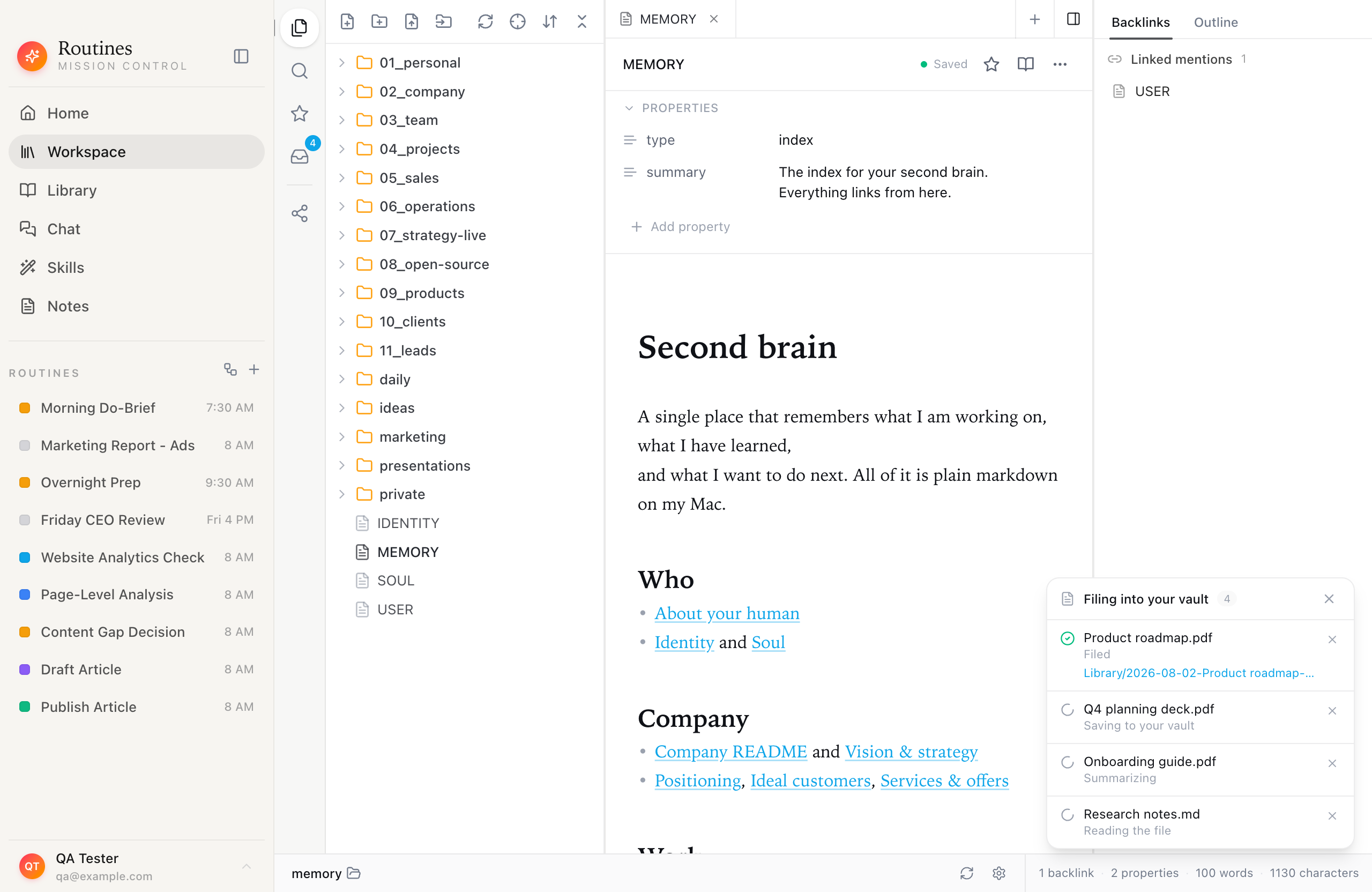
Four files dropped at once. Each row shows where that file is in the pipeline, and a filed one links to the markdown note it became.
There are two ways in, and they end in the same place. Drag files onto the Workspace and a dashed drop target appears over the note area.
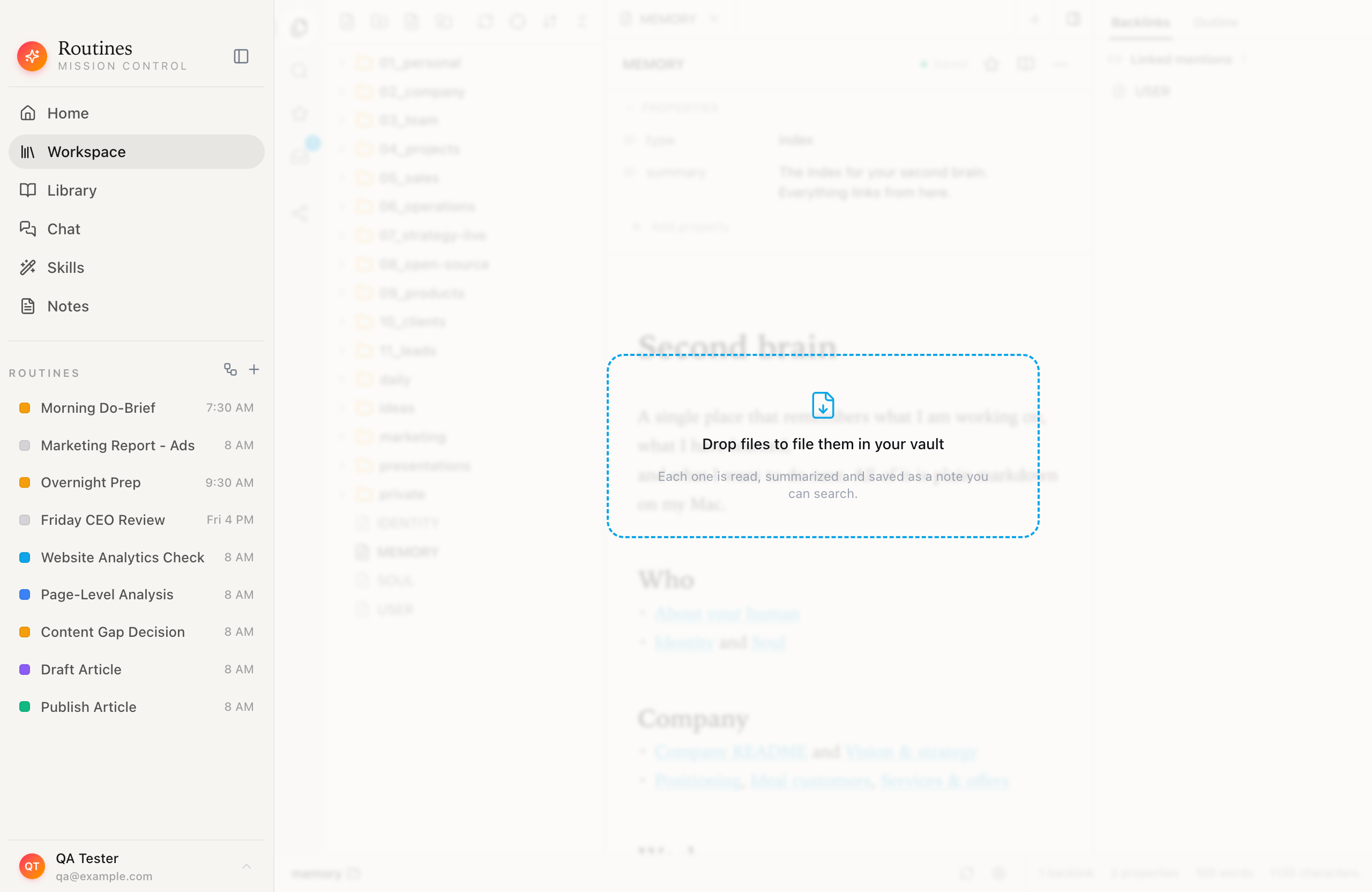
If dragging is awkward, the file explorer toolbar has an Add files button next to New note and New folder, and right-clicking empty space in the tree offers the same action with a longer label. The picker takes a multi-selection, so a folder's worth of files goes in with one Command-A.
A note on what changed, because this article is older than the app. Routines used to offer a second entry point, an Add folder that walked a folder recursively as a resumable background job. That vault import was retired in version 1.5.5, on 2026-09-06. Notes it had already filed stayed exactly where they were, and the per-file path described here is unchanged. What Routines does with a folder now is different in kind: you choose one folder as your memory folder, on the last step of setup or later under Settings, Memory, and it reads and indexes the notes already in there in the background, without rewriting a line you wrote.
Know the cost before you select four hundred files
Nothing is read until you drop or pick the files, so the size of the selection is your cost estimate, once you know the arithmetic. A text file, a CSV, a web page or a PDF costs one model call: the text is pulled out on your Mac and sent once to be summarized and filed. An image costs two, one call to look at the picture and one to summarize and file what it says, and the picture itself is part of what you pay for. So 135 documents is roughly 135 model calls, drawn from your AI credit or billed to your own key, while 135 screenshots is closer to 270. Knowing that arithmetic before you select a Desktop full of screenshots is the difference between an informed batch and a surprise bill.
The readable formats are txt, md, markdown, json, csv, html, pdf, png, jpg, jpeg, gif and webp. Anything else is skipped and left alone on disk.
What happens to each file
Every file goes through the same short pipeline, and the status label tells you exactly where it is:
- Waiting. Queued. At most two files are processed at a time, so a batch trickles rather than floods. That is a cap, not immunity: on a tight provider rate limit, two concurrent calls can still be two too many.
- Reading the file. Text and markdown are read directly. PDFs give up their text layer. HTML is stripped to its readable content. Images are sent to the model as pictures, so a screenshot of a dashboard or a photo of a whiteboard is described by what is in it. This is not OCR, and it does not need the image to contain typed text. Looking at a picture is itself a model call, which is why an image costs two and a document costs one.
- Summarizing. One model pass produces a title, a summary, key points, tags, and a suggested folder.
- Saving to your vault. The note is written as plain markdown, linked to related notes found by full-text search across the vault, and filed. If the model's folder suggestion names a folder you already have, or one sensible new top-level name, it is used and the note records that it was filed automatically. Otherwise it lands in your default folder, where you can move it.
- Filed. Done, with a link to the note it became.
A big selection keeps filing in the background while you work, and the tray counts it down row by row, including the rows you would rather not see. Failures are visible during the run, not discovered afterwards.
Failure honesty is a feature
Any tool that reads four hundred arbitrary files off a real Mac will hit files it cannot handle. The question is what it does about it.
Routines fails one row at a time, in plain language, and keeps going. A scanned PDF with no text layer stops with the reason "PDF contained no extractable text (it may be a scanned image)" written under its name, and the rest of the batch carries on. A file already in your vault is marked "Already in your vault" rather than duplicated. A file that got most of the way is marked "Filed with gaps" rather than pretending to be complete.
Everything that has been dropped or picked also has a permanent home in the Activity panel, behind the inbox icon in the left rail. It survives navigating away and restarting the app, because it reads from the same local database the filing job uses.
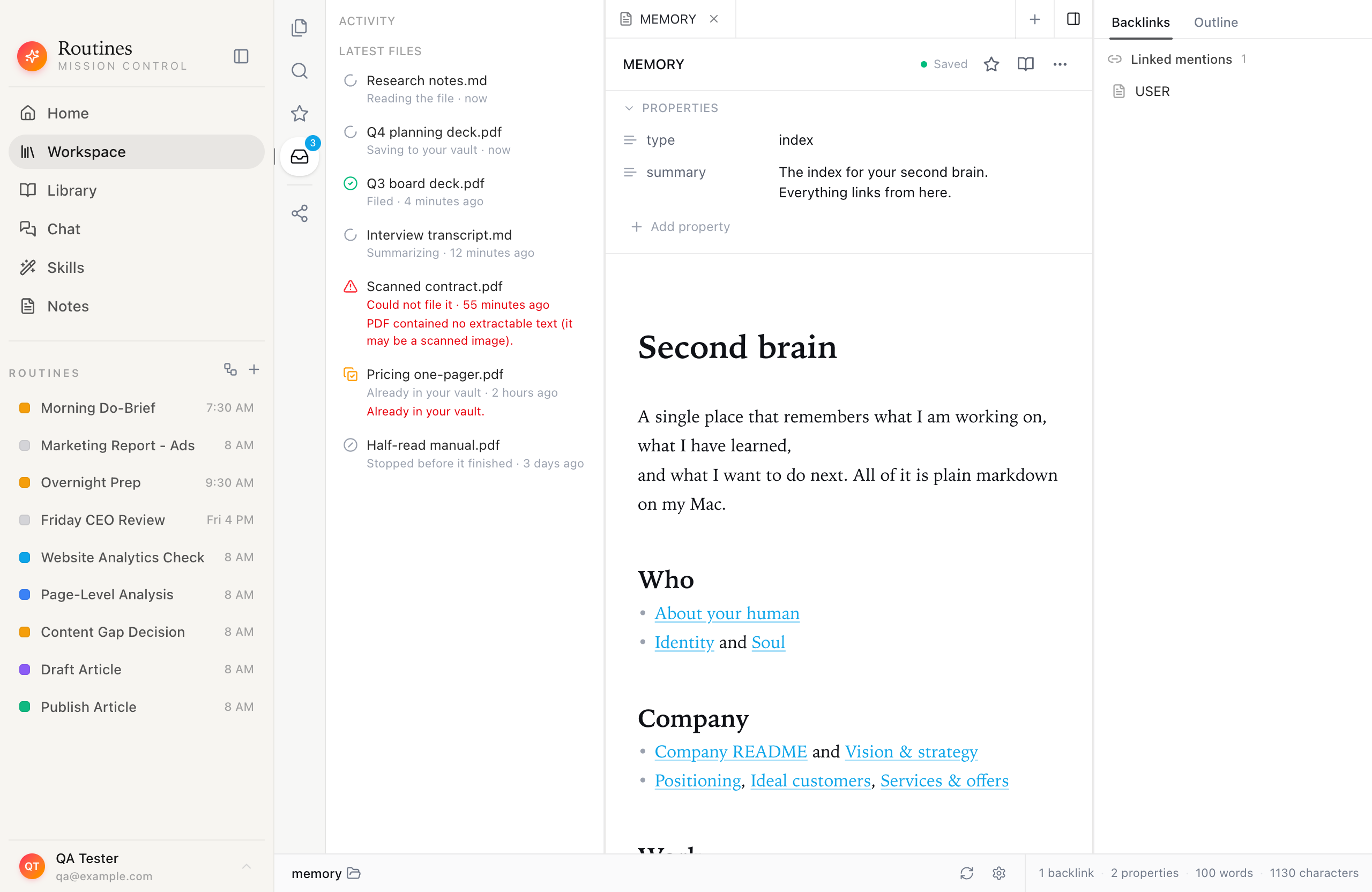
Seven files, seven different outcomes. The failed row carries the actual reason, not an error code.
A file that goes silent for over an hour is shown as "Stopped before it finished" rather than spinning forever, which is a small thing that saves you from trusting a progress indicator that has quietly died.
Where the files actually end up, and what leaves your Mac
This part deserves precision, because privacy claims in this category are usually sloppy.
Your vault is yours. Every note is a plain .md file in a folder you choose, with an ordinary frontmatter block and readable text under it. The search index is a local SQLite database with full-text search. You can open the same folder in Obsidian, VS Code, or the Finder, edit a note in any of them, and Routines re-indexes it. Back it up with the tools you already use. Nothing is converted into a proprietary format, and you can walk away with the whole thing at any time.
Reading and summarizing is a model call, and you pick the route it takes. When a file is read and summarized, its extracted text goes to the model, and for images the picture itself goes as well. There are two routes and only two. With Routines AI, which is what a signed-in account uses when you have not added a key of your own, the request goes from your Mac through our server to Anthropic. We pass it on, we do not store the prompt or the response, and what we do keep is the token count and the cost, because that is what your AI credit is drawn from. With your own key, held in your macOS Keychain, the request goes from your Mac straight to your provider, Anthropic by default, or OpenAI or OpenRouter if that is where you pointed it, and no server of ours is in the path at all. Either way, the content of the files you add does reach a hosted model, which is true of any tool that summarizes your documents this way, and either way we keep no copy of your files. If some of it is too sensitive for that, add the rest and leave those files out. The vault itself stays on your disk unless you share part of it by link or switch on Cloud Sync, which mirrors it to your account deliberately and is off until you ask for it.
That is the honest shape of it: local-first storage, plain files on disk, and one model call that either passes through a server storing none of it or goes straight to your provider on your own key.
Keeping it fed after the first batch
The big selection is the one-time part. A second brain that only holds what you owned in August is a snapshot, not a system.
- Drop single files as they arrive. A contract, a deck someone sent you, a screenshot worth keeping. One drag, and it is filed and linked like everything else.
- Let routines write into it. Scheduled routines can add to the vault on their own. The Invoice and Receipt Collector pulls invoices out of your inbox each month, and Meeting Notes Filing puts each meeting's summary where it belongs instead of in a pile.
- Talk instead of typing. If capture friction is your real problem, hotkey dictation gets a thought into a note faster than opening an editor does.
Is this different from just picking a second brain app?
It is a different question, not a better answer. Choosing between Notion, Obsidian, Logseq and the rest is a question about where your notes should live, and it is worth answering carefully. We compared them in the best second brain apps, including the tradeoffs where the classic tools clearly win.
This article answers the other question: how the notes get written in the first place, when you already have years of material and no realistic path to processing it by hand. If you have picked Obsidian and love it, keep it. Make that same vault folder your Routines memory folder and drop new material into it. The two are not competing for the same job.
Get started
The reason most second brains fail is not the app. It is that the gap between "files I have" and "notes I can search" is measured in dozens of hours nobody has.
Download Routines and open your Downloads folder, because it is the messiest thing you own. Select the twenty files you would actually want back one day, drop them on the Workspace, and let them file themselves in the background while you do something else. The notes it writes open in any markdown editor. Seven days free, no credit card.
FAQ
What is an AI second brain?
A digital knowledge base where an AI does the organizing for you: reading each item, summarizing it, tagging it, linking it to related notes and filing it in the right folder. The classic second brain method asks you to do those steps by hand, which is why most vaults go stale. The AI version keeps working when your discipline does not.
Do I need to start from scratch, or can I use files I already have?
You can start from what you have. Select the PDFs, screenshots, text files, exports or old notes already on your Mac, drop them on the Workspace, and each file is read, summarized, tagged, linked and saved as a markdown note. There is no migration step and no proprietary format.
Can it take many files at once, not just one at a time?
Yes. Drag a whole selection onto the Workspace, or use Add files and multi-select in the picker, and every file goes into the same filing tray. Each one is read, summarized, tagged and filed on its own row, so a failure on one file never stops the others. Routines no longer walks a whole folder recursively for you: that vault import was retired in version 1.5.5, and the notes it had already filed stayed where they were.
What is the difference between adding files and choosing a memory folder?
Adding files is the pipeline in this article: each file is read, summarized, tagged and written into your vault as a new markdown note. Choosing a memory folder, on the last step of setup or later under Settings, Memory, points Routines at notes you already keep. The pick is instant, the reading and indexing runs in the background, and nothing you wrote is rewritten.
Can it read screenshots and scanned documents?
For PNG, JPEG, GIF and WebP images, the model looks at the picture itself rather than running OCR, so a screenshot of a dashboard or a photo of a whiteboard becomes a real summary. For PDFs it pulls out the text layer. A scanned PDF with no text layer fails on its own row with the reason PDF contained no extractable text (it may be a scanned image), and the rest of the batch keeps going.
Do I need Obsidian to use this?
No, but the two work together. The vault is a plain folder of markdown files, so you can point Routines at an existing Obsidian vault and keep editing in Obsidian. Nothing is converted and nothing is locked in.
Is a second brain built this way private?
Your vault is plain markdown in a folder you choose, with a local SQLite index, and it stays on your disk unless you switch on Cloud Sync yourself or share part of it by link. The reading and summarizing step needs a hosted model, so the contents of the files you add do reach one, and you choose the route: Routines AI passes the request through our server to Anthropic and stores neither the prompt nor the response, or you sign in with the Claude or ChatGPT plan you already pay for, or run on your own API key, and the request goes from your Mac straight to your provider with no server of ours in the path. We keep no copy of your files either way. If some of it is too sensitive for that, add the rest and leave those files out.
How long does it take to get a useful second brain?
Filing 400 files by hand is roughly 30 to 60 hours of reading and typing. A batch dropped onto the Workspace runs unattended in the background while you work, and you can search the results as soon as the first files land. The honest limit is your AI spend and your connection, not your calendar.