
Short answer: consumer ChatGPT is not private in the way most people mean when they ask the question. Your conversations travel to OpenAI, are stored on OpenAI's systems until you delete them, and on the free and paid consumer plans they may be used to help train OpenAI's models unless you turn that setting off yourself. OpenAI's own help centre says it plainly: "When you use our services for individuals such as ChatGPT and Codex, we may use your content to train our models."
Longer answer: privacy is not one switch. There are three separate questions hiding inside "is ChatGPT private", and the marketing around AI tools tends to answer the easy one and stay quiet on the other two. This article separates them, states what OpenAI's current policies actually say, and ends with things you can do this afternoon if you want to keep using ChatGPT with less exposure.
The three questions people mix up
1. Can someone intercept my messages on the way? Almost certainly not. OpenAI encrypts data in transit with TLS 1.2 or higher and at rest with AES-256. That is a normal, solid setup.
2. Can the company on the other end read and keep what I send? Yes. Encryption in transit protects your message from a stranger on the café Wi-Fi. It does nothing to stop the recipient reading it, because the recipient holds the keys. "Encrypted" and "private from the provider" are different claims, and only the first one is being made.
3. Will what I send be used for something beyond answering me? This is the question that actually matters, and it is the one where the answer depends entirely on which ChatGPT you are using.
What consumer ChatGPT does by default
If you signed up with an email address and you are on Free, Go, Plus or Pro, you are on a consumer plan. Three things are true there.
Training is on unless you switch it off. OpenAI's Data Controls FAQ describes a setting called "Improve the model for everyone" under Settings, then Data Controls. Turn it off and, in OpenAI's words, "your conversations will still appear in your chat history but won't be used to train ChatGPT". The setting applies to your whole account across devices, and you can change it at any time. Note the shape of this: it is opt-out, not opt-in. If you have never opened that screen, it is on.
Your chats are stored until you delete them. OpenAI's retention page states that chats are saved to your account until you delete them manually. When you do delete one, it is removed from your account immediately and scheduled for permanent deletion within 30 days, unless it has already been de-identified or OpenAI has a security or legal obligation to keep it longer.
Content is monitored. OpenAI's privacy policy, which it maintains in separate US, European and rest-of-world versions that are revised several times a year, lists among its uses of personal data preventing "fraud, illegal activity, or misuses of our Services, and to protect the security of our systems and Services, including by monitoring any Content submitted or exchanged on our platforms". Its enterprise page describes access to stored conversations as limited to authorized employees who need it for engineering support, abuse investigation and legal compliance, plus specialist third-party contractors bound by confidentiality who review for abuse and misuse. That is a reasonable design for a service operating at this scale. It is also not "nobody will ever look at it".
One more thing worth knowing, because it is new and it surprises people: the same privacy policy says that for Free and Go users, subject to your settings, OpenAI uses information to personalize the ads you see on its services and to measure their effectiveness. If you are on a free tier, an advertising layer is now part of the picture.
What Temporary Chat and history controls really cover
Temporary Chat is the closest thing consumer ChatGPT has to an incognito mode, and it does a real job. OpenAI states that Temporary Chats do not appear in your history, do not use or create memories, and are not used to train its models, and that they are deleted from OpenAI's systems within 30 days. It also says a copy may be kept for safety purposes and reviewed to monitor for abuse.
So Temporary Chat controls retention and training. It does not control transmission. Your message still leaves your machine, still gets processed on OpenAI's infrastructure, and still passes through the same abuse monitoring. If your worry is "I don't want this saved and reused", Temporary Chat addresses it. If your worry is "this information must not leave my organisation", it does not.
The same distinction applies to the training toggle. Turning off "Improve the model for everyone" stops future conversations feeding model training. It does not delete your history, and it does not make the conversation invisible to the provider.
Business, Enterprise and the API are a genuinely different deal
This is where a lot of the anxiety around ChatGPT is misplaced, because the business products have materially different commitments and most people never see them.
OpenAI's enterprise privacy page, updated 8 January 2026, states that for ChatGPT Business, Enterprise, Edu, Healthcare, ChatGPT for Teachers and the API Platform, "we do not train our models on your data by default", and that data from these products after 1 March 2023 is not used for training unless you explicitly opt in. Enterprise workspace admins control retention, and deleted conversations are removed within 30 days unless legal retention applies.
The API is stricter still on training and looser on nothing much: OpenAI's platform documentation says data sent to the API has not been used to train or improve its models since 1 March 2023 unless you opt in, and that abuse monitoring logs containing prompts and responses are retained for up to 30 days by default, with Zero Data Retention available to approved customers on eligible endpoints.
There is a trade in the business tiers that is worth naming. On ChatGPT Business, OpenAI says workspace admins "can view, access, export, and delete end user conversations in the workspace". You gain a contractual guarantee against training and you hand your employer visibility. That is the correct arrangement for company data. It is a poor arrangement for asking about a medical worry on your lunch break.
The part that gets people in trouble at work
Most real-world ChatGPT privacy incidents are not exotic. They look like this: someone pastes a client contract into a free account to get a summary, or drops a customer export into a chat to reformat it, or asks for help with a bug and includes a stack trace containing production credentials.
The retention policy is almost beside the point in those cases. The problem is the disclosure itself. If you signed an NDA that says client material stays inside your systems, sending it to a third party can breach that clause whether or not the third party deletes it in 30 days. If you handle health, financial or personal data of EU residents, your legal basis for processing is your problem, not the model provider's, and "the vendor says they don't train on it" is not a defence on its own. This is exactly why organisations buy Enterprise seats and sign a data processing agreement: the commitments become contractual and auditable rather than a help page that can be updated.
Practical test before you paste anything: would you be comfortable if this text appeared in an email to someone outside your company? If not, it does not belong in a consumer AI chat.
What local-first and bring-your-own-key actually change
Being precise here matters, because the AI privacy category is full of overclaiming.
If you use a local-first app such as Routines, your prompts still go to the model provider. That is true whether the app supplies the AI, in which case the request passes through its server on the way to Anthropic, or you run on your own key and the request goes straight from your Mac. Either way the text of your question is processed on a frontier lab's servers. Nothing about the architecture makes that step disappear, and any tool that tells you otherwise while calling a hosted frontier model is misleading you. What an honest app can tell you is how many parties hold a copy on the way, and whether any of them keeps one.
Three things do change, and they are the things worth having.
No middle vendor accumulating your history. In a typical AI product there are two parties holding your data: the model provider and the app company sitting in front of it. With a bring-your-own-key setup, the second one drops out. When you run on your own key, Routines calls the provider's API directly from your Mac with your key held in the macOS Keychain, so there is no product server in between storing your conversations. On Routines AI our server sits in between to relay the request, and it stores neither the prompt nor the answer.
The output stays yours as files. Your notes, meeting summaries and routine outputs are written to plain markdown on your own disk and a local SQLite database, not to a vendor's account you rent access to. You can open the same folder in Obsidian or grep it from the terminal. See how the local memory works if you want the detail.
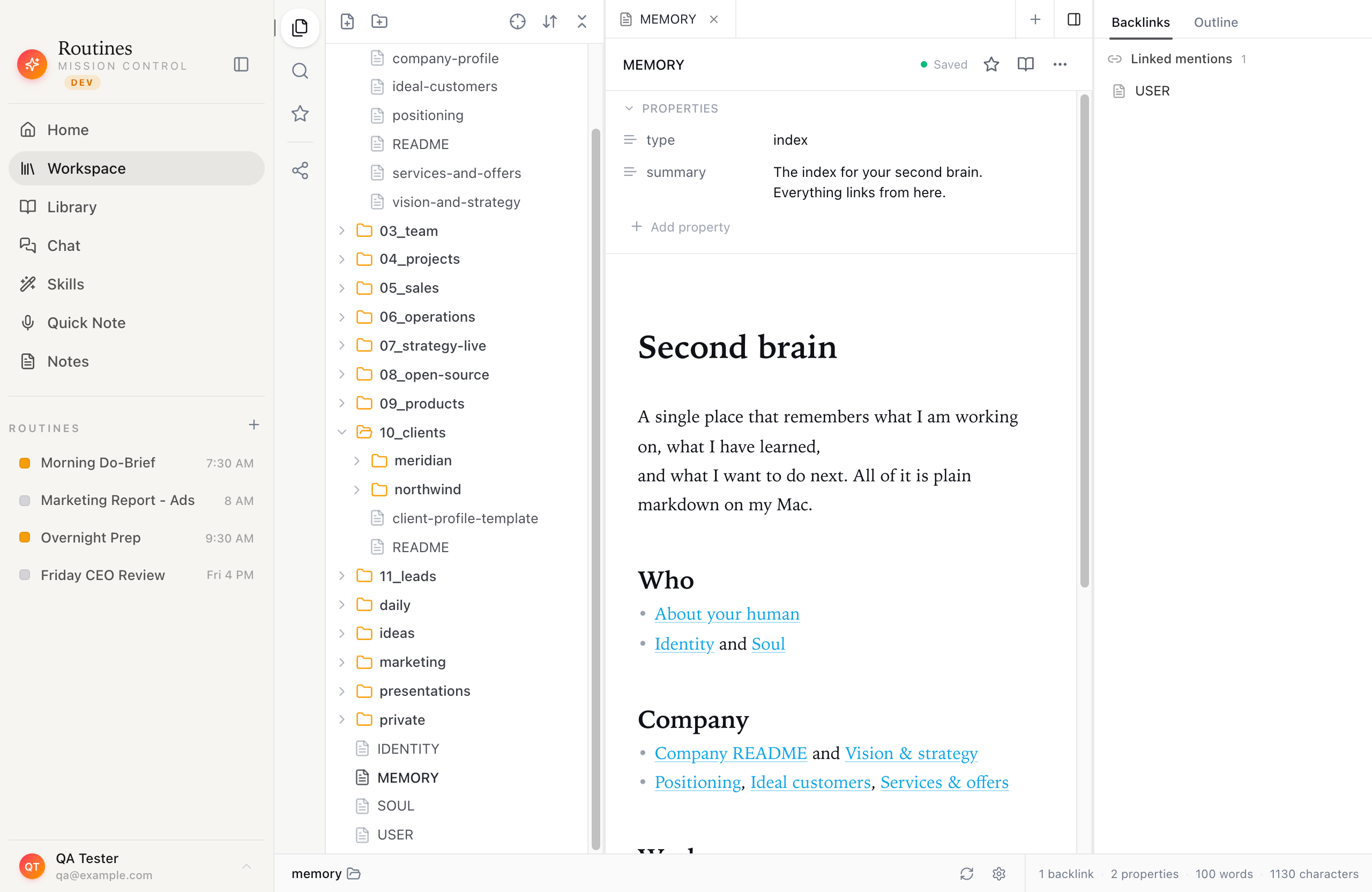 Notes and outputs are plain markdown files on your own disk, not rows in a vendor's database.
API traffic is not consumer chat traffic. The default training posture on the API side is the opposite of the consumer side. OpenAI's platform docs state API data is not used for training unless you opt in. Anthropic's policy page for its commercial offerings, updated 16 March 2026, states "We will not use your chats or coding sessions to train our models" unless you join its Development Partner Program. So the same sentence, typed into a consumer chat box or sent through an API key, lands in two different policy regimes.
What this does not give you is offline AI or full privacy from the model provider. If that is your requirement, the only honest answer is a model running entirely on your own hardware, with the quality trade that involves. Our privacy architecture page sets out where the boundary sits.
If you want to keep using ChatGPT, do these five things
- Turn off "Improve the model for everyone." Settings, then Data Controls. Two clicks, applies account-wide, reversible.
- Use Temporary Chat for anything sensitive. No history, no memories, no training, deleted within 30 days.
- Redact before you paste. Replace names, account numbers, addresses and internal system names with placeholders. The answer is almost always just as good.
- Put work on a work account. If your employer has Business or Enterprise, use it for work material and keep the personal account for personal things. Remember that admins can see the work one.
- Review what is already stored. Chat history, saved memories and uploaded files are three separate stores. Deleting a chat does not delete a file you saved to your Library. Clear each one.
The honest bottom line
ChatGPT is not a privacy disaster and it is not private. It is a hosted service with reasonable security, a default that favours model improvement over your discretion, and a set of controls that work well once you find them. Most people asking "is ChatGPT private" have never opened Data Controls, and ten seconds there changes their answer more than switching tools would.
The structural question is different: how many companies hold a copy of your thinking, and where do the outputs live when you are done. If the answer you want is "one company sees the prompt, nobody stores the history, and everything I produce is a file I own", that is an architecture choice, and it is the one we built.
Try Routines free for 7 days, no credit card. AI is included from the first minute, and you can switch to your own Anthropic, OpenAI or OpenRouter key whenever you want your AI requests to skip our servers. Sign-in and sync still go through them. Either way your notes stay as markdown on your Mac, and you decide for yourself where the line sits.
Frequently asked questions
Is ChatGPT private?
Not by default on the consumer plans. OpenAI's help pages state that for services for individuals such as ChatGPT, your content may be used to train its models unless you opt out, and your chats are stored on OpenAI's systems until you delete them. Conversations are encrypted in transit and at rest, but encryption protects them from outsiders, not from OpenAI itself.
Does ChatGPT use my conversations to train its models?
On consumer ChatGPT, yes unless you turn it off. OpenAI's Data Controls FAQ describes a setting called "Improve the model for everyone" under Settings then Data Controls. Turning it off means new conversations are not used for training. Your chat history still stays in your account. For ChatGPT Business, Enterprise, Edu and the API, OpenAI says it does not train on your data by default.
Can OpenAI employees read my ChatGPT conversations?
OpenAI's privacy policy says it monitors content submitted to its platforms to prevent fraud, illegal activity and misuse, and its enterprise privacy page says access to stored conversations is limited to authorized employees who need it for engineering support, abuse investigations and legal compliance, plus specialist contractors reviewing for abuse. Assume a human could see a conversation under those circumstances.
Does Temporary Chat make ChatGPT private?
It reduces what is kept. OpenAI states Temporary Chats do not appear in history, do not create memories, are not used to train its models, and are deleted from its systems within 30 days, though a copy may be reviewed for abuse. Your message still travels to OpenAI and is processed there, so Temporary Chat is a retention control, not anonymity.
Is it safe to paste work or client data into ChatGPT?
Check your contracts first. If you are under an NDA, or handling regulated data such as health or financial records, sending it to a third party can breach an obligation regardless of what that third party's retention policy says. Business and Enterprise workspaces exist partly to give an employer a data processing agreement and admin control, and on ChatGPT Business your workspace admin can view, export and delete conversations.
Does using your own API key make AI private?
It changes what happens around the request, not the fact that the request leaves your machine. Your prompts still go to the model provider's API. What changes is that no intermediate vendor stores your conversations, your notes and outputs can stay as files on your own computer, and both OpenAI and Anthropic state that API and commercial data is not used to train their models by default.