
If you talk faster than you type and you want that turned into clean text on your Mac without sending your voice to someone else's server, Superwhisper is one of the best tools you can install today. It lives on a global hotkey, transcribes with speech models that can run entirely on-device, and drops the result straight into whatever app you are in. For a lot of people, that is the whole job, done well. The honest catch is not a flaw, it is a matter of scope: Superwhisper does dictation, and only dictation. If you also want meeting notes, clipboard history, or scheduled AI tasks, you end up stacking three or four separate apps around it.
This is a fair, low-hype review from people who build a competing tool. Quick disclosure: we make Routines, a local-first Mac app that includes hotkey dictation alongside meetings, clipboard, and automations, so we have a horse in this race. We will keep the comparison honest, credit Superwhisper for what it genuinely does better, and be clear about where each tool fits.
What Superwhisper gets right
Superwhisper earned its following, and it is worth being specific about why.
On-device transcription that respects your privacy. The single best thing about Superwhisper is that it can run speech recognition entirely on your Mac using local Whisper models. Your audio never has to leave the machine. In a category where most voice tools quietly ship your recordings to a server for processing, this is a real, structural privacy advantage, and it is the reason a lot of people pick Superwhisper in the first place. If keeping your spoken words off the cloud matters to you, this is the feature that closes the deal.
A global hotkey that makes dictation feel instant. You do not have to open an app, click into a box, or aim at anything. You press a key from wherever you are, talk, and the transcribed text appears where your cursor was. That immediacy is what turns dictation from a novelty into a habit, and Superwhisper nails the feel of it.
Modes and custom vocabulary. Superwhisper lets you set up different modes for different jobs, so a quick message, a longer note, and a prompt to an AI tool can each get handled the way you want. You can teach it names, product terms, and jargon it would otherwise mangle. This is the kind of detail that separates a tool people demo once from a tool people keep on a hotkey for a year.
Your choice of speech model. You are not locked into one engine. You can lean on local models for privacy and speed, or opt into more capable cloud models when you want maximum accuracy on a tricky recording. Giving the user that dial, instead of deciding for them, is the right call.
Mac-native polish. Superwhisper feels like a Mac app, not a web page in a wrapper. It is quiet, quick, and stays out of the way. For the Alfred and Raycast crowd who notice craft, that polish is part of the appeal.
Credit where it is due: if your goal is the cleanest possible hotkey dictation with your audio staying on your own machine, Superwhisper is a strong default and an easy tool to recommend.
Who Superwhisper is perfect for
Superwhisper fits some people almost exactly. You are probably one of them if:
- Dictation is the specific problem you want solved, and you are happy to use other apps for notes, clipboard, and automation.
- You care that your voice audio stays on-device, and local Whisper models are a feature you will actually use, not just a checkbox.
- You write in bursts all day and want a hotkey that keeps up without any warm-up.
- You value a focused, single-purpose tool that does one thing with taste rather than a suite that does many things.
For that profile, Superwhisper is close to ideal, and you should not overthink it.
Where Superwhisper stops
Here is the honest limitation, and it is by design rather than by accident. Superwhisper is a dictation app. That focus is a strength, but it means the moment your needs grow past voice-to-text, Superwhisper cannot follow you there.
No meeting recording or notes. Superwhisper transcribes what you say into a text field. It does not sit in on your calls, separate the speakers, or hand you a summary with action items afterward. That is a different job, and it belongs to a different tool, which for most people means adding a Granola or an Otter to the stack.
No clipboard history. Voice typing and clipboard management are cousins, both about getting text where it needs to go fast. Superwhisper does the first and nothing for the second, so your copy-paste history still needs Alfred, Raycast, or Paste alongside it.
No scheduled routines or shared memory. Superwhisper has no concept of a recurring task, a morning briefing, or a memory that other tools can read. It transcribes in the moment and forgets. If you want your Mac to brief you every morning or file your notes automatically, that lives somewhere else entirely.
The stack adds up. None of the above is a knock on Superwhisper for being what it is. But be clear-eyed about the real cost: a dictation app here, a meeting-notes app there, a clipboard manager, and an automation tool means four subscriptions, four privacy policies, and your data scattered across four different clouds. The focused tool is elegant on its own and fragmenting in aggregate.
Pro is a paid upgrade, and cloud models send audio out. Superwhisper offers a free tier with local models, with a paid Pro plan for the more advanced models and features. That is fair for the value, and worth knowing before you commit. Just remember that the on-device privacy story applies to the local models. If you switch to a cloud model for accuracy, your audio does leave the machine, same as any cloud tool.
The alternative: dictation plus a whole assistant
If the dictation itself is great but the fragmentation is the part that bothers you, the alternative worth understanding is a single local-first app that treats dictation as one feature among several. This is the lane we build in, so read the rest of this section as both an explanation and a disclosure.
Routines is a Mac app with global-hotkey dictation built in, alongside meeting recording, clipboard history, and scheduled AI routines, with your notes and outputs stored as plain markdown and a local SQLite database on your own Mac. The dictation half works the way you would expect from a good voice tool:
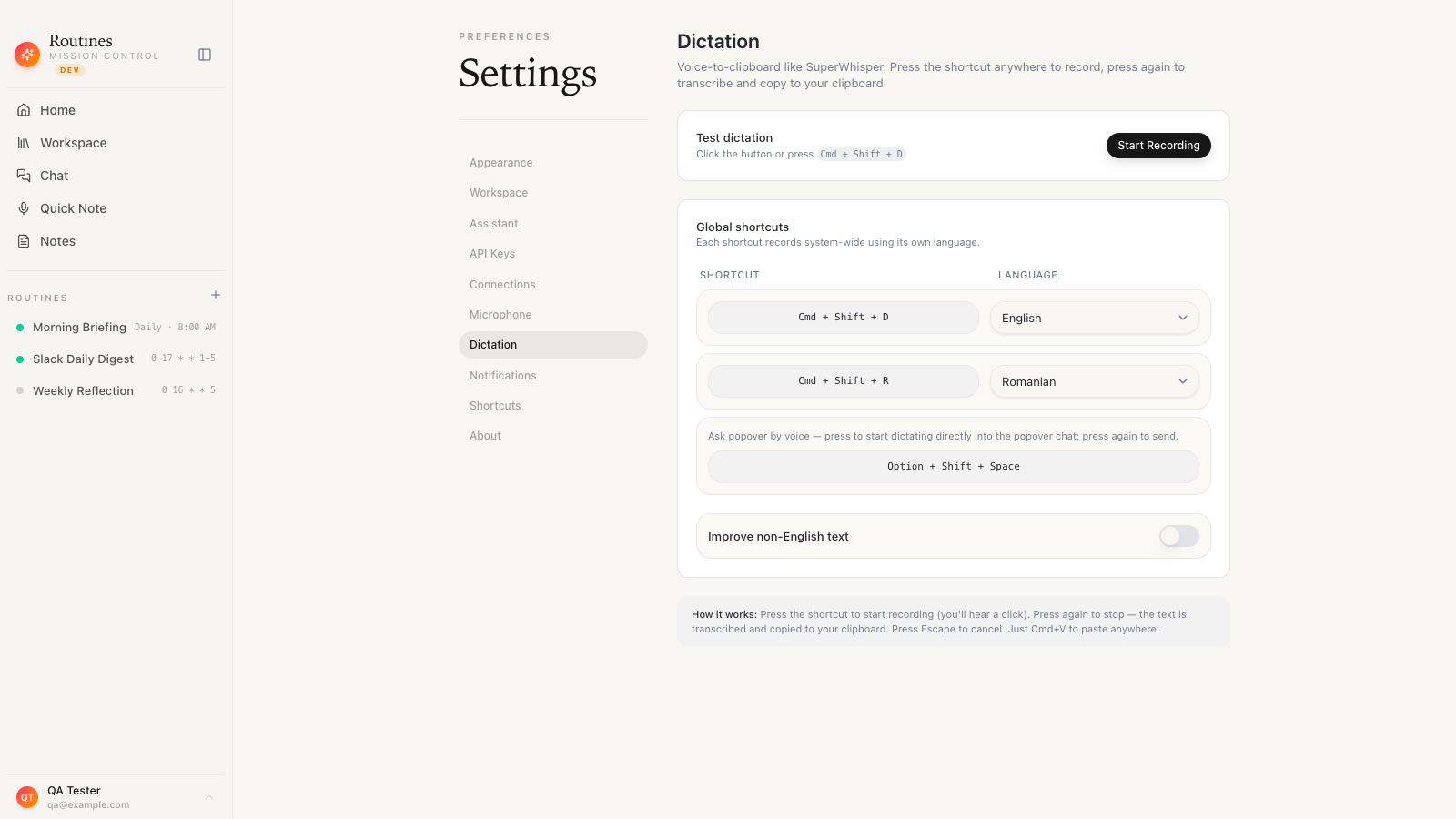
- Press a global hotkey from anywhere, talk, and tap it again to stop. You do not have to be focused in a specific field first.
- Your words transcribe live while you speak through a streaming speech service, so the text is ready the instant you tap the shortcut again to stop, instead of leaving you waiting on a spinner.
- It auto-pastes into the app you were in, so the transcript lands at your cursor and you stay in your flow.
- A second hotkey handles a second language, so you can switch between, say, English and Romanian without diving into a menu.
- Multilingual text polishes itself, correcting speech-to-text slips, fixing punctuation, and restoring accented characters, while English stays instant.
- An offline Whisper fallback keeps working when the connection is flaky or no Deepgram key is present. It is a safety net rather than a mode you pick: dictation audio streams to Deepgram by default on every plan, Free included.
Where Routines diverges from a pure dictation tool is everything around the dictation. The same app records your meetings with speaker separation and writes AI notes, keeps a searchable clipboard history on your machine, and runs scheduled AI routines like a morning briefing across your email and calendar. Because it all shares one local memory, a thought you dictate flows into the rest of your day without leaving the app. The spoken audio goes to Deepgram to become text, and what the memory keeps afterwards stays on your Mac.
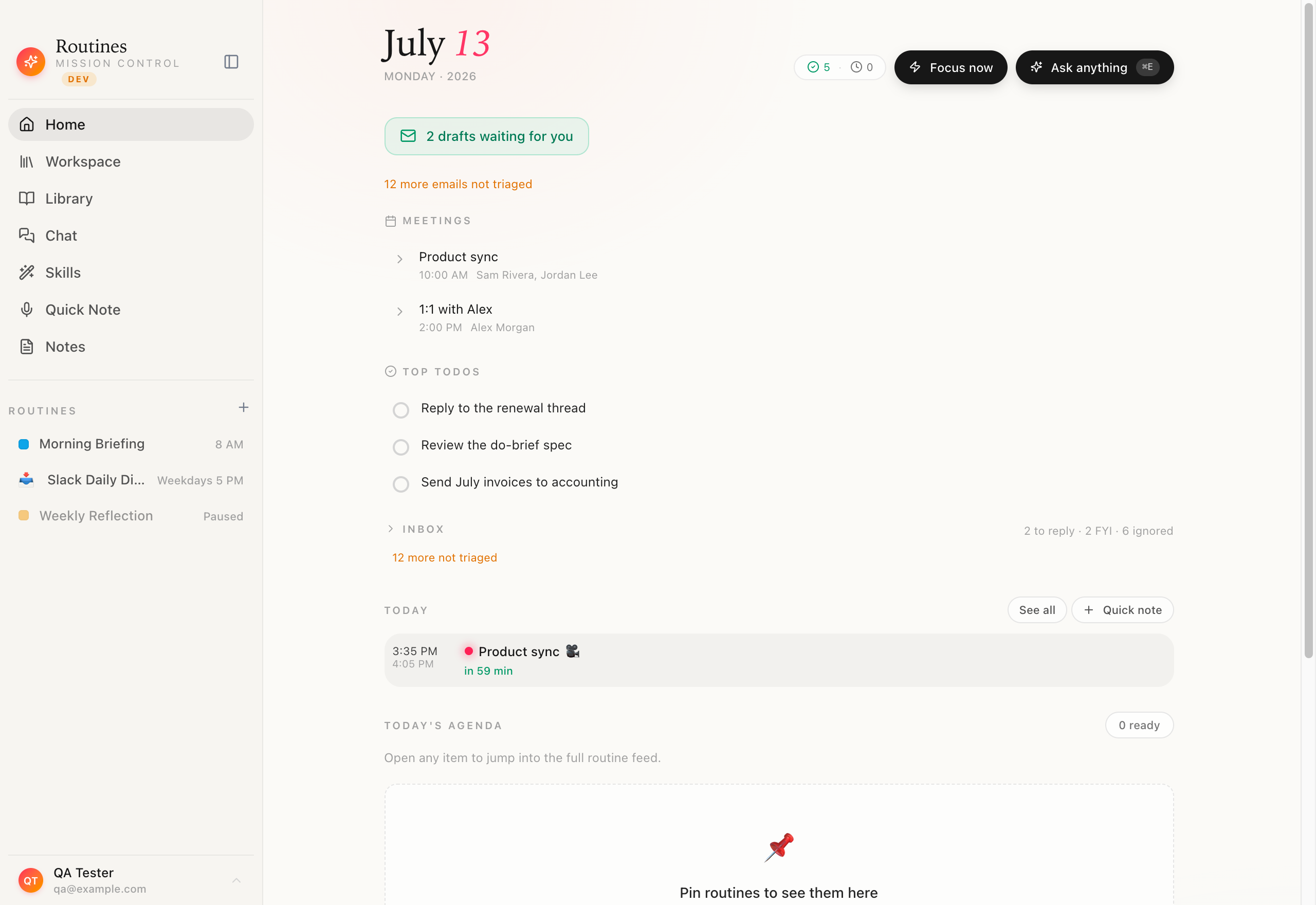
The honest tradeoff in the other direction: Superwhisper is a more mature, more focused dictation tool, and its fully on-device local models are a stronger privacy story for the raw audio than a live streaming path is. Routines is younger and deliberately broader, and its instant dictation streams to a speech service for the live transcript, with the offline fallback there when you want it. Where Routines wins is scope and ownership: one app instead of four, and your notes, transcripts, clipboard, and routine outputs living as files you control rather than scattered across vendor clouds. If all you want is the single best on-device dictation utility, that breadth is not the point for you.
If you want the detailed side-by-side, we keep an honest Routines vs Superwhisper breakdown, and a Routines vs Wispr Flow one for the other big dictation option.
How to choose
You do not need a spreadsheet for this. Two questions settle it:
-
Do you want only dictation, or dictation plus the rest? If voice-to-text is the entire job and you are content running separate apps for notes, clipboard, and automation, Superwhisper is a superb single-purpose pick. If you would rather have one app cover dictation, meetings, clipboard, and routines, a suite is the better shape.
-
Where do you want your text to live? If you want your dictated notes, meeting transcripts, and clipboard to sit as files on your own machine that you can open in Obsidian or back up yourself, weight local-first storage heavily. If you do not think about where the data lands, that difference will not move you.
Answer "only dictation" and "do not care where it lives," and Superwhisper is a great choice you can stop researching. Answer "dictation plus more" or "I want to own the files," and a broader local-first tool deserves a look first.
The bottom line
Superwhisper is a genuinely good product. The on-device transcription is its standout, the hotkey feel is excellent, and the modes and custom vocabulary respect how people actually work. For anyone who wants a focused, private dictation utility, it is the right answer and we would not pretend otherwise.
The only thing to go in with eyes open about is scope. Superwhisper does dictation beautifully and stops there, so the more of your text life you want handled in one private place, the more its focus starts to feel like a ceiling. Know which you want before you build a stack around it.
If dictation is the door and a whole local-first assistant is what you actually want behind it, it is worth trying the broader approach yourself. If you are curious how native voice typing compares to the built-in option first, our guide to dictation on Mac covers that. When you are ready, download Routines, put it on a hotkey, and talk. Your words land where you were typing, and they stay on your Mac.
FAQ
Is Superwhisper worth it? Yes, if you want a focused, private, on-device dictation app for your Mac, Superwhisper is one of the best at that single job. The main thing to weigh is scope: it does dictation and nothing else, so pair it with other tools if you also need meeting notes or clipboard history.
Does Superwhisper work offline? Yes. Superwhisper can transcribe fully on your Mac using local Whisper models, so your audio never leaves the machine. Cloud models are optional if you want higher accuracy and are comfortable sending audio out.
Is Superwhisper free? Superwhisper offers a free version with local models plus a paid Pro upgrade that unlocks more advanced models and features. Check its site for current pricing, since plans change over time.
What is a good Superwhisper alternative? Routines is a local-first Mac app with hotkey dictation plus meeting notes, clipboard history, and scheduled AI routines in one place. We build Routines, so weigh that. Wispr Flow is another strong option if you want a pure dictation tool.
Superwhisper vs Wispr Flow: which is better? Both are excellent Mac dictation apps. Superwhisper leans on local, on-device models for privacy, while Wispr Flow leans on cloud transcription with heavy polish. The right pick depends on whether you value on-device processing or maximum convenience.