
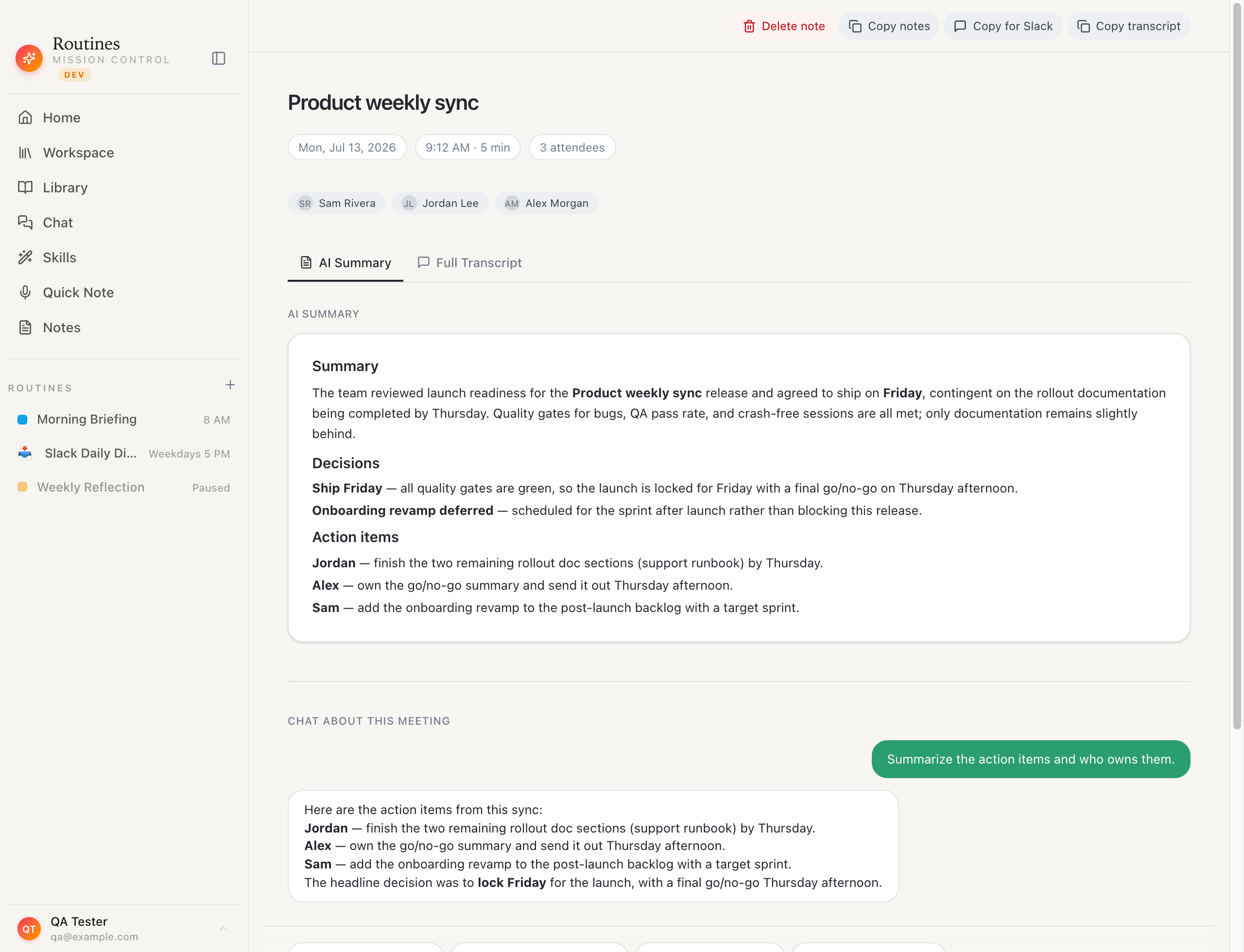
 A recorded meeting in Routines: the AI summary and action items are written straight to a markdown file on your Mac, with the full transcript kept locally alongside.
Your last 90 days of meeting notes exist somewhere. The question is: where, exactly, and who controls them?
If you use Granola, the answer is Granola's servers. That is not a criticism. Their product is genuinely excellent. But it is a fact that matters when you are a founder whose meetings contain unreleased roadmaps, client names, and board conversations. And it matters when you want to search those notes in Obsidian at midnight, paste them into a new AI model next year, or simply walk away from a subscription without losing your own thinking.
We tested five Granola alternatives across 60+ real meetings over four weeks. The table below shows the one thing most comparison posts skip: where your notes actually live after the meeting ends.
The one question that separates these apps
Before the feature list: ask each app "where does the transcript go?" The answer tells you more about long-term fit than any feature comparison. Cloud storage means faster sync and zero setup. Local storage means your data is yours, portably, permanently, and privately.
Neither is wrong. But they are different architectures with different risk profiles. Choose deliberately.
Granola alternatives at a glance
| App | Where notes live | Local recording | Bot in the call | Mac-native | Price |
|---|---|---|---|---|---|
| Routines | Your Mac (markdown + SQLite) | Yes | No | Yes | Free plan / Pro subscription (7-day trial) |
| Fathom | Fathom cloud | Yes | No | Web + Mac | Free tier / $19/mo |
| Otter.ai | Otter cloud | Yes | Optional | Web + iOS | Free tier / $17/mo |
| Fireflies.ai | Fireflies cloud | Bot joins call | Yes | Web | Free tier / $18/mo |
| Granola | Granola cloud | Yes | No | Yes, plus Windows, iOS, Android | Free tier / from $14/user/mo |
1. Routines: your notes as markdown files on your Mac
Best for: founders and ops leads who want Granola-quality meeting notes that belong to them, not a vendor.
Routines records meetings directly on your Mac using ScreenCaptureKit, with transcription and speaker separation by Deepgram (Nova-3 for English and Hebrew). The AI summary and action items are generated by whichever model you wire up (Claude, GPT-4o, or any OpenRouter endpoint). The summary and every action item land as a markdown file in your local vault, the same one your Obsidian sees, and the full transcript is kept locally on your Mac in the app's database.
Meeting audio streams to Deepgram for transcription, on the key we manage if you are on Pro or in the free trial, and on your own Deepgram key on the Free plan. Cloud Sync and Backup is off by default; turn it on and your transcripts and notes are copied to your Routines account so your devices share them. After the meeting, the file is on your disk: readable in any text editor, searchable with Spotlight, portable to any future tool.
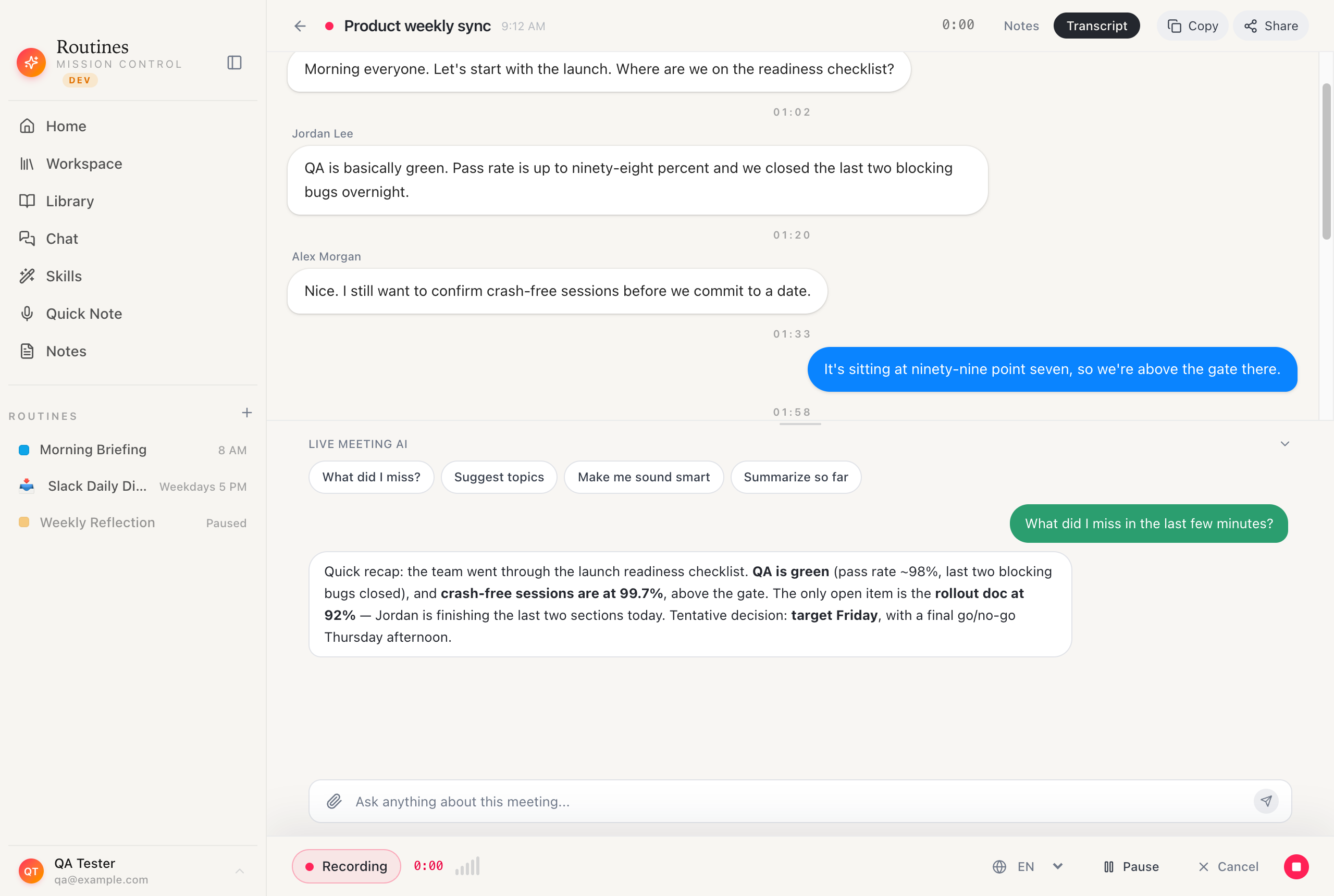 After a call you can chat over the transcript to surface decisions and follow-ups, all against notes that live on your Mac unless you switch on Cloud Sync and Backup, which is off by default, or share one by link.
The setup takes about four minutes: DMG install, sign in with Google, Calendar permission granted, done. Your next meeting is automatically detected and recorded.
What Granola does better: Granola's note-editing UI is more polished. Their template library is deeper. If you want a product that feels finished and refined and you are comfortable with cloud storage, Granola is a better fit.
What Routines does differently: your notes stay on your Mac as files unless you turn on Cloud Sync or share one by link. You can point Routines at your existing Obsidian vault. You can swap AI models without losing your history. And Routines is not only a meeting notes app. It handles scheduled AI routines (morning briefings, email digests, weekly reports), dictation, clipboard history, and AI chat from a single native Mac app. One subscription instead of three.
See how meeting notes work in Routines
2. Fathom: the best free Granola alternative
Best for: individuals who want accurate transcription and summaries for free, and are fine with cloud storage.
Fathom is the strongest free option in this category. Their accuracy on English is excellent, the summary quality is high, and the free tier has no meeting limit. Notes live in Fathom's cloud, synced to your dashboard. There is no local storage option.
The product is US-company-hosted SaaS. If data residency matters to you professionally, read their DPA before relying on it for sensitive client calls.
Friction: Fathom requires a calendar connection and works via browser extension. It is not a native Mac app in the same sense as Granola or Routines.
3. Otter.ai: the veteran with the largest feature set
Best for: teams that want shared workspaces, live captions during calls, and integrations with Notion and Slack.
Otter has been at this longer than anyone. Their live captioning during Zoom and Google Meet is genuinely useful for real-time note-taking. The shared workspace lets teams collaborate on transcripts. All of this lives in Otter's cloud.
The free tier limits you to 300 minutes/month of transcription. The AI summary quality is good but not at Granola's level for standalone audio. If you use Otter on a large team and are primarily interested in the collaboration layer, it earns its place. If you want the cleanest single-player summary experience, the others are sharper.
4. Fireflies.ai: the bot-based option for large teams
Best for: sales teams and enterprise use cases where a bot-in-the-call is acceptable and CRM sync is the priority.
Fireflies sends a bot participant to your meeting, which means everyone on the call can see it. Some meeting participants object to this. Some enterprise security policies block unknown bot accounts. Know your context.
What Fireflies does well: CRM integration (Salesforce, HubSpot), action-item tracking, and their search across your entire meeting history is fast. For a sales org where "bot in the call" is normal and CRM sync matters more than local privacy, Fireflies is a mature product.
For a founder running sensitive investor calls or client conversations, the bot is a problem. None of the other apps on this list use bots.
5. Granola itself: still the benchmark for note quality
We would be misleading you if we did not say this clearly: Granola's note quality and editing experience are the best in the category right now. Their structured note templates, the way they blend your own in-meeting typing with AI completion, and the overall polish of the Mac app are ahead of most alternatives.
If cloud storage does not concern you and you only need meeting notes (not dictation, clipboard, routines, or a broader AI assistant), Granola is an excellent choice. Their free tier only shows notes from the last 30 days. Their paid plans are $14 or $35 per user per month, depending on tier. If you are budgeting for a team rather than one seat, we keep a current breakdown of what Granola's tiers cost over a year.
The reason people look for alternatives is almost always one of three things: the cloud storage concern, the desire for a broader productivity system in one app, or the pricing once the free tier is exhausted. If any of those resonate, read on.
The data-ownership question in practice
Here is the scenario that clarifies the choice faster than any benchmark: imagine your AI transcription provider raises prices by 40%, changes their terms of service, or shuts down. What happens to your notes?
With a cloud-stored app, your notes are in their format on their servers. You can typically export, but you may be exporting to a proprietary format, and your future search and AI context depend on your next vendor's import quality.
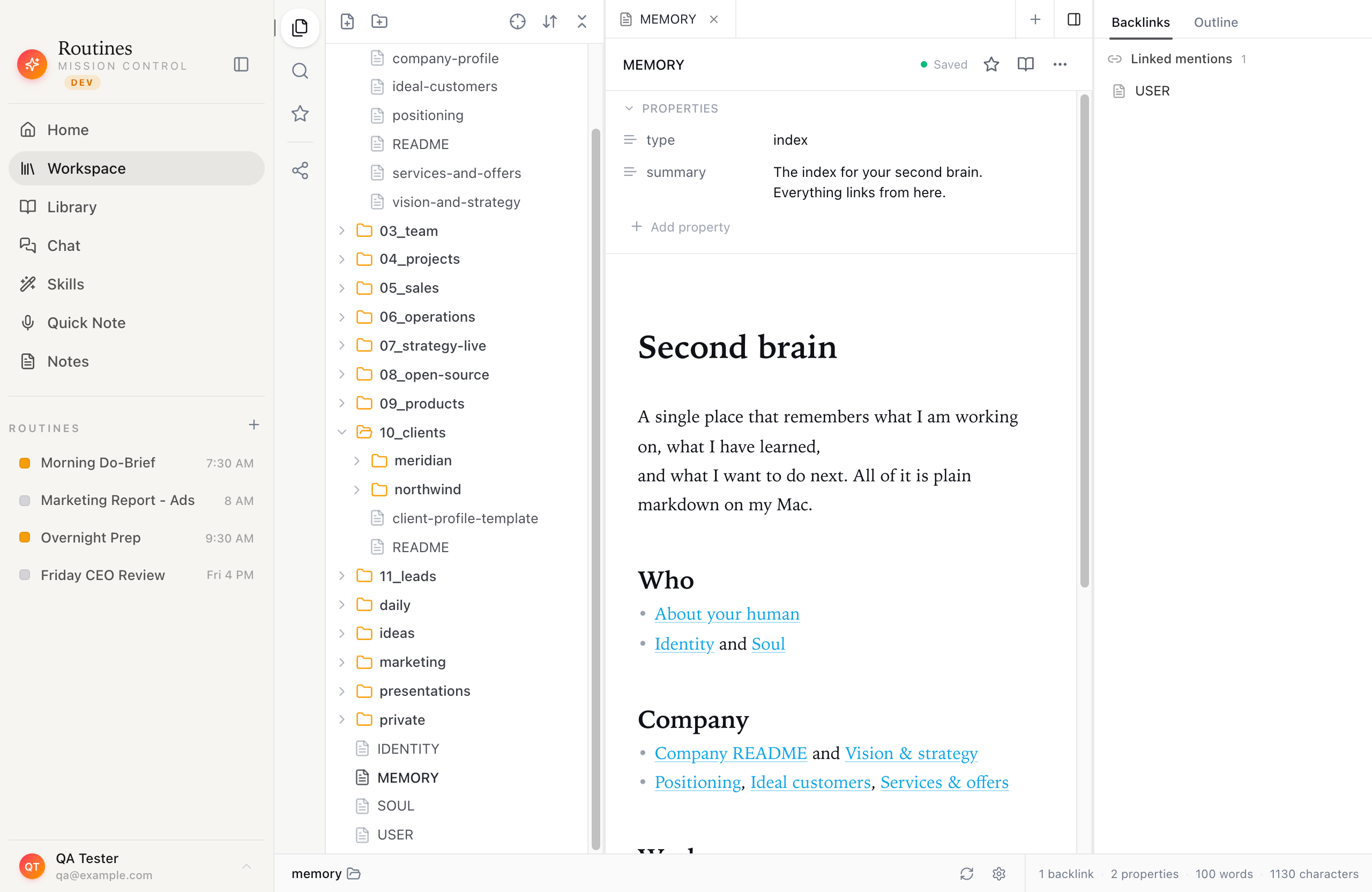 Where your notes actually live in Routines: an ordinary folder of markdown files on your Mac, browsable like an Obsidian vault.
With Routines, your notes are markdown files on your disk. They existed before Routines, and they will exist after. You can open them in Bear, Obsidian, Notion, or a text editor. You can feed them to any AI model. You can write a script to search them. Vendor lock-in is not possible by architecture.
That is not a privacy toggle in settings. It is the structure of where data lives: files on your disk.
How long a transcript sticks around is part of the same structure. Granola's Enterprise tier already lists org-wide auto-deletion (their pricing page, checked August 12, 2026). For the other tiers, their CEO Chris Pedregal told Platformer (published July 30, 2026, checked August 2026), "Right now we're looking into whether we should delete the transcript automatically after a certain amount of time for all users." On those tiers nothing has shipped yet. On your Mac the files were always yours to keep or delete. Cloud Sync and Backup is off by default; turn it on and your vault, your meeting transcripts and your notes are copied to your Routines account so your devices share them.
Which Granola alternative should you pick?
- You want Granola's quality but your notes must live on your Mac: Routines.
- You want the best free option and cloud storage is fine: Fathom.
- You want team collaboration and live captions: Otter.ai.
- You run a sales team where bot-in-call is normal and CRM sync matters: Fireflies.
- Note quality is the only thing that matters and you trust the cloud: stay with Granola.
Keep the notes on your Mac
Routines is a native macOS app with a 7-day free trial. Sign in with Google, grant Calendar access, and your next meeting is recorded automatically. No credit card for the trial, and your notes land as markdown on your Mac from the first session.
If you want to see the meeting notes feature before downloading, the Morning Briefing recipe shows how Routines combines meeting output with your daily brief in one scheduled routine.
Frequently asked questions
Is Granola shutting down?
No. As of June 2026, Granola is an active, funded product. This article is about alternatives for people who want different tradeoffs, not a replacement for a product in trouble.
Can Granola export notes to Obsidian?
Granola supports markdown export, but it is a manual step per meeting. Routines writes every meeting note directly to your local vault automatically, with no export step.
Which AI meeting note taker works without a bot?
Fathom, Granola, and Routines all record locally on your Mac without sending a bot to the meeting. Fireflies uses a bot. Otter.ai can record locally via their app but also offers a bot mode.
Do any Granola alternatives work offline?
Not for the transcript. Routines captures meeting audio on your Mac with ScreenCaptureKit, but meeting transcription streams that audio to Deepgram, so it needs a connection, and the AI summary step needs a model connection as well (Claude, GPT-4o, or an OpenRouter model).
What is the best free Granola alternative?
Fathom's free tier is the strongest: no meeting limit, good accuracy, no bot. If you want local storage on the free tier, Routines offers a 7-day trial with full features before any payment.
Where do Routines meeting notes live?
As markdown files on your Mac, in a folder you choose. They are readable in any text editor and compatible with Obsidian, Bear, and any other markdown tool. Cloud Sync and Backup is off by default; turn it on and copies are stored in your Routines account so your devices share them.
Related reading
- AI Meeting Notes That Stay on Your Mac: how Routines handles recording, transcription, and summaries
- Morning Briefing Recipe: combine meeting notes with your daily brief in one scheduled routine
- Download Routines: 7-day free trial, no credit card