
☀️ Productivity recipe
Morning Briefing AI Routine for Mac
Start your day with one brief: today's calendar with context, the emails that need a reply, and the commitments you still owe.
The exact prompt
Paste this into a new routine.
Every morning at 7:30, write my brief for the day from my calendar, my inbox, my meeting notes and my to-dos, under three headings in this order. Today: each meeting on my calendar today with its time and who is in it, plus one line of prep from the notes of my last meeting with those people; flag anything that needs something from me before it starts. Inbox: emails from real people since yesterday evening that are waiting on me, split into reply now and can wait, with the sender and the ask in one line each; skip newsletters, receipts and notifications. Still open: what I said I would do in this week's meetings (read the notes, keep only the items on me) and my to-dos due today or overdue, each with who it is for. Under 200 words: a short heading for each part, one bullet per item, no bold and no tables. If a part is empty, say so in one line.
Set the schedule. Keep the default 7:30 AM daily, or change it in plain English like "every weekday at 7am". cron: 30 7 * * *
Set it up
Step 02Connect Calendar and Gmail
One-click OAuth connects Google Calendar and Gmail, so the brief can read today's events and the mail waiting on you. Tokens stay on your Mac.
Step 03Pick the Morning Briefing recipe
Open the recipe library and choose Morning Briefing, or paste the example prompt into a new routine.
A real run
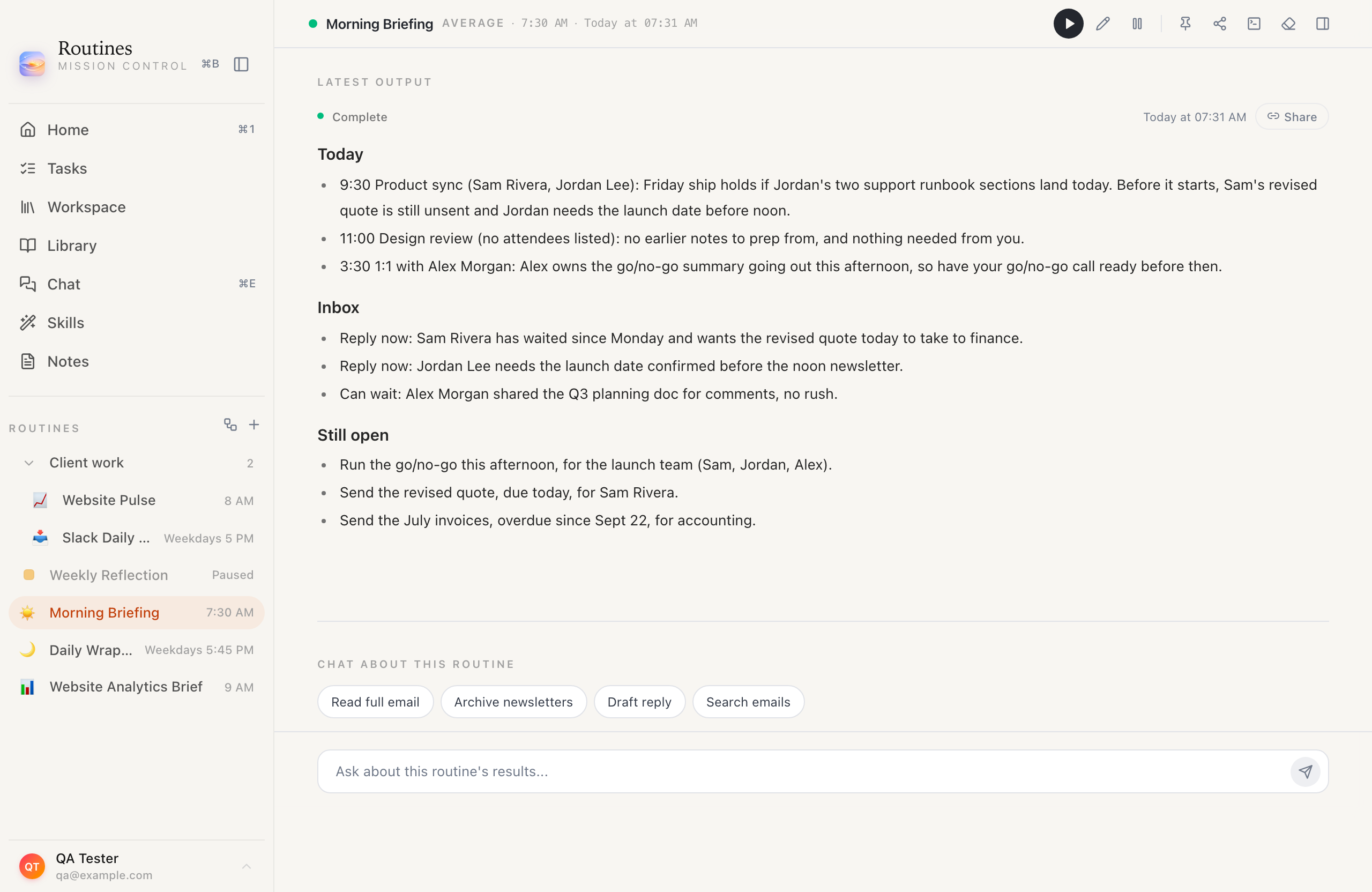
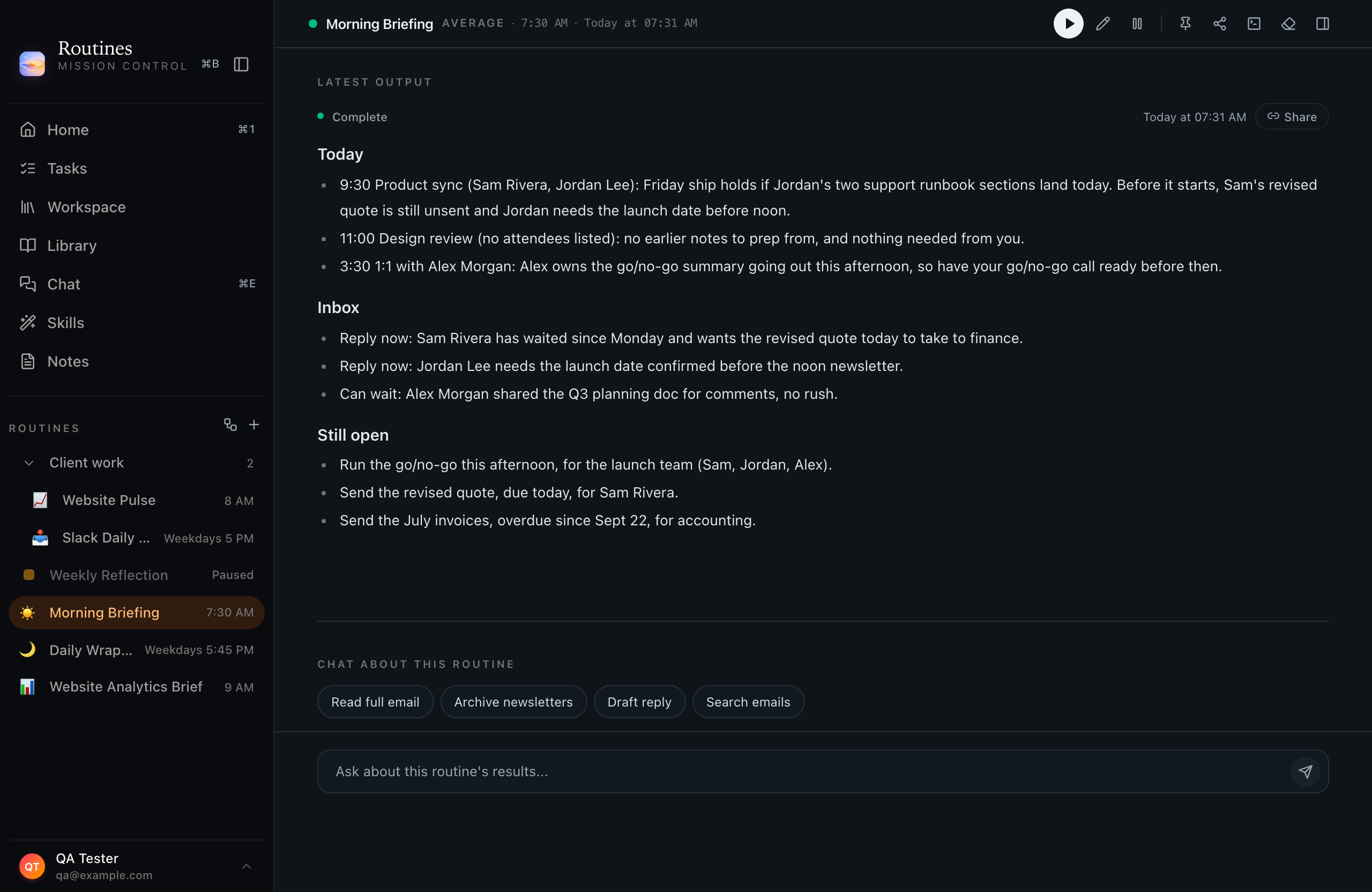
One run, unedited.
What it read
- Calendar
- Inbox
- Meeting notes
- To-dos
The unedited output of this exact prompt, run with the app's routine instructions and tools over demo data. Names are demo names.
Morning Briefing
Today at 07:31
Done
Today
9:30 Product sync (Sam Rivera, Jordan Lee): Friday ship holds if Jordan's two support runbook sections land today. Before it starts, Sam's revised quote is still unsent and Jordan needs the launch date before noon.
11:00 Design review (no attendees listed): no earlier notes to prep from, and nothing needed from you.
3:30 1:1 with Alex Morgan: Alex owns the go/no-go summary going out this afternoon, so have your go/no-go call ready before then.
Inbox
Reply now: Sam Rivera has waited since Monday and wants the revised quote today to take to finance.
Reply now: Jordan Lee needs the launch date confirmed before the noon newsletter.
Can wait: Alex Morgan shared the Q3 planning doc for comments, no rush.
Still open
Run the go/no-go this afternoon, for the launch team (Sam, Jordan, Alex).
Send the revised quote, due today, for Sam Rivera.
Send the July invoices, overdue since Sept 22, for accounting.
- Who it's for
- Busy professionals who want to walk into the day already knowing what matters, without opening five apps first.
- What lands in your morning
- A single written brief waiting for you at 7:30 AM: today's calendar with a prep note on each meeting, your email split into reply now and can wait, and the commitments you made that are still open.
FAQ
Questions about this recipe.
What does the Morning Briefing need connected?
Google Calendar and Gmail, both one-click OAuth. The calendar gives it today's events, Gmail gives it the mail waiting on you, and the open commitments come out of those same threads. Point the routine at your meeting notes and memory too and it will pull commitments from there as well.
What if my Mac is asleep at 7:30 AM?
Routines catches up on wake. When your Mac comes back, it runs the missed briefing retroactively and flags that it ran late, so you never miss it.
Where is the briefing stored?
Every run is saved to a local output record on your Mac, rendered as a card in your history, and it stays there unless you turn on Cloud Sync or share it by link.
Can I change what the briefing covers?
Yes. Edit the prompt anytime to drop one of the three parts, add another, or change the tone. Changes apply on the next run.
Does the Morning Briefing run automatically when I install Routines?
No. Routines does not send a morning brief until you add the Morning Briefing recipe, or build your own routine, and set its schedule. Once added, it runs on its own at the time you choose, 7:30 AM by default.
What is in a Routines morning briefing?
Today's calendar with a prep note on each meeting, your email split into reply now and can wait, and the commitments you made that are still open.
More Productivity recipes
Keep exploring
Calendar Prep
A weekday brief on today's meetings, each with who you're meeting, the likely agenda, and a few talking points, so you're ready before the first call.
Daily Standup Prep
A weekday standup update drafted in the classic format: what you did yesterday, what you are doing today, and what is blocking you, pulled from your Jira and calendar.
Daily Overview
A dashboard waiting each morning: yesterday's time by app, what you were working on reconstructed from window and tab titles, what you have touched so far today, and last night's sleep against the night before.
Email Digest
A ranked digest of overnight unread mail, the must-reply messages at the top, the newsletters and noise summarized at the bottom, ready when you sit down.
Weekly Report
A Friday-afternoon summary of the week: what you accomplished, what moved, and what's carrying into next week, drafted from your notes and meetings.
Slack Digest
An end-of-day catch-up on the channels that matter: the decisions, the questions aimed at you, and the threads worth opening, in one summary.
Run Morning Briefing on your Mac.
Install Routines, paste the prompt, set the schedule. It runs locally and the output stays on your machine.
Step 01 · Install Routines. Download the notarized DMG, drag Routines to Applications, and sign in with Google once.