
You saw a demo. An AI agent that reads your email, books your calendar slot, and drops a summary into Slack, all on its own. You went to set it up. Twenty minutes later you were reading a README about credentials.json, Python virtual environments, and a Docker command that failed on the first run.
That is why people go looking for OpenClaw alternatives. It is a genuinely impressive agent framework with a genuinely steep on-ramp. If you write code for a living and enjoy a good YAML file, it is exactly the right tool. If you run a company and your tolerance for terminal debugging is roughly zero, the demo-to-done gap is real.
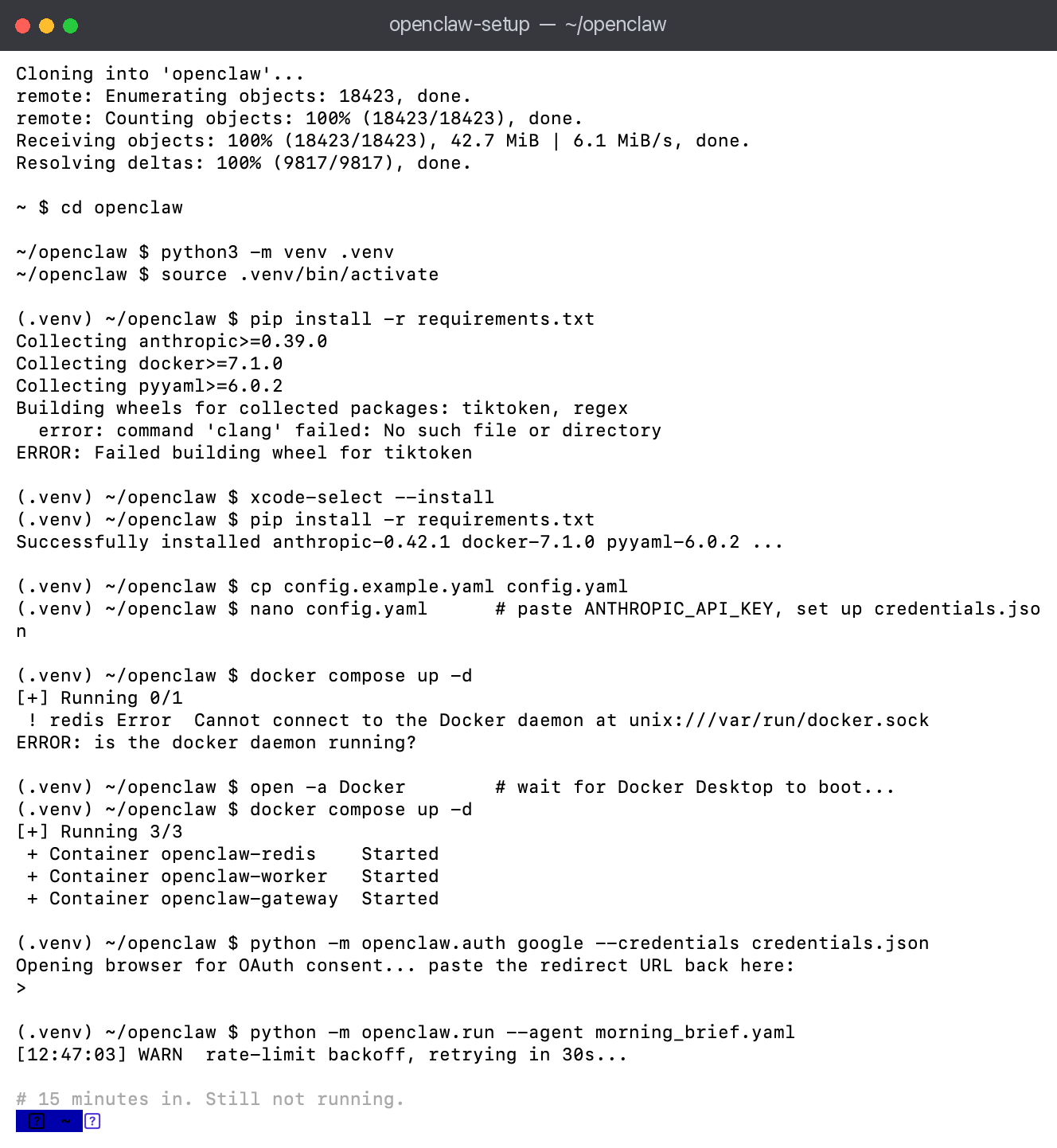 The OpenClaw "before": clone the repo, build a Python environment, fix a compiler error, edit config files, boot Docker, paste an OAuth URL. Fifteen minutes in and the agent still has not run.
This post lists five OpenClaw alternatives, then explains in plain terms where each one fits and what it is genuinely worse at. Routines is on the list because we build it, and because it is designed to close that gap specifically for Mac users who want agent power without the setup tax. If you have not actually tried the framework yet and want the neutral version first, start with what OpenClaw is and what setup really involves.
What people actually want from OpenClaw alternatives
The unmet need is not "a worse OpenClaw." It is "the same outcome through a different door."
Most people searching here want one or more of these three things:
- Scheduled AI tasks that run without babysitting. A morning briefing, an email digest, a weekly report.
- A way to connect the AI to their real accounts: Gmail, Calendar, Slack, Jira.
- A product that costs five minutes to install, not five hours.
OpenClaw does all three, brilliantly, if you are comfortable in a terminal. There is also a fourth thing people want and rarely say out loud: they want it running all the time, which is why so many builds end up on a spare box. We covered that route separately in running OpenClaw on a Mac mini, including the process supervisor and credential gotchas that eat most of the evening.
The alternatives below trade some raw flexibility for dramatically lower setup friction.
The five best OpenClaw alternatives in 2026
1. Routines (getroutines.ai) - best for Mac users who want a native app
Who it is for: founders, operators, and anyone on a Mac who wants scheduled AI routines with no code.
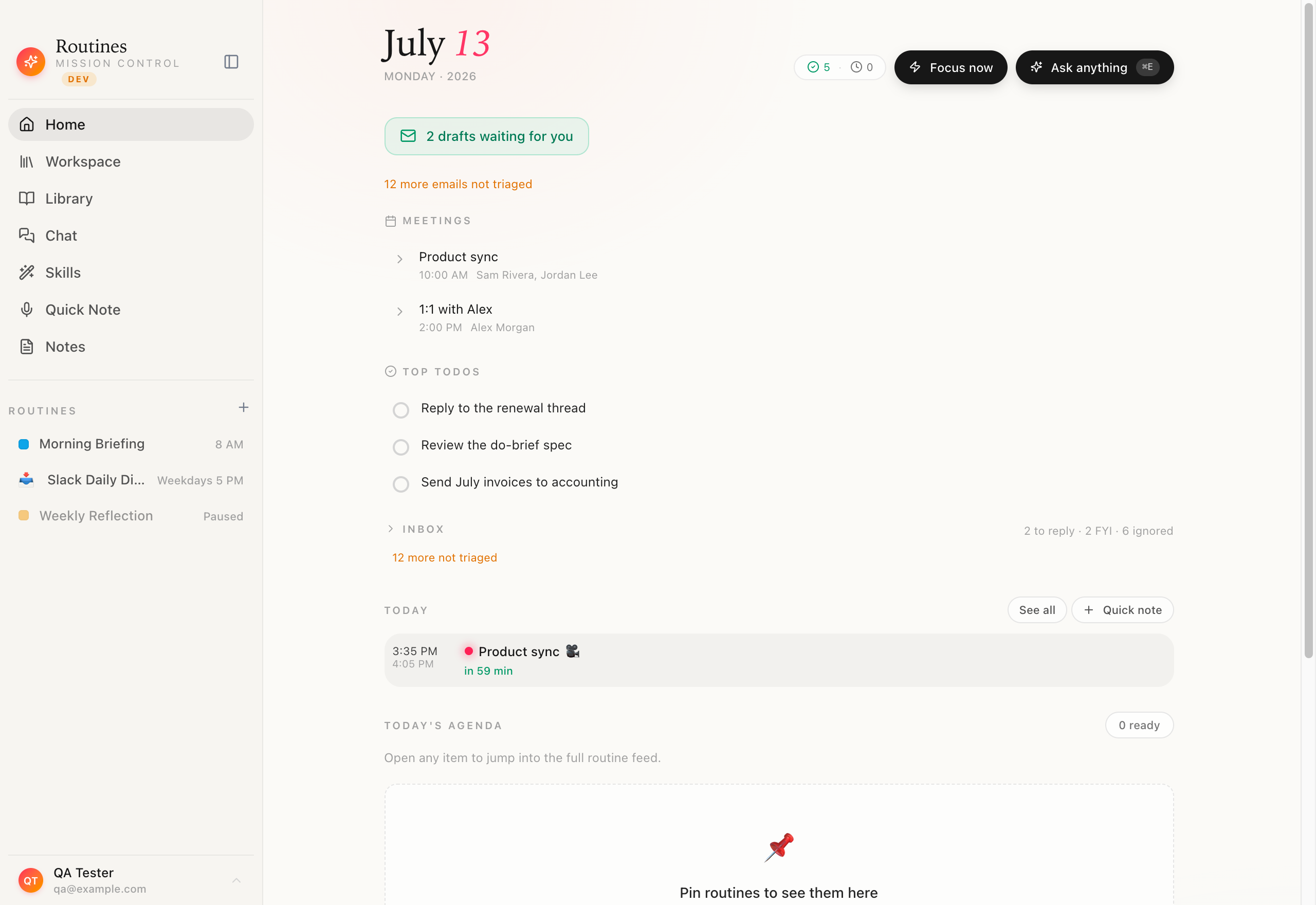 The "after": a clean native macOS app. Your scheduled routines live in the sidebar and run on their own, no terminal, no Docker, no config files.
Routines is a native macOS app. You download a DMG, drag it to Applications, sign in with Google, and connect Gmail and Calendar with one tap each. The whole process takes about 60 seconds. From that point you can build a routine in plain English: "Every weekday at 8 AM, read my unread emails and my calendar for today, then give me a briefing as a markdown file." The scheduler runs it, and the output lands in your Routines workspace, stored locally as markdown on your Mac.
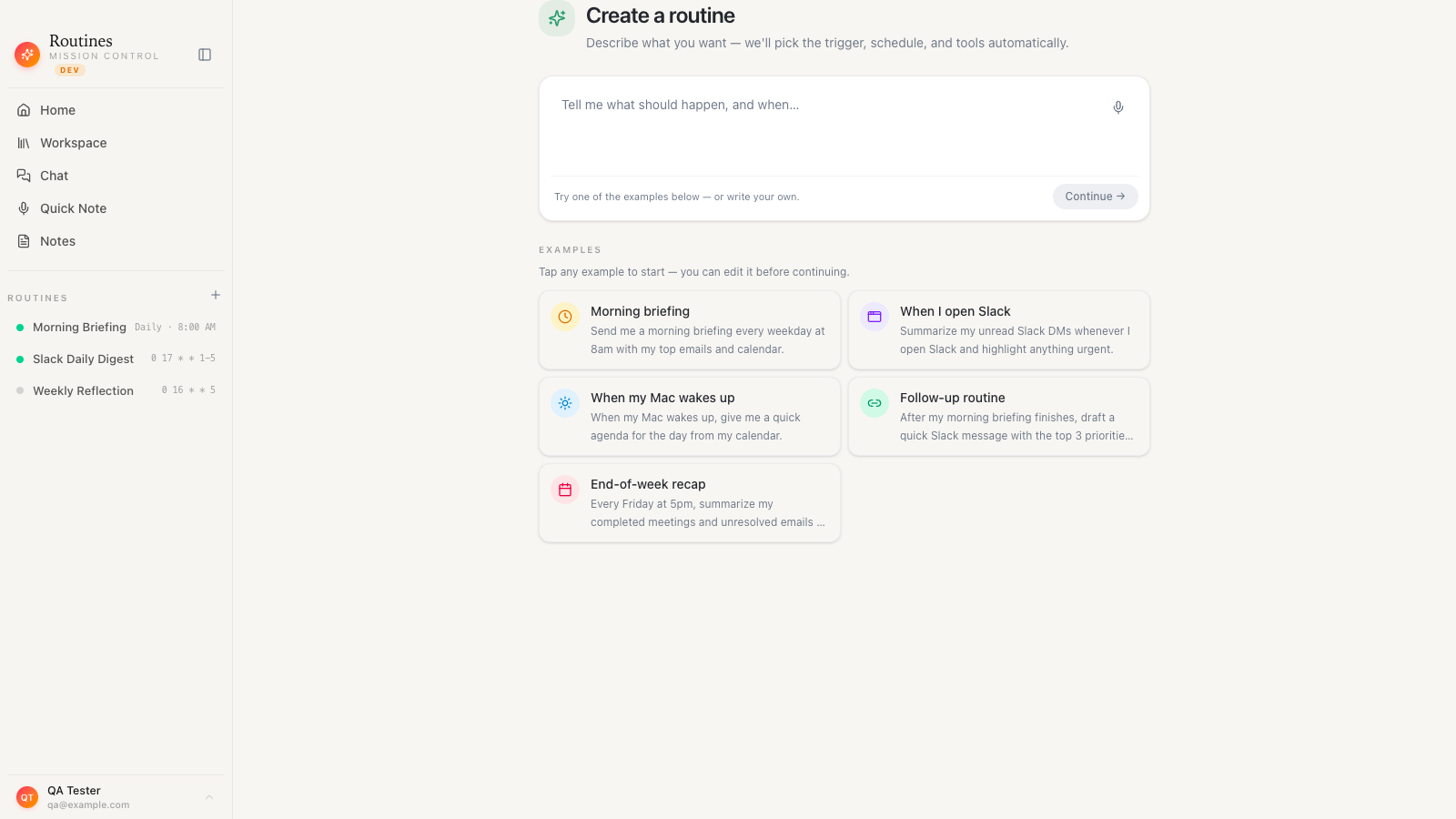 Build a routine by describing it in plain English. No YAML, no agent loop to wire up by hand.
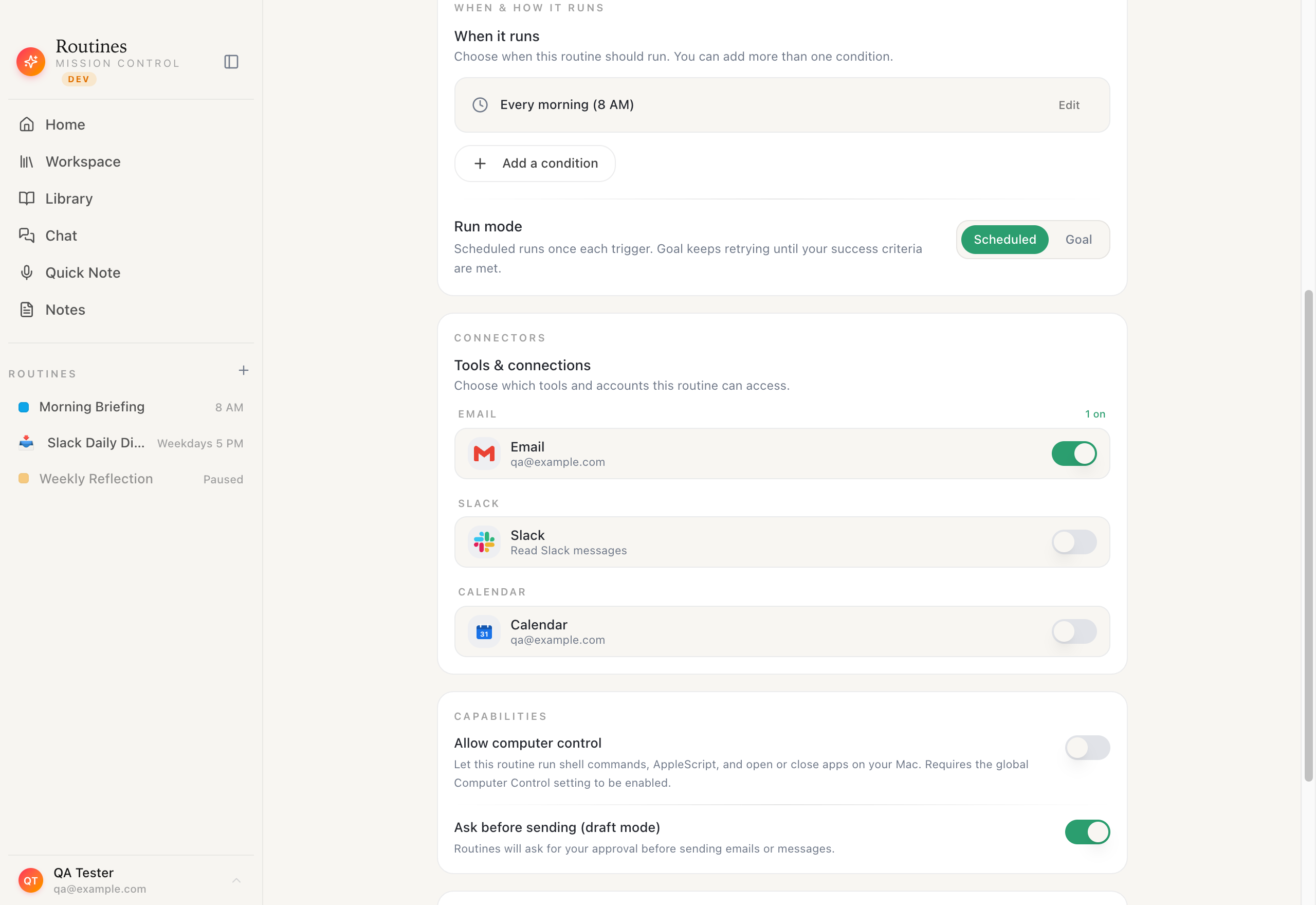 Set when it runs: a recurring trigger like every weekday at 8 AM, or any schedule you describe. No cron syntax, no terminal.
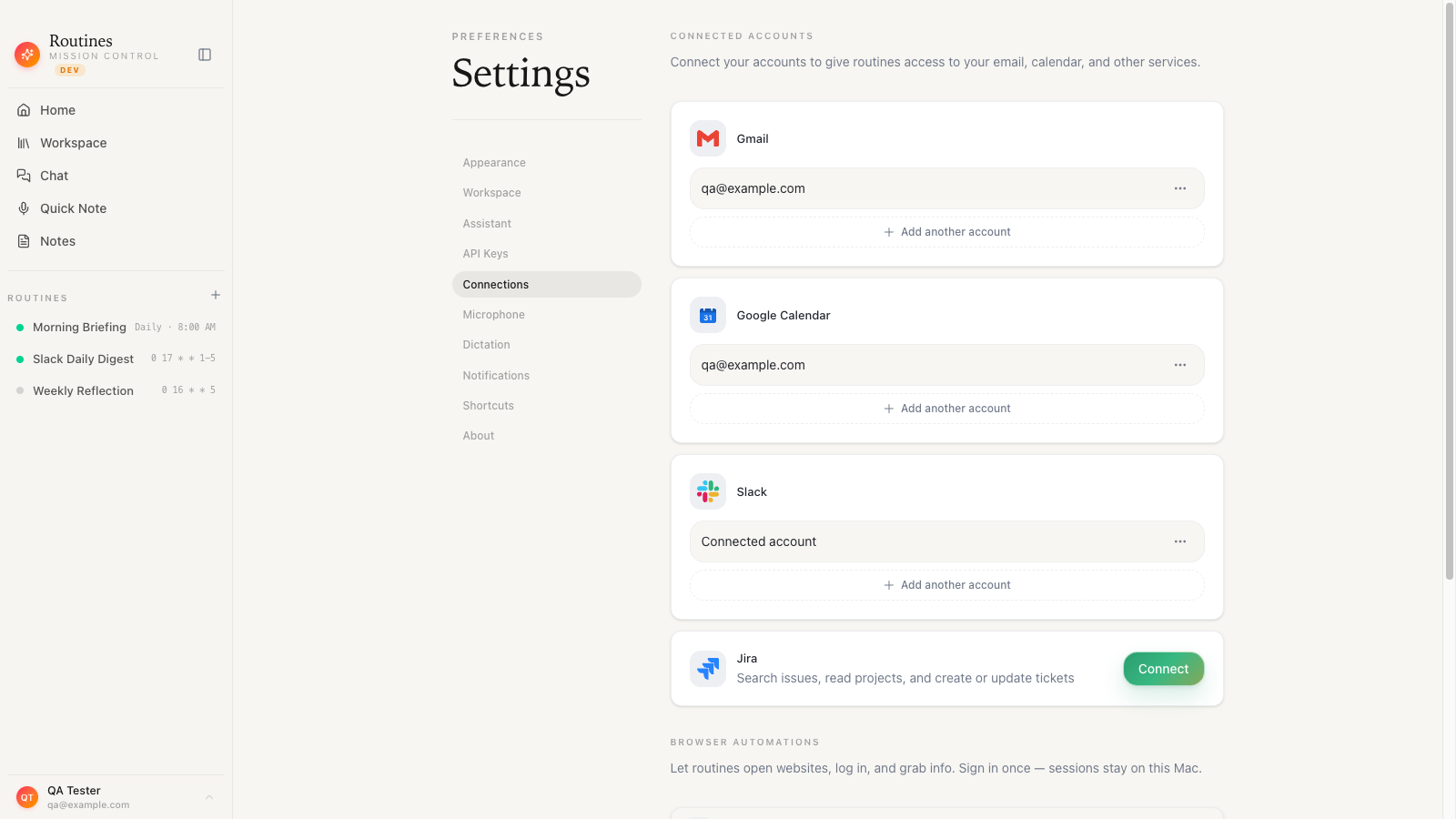 Connect Gmail, Calendar, and Slack with one-click OAuth. No credentials.json to hand-edit, no API keys to paste into a config file.
What it does well compared to OpenClaw:
- No terminal, no Python, no Docker. One notarized DMG.
- Your notes, memory, and routine outputs stay on your Mac as markdown files and a local SQLite database, and they only reach our servers if you switch on Cloud Sync yourself or share one by link.
- Model-agnostic: AI included with your account, or bring your Claude key, your OpenAI key, or any OpenRouter model. Swap models without rebuilding anything.
- Scheduled AI routines cover the jobs most OpenClaw users build agents for: morning briefings, email digests, Slack summaries, meeting notes auto-filed after every call.
- Meeting recording and transcription built in: meeting audio streams to Deepgram for transcription, on the key we manage if you are on Pro or in the free trial, and on your own Deepgram key on the Free plan, with the notes written to your local vault.
- Native Mac features including global-hotkey dictation and clipboard history.
If you want the install and first routine walked through step by step, we wrote that up as how to run an AI agent on a Mac without the terminal.
Where OpenClaw still wins: raw, unbounded agent loops; custom tool definitions; multi-agent orchestration; anything that requires code-level extension. If you need to write a custom tool that calls a proprietary internal API, OpenClaw is the better choice. Routines does not do code-level customization.
Pricing: 7-day free trial via Google sign-in. When the trial ends you drop to the Free plan unless you subscribe.
Try it: Download Routines for macOS (free 7-day trial)
2. n8n (self-hosted) - best for developers who want visual workflow automation
n8n is a visual workflow builder that can trigger on schedules, connect to hundreds of services, and call LLMs at each step. You self-host it on a server or run the cloud version. Setup is more involved than Routines but far less than raw OpenClaw. The visual node editor means you can build without writing code for most flows, though debugging complex chains still requires patience.
Good fit if you want to wire together more than a dozen services and are comfortable running a Docker container. Not a fit if you want a native Mac experience or local storage.
3. Zapier with ChatGPT actions - best for no-code users already on Zapier
If you already use Zapier, adding a ChatGPT or Claude step to an existing Zap gives you a lightweight version of what OpenClaw offers for simple tasks: summarize this email, classify this support ticket, draft this reply. Setup is genuinely fast.
The ceiling is low. You cannot build multi-step reasoning loops, long-running context windows, or anything that requires the AI to read your local files. Everything lives in Zapier's cloud. If privacy is a concern, this is not the right tool.
4. Make (formerly Integromat) - best for complex multi-step automations without code
Make sits between Zapier and n8n in complexity. The visual builder is more powerful than Zapier's, the pricing is more generous, and the learning curve is moderate. You can call any AI API at a step and chain the results through subsequent modules.
Like Zapier, all data flows through Make's cloud infrastructure. No local storage option.
5. Microsoft Copilot Studio - best for enterprise teams already in the Microsoft 365 ecosystem
If your team lives in Teams, Outlook, and SharePoint, Copilot Studio lets you build AI agents that act on that data. The integration depth with Microsoft products is unmatched. The setup is still substantial, and the product is clearly aimed at enterprise IT teams rather than individual operators. Pricing reflects that.
Worth evaluating if the org is Microsoft-first. Not worth it if you are a founder running a small team on Google Workspace and a Mac.
The OpenClaw alternatives, side by side
| Routines | n8n (self-hosted) | Zapier + AI | OpenClaw | |
|---|---|---|---|---|
| Setup time | 60 seconds | 30-120 minutes | 5-10 minutes | 15-60 minutes |
| Terminal required | No | Docker CLI | No | Yes |
| Data location | Local Mac | Your server | Zapier cloud | Your server |
| Native Mac app | Yes | No | No | No |
| Scheduled routines | Yes | Yes | Yes | Yes |
| Meeting notes | Yes | No (custom) | No | No |
| Dictation | Yes | No | No | No |
| Model flexibility | Any (BYOK) | Any (BYOK) | Limited | Any (BYOK) |
| Custom code/tools | No | Yes | No | Yes |
| Free trial | 7-day + Free plan | Free (self-host) | Free tier | Free (open source) |
How Routines handles the jobs people build OpenClaw agents for
The three most common OpenClaw use-cases in developer forums are also the three most requested jobs in the Routines community. Here is how Routines does each one without touching a terminal.
Morning briefing
Set a routine: "Every weekday at 7:30 AM, read my Gmail inbox (unread, last 12 hours), my Google Calendar (today's events), and give me a 200-word briefing with the three things I need to do today."
Connect Gmail and Calendar with one-click OAuth. Done. The routine runs on schedule and the briefing appears in your Routines workspace as a markdown file. See the Morning Briefing recipe.
Email digest
"Every day at 6 PM, scan my inbox for emails from people not in my contacts, summarize each one in one sentence, and flag any that need a reply today."
Two minutes to set up. Runs daily. Output stays on your Mac.
Meeting notes
Routines records your meetings from your microphone and your Mac's system audio, and keeps the recording on your Mac. Transcription with speaker separation runs through Deepgram: meeting audio streams to it on the key we manage if you are on Pro or in the free trial, and on your own Deepgram key on the Free plan. The AI-drafted summary plus action items land as a markdown file in your vault.
The question worth asking before you choose
OpenClaw is genuinely excellent at what it does. If you are a developer and you want to build custom agent loops with tool-calling, it is the right answer and you should use it. This post is not a case against OpenClaw.
The question is whether the thing you actually need is "a powerful agent framework" or "a scheduled AI assistant that handles my daily work." Those are related but different jobs.
If you want to automate your morning brief, keep meeting notes locally, and stop re-explaining your business context to every AI session, Routines does all of that in 60 seconds. If you want to build a custom multi-agent pipeline that calls your internal APIs, OpenClaw or n8n are better choices.
Most people who go looking for an OpenClaw alternative turn out to want the first thing.
Frequently asked questions
What are the best OpenClaw alternatives?
For Mac users who want scheduled AI agents without a terminal, Routines is the closest fit. n8n suits developers who want a visual workflow builder they self-host. Zapier with AI steps is fastest for simple one-shot tasks. Make handles complex multi-step automations without code. Microsoft Copilot Studio fits teams already standardized on Microsoft 365.
Is there an OpenClaw alternative that doesn't require a terminal?
Yes. Routines is a native macOS app with a 60-second DMG install. You sign in with Google, connect your accounts with one-click OAuth, and build scheduled AI routines in plain English. No terminal, no YAML, no Docker.
Can I use my own Claude or OpenAI API key with these alternatives?
Routines ships with AI included in your account, and it also supports BYOK for Claude, OpenAI, and any OpenRouter model. Bring a key and Routines stores it in the macOS Keychain; run on it and Routines calls the API directly from your Mac. n8n and Make also support custom API credentials. Zapier's AI steps use OpenAI's API but abstract the key behind Zapier's system.
Does Routines store my data in the cloud?
Your notes, memory, routine outputs, and any API key you add live on your Mac as markdown files, a SQLite database, and the macOS Keychain, and they stay there unless you switch on Cloud Sync yourself or share one by link. Some things do leave your Mac. Meeting audio streams to Deepgram for transcription, on the key we manage if you are on Pro or in the free trial, and on your own Deepgram key on the Free plan. The model call takes one of two shapes: with the AI included in your account it passes through our server to Anthropic and we store neither the prompt nor the answer, and with your own key it goes straight from your Mac to your provider. If you stop using it, you keep everything: the notes are plain markdown you can open in Obsidian or any text editor, with no export step.
Can I run OpenClaw on a Mac without terminal knowledge?
OpenClaw requires Python, API key configuration in config files, and in most cases Docker or a virtual environment. It is not designed for non-developers. If you want agent automation on a Mac without those requirements, Routines is the closest equivalent.
Is Routines free to try?
Yes. Pro comes with a 7-day free trial, and there is a Free plan you drop to if you do not subscribe. Sign in with Google at getroutines.ai/download.
Start in 60 seconds
If the demo you saw for OpenClaw described something you want, and the setup wall is the only thing stopping you, Routines is worth 60 seconds of your time.
Download the DMG, sign in with Google, connect Gmail and Calendar, and run your first morning briefing routine. If it is not what you need, everything uninstalls cleanly and your trial does not cost you anything.
Download Routines for macOS, free 7-day trial