
A mid-size software team put more than a hundred Jira stories on the board in a week. AI wrote all of them. Nobody read them.
The stories looked right. Correct length, correct headings, an acceptance criteria section on every one. Then QA opened the first ticket and could not write a test from it. Grooming turned into a room of people reading a screen in silence. The tickets were not wrong, exactly. They were unfalsifiable, which is worse, because wrong gets caught.
A better prompt was not the missing piece. A reader was. Something that opens the draft, holds it against a standard somebody wrote down, and hands it back with the reason when it does not clear the bar.
That shape has three parts, and all three are now in Routines: a check that sits on the connection between two steps, a retry that carries the reviewer's critique back into the prompt, and a trace where you can read every attempt the agent made before it got there.
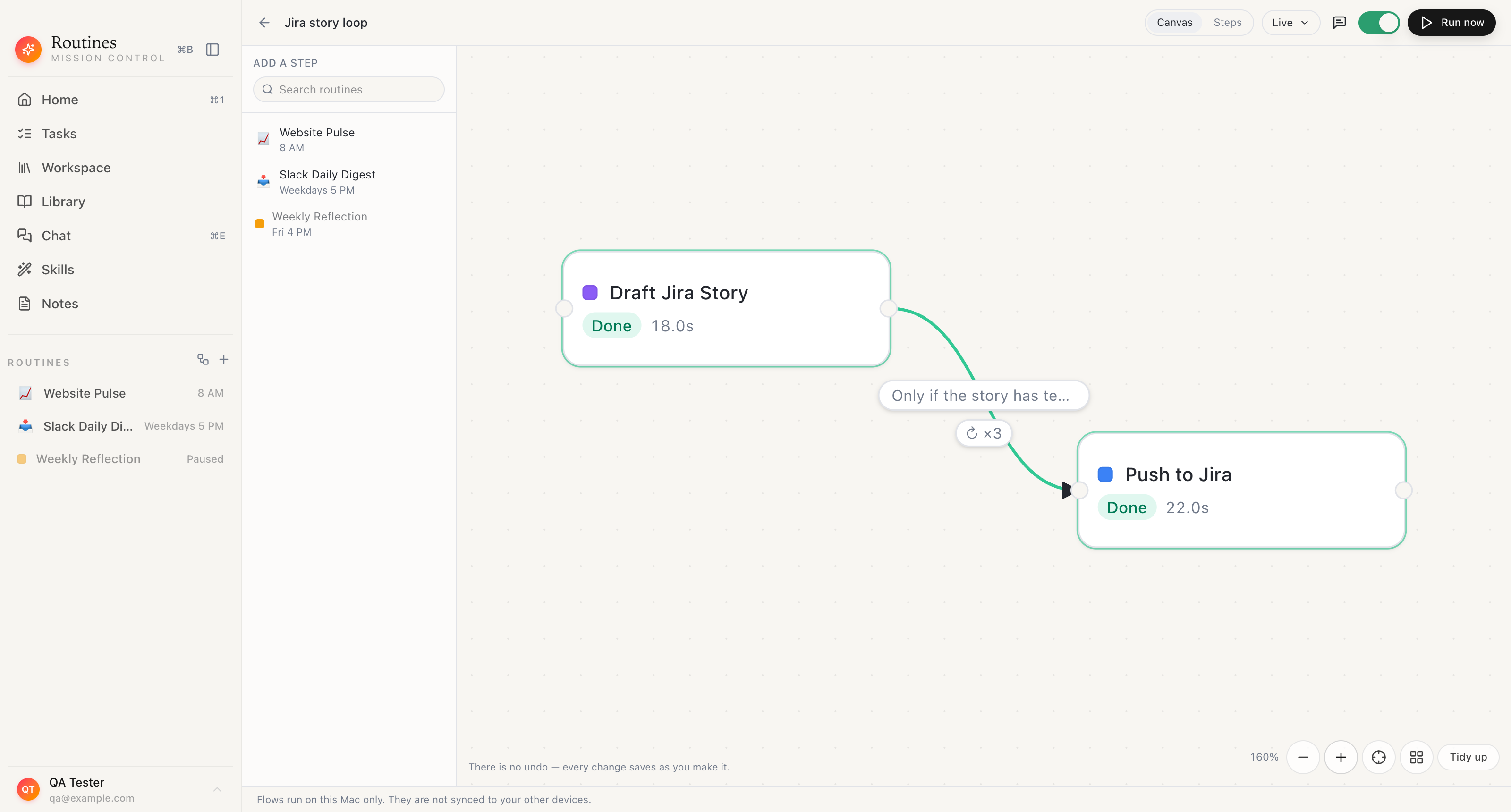 Two steps and one connection. The pill on the connection is the standard the draft has to clear, and the badge under it is how many retries the writer gets.
The check lives on the connection, not in the prompt
On the Flows canvas, any connection between two steps can carry a check written in plain language. The app frames it as "Only continue when...", and the flow above uses this rubric:
Only if the story has testable acceptance criteria, names its dependencies and bounds its scope
Three things worth noticing about where that sentence sits.
It is graded by a separate model call, not by the call that wrote the draft, and that call returns its own verdict and its own written critique. That separation is the whole point. A model asked to write a story and then grade the story it just wrote is not an independent reader. A second call, judging the finished draft against a standard somebody committed to in advance, is closer to one.
It reads the draft, not a summary of the draft. The editor states the limit in the same breath: "The check reads the first ~12,000 characters of the previous step's result. When it can't tell, the setting below decides."
And it gates the connection. A pass flows downstream to the next step. A fail does not. The Jira step never sees a story the rubric turned down.
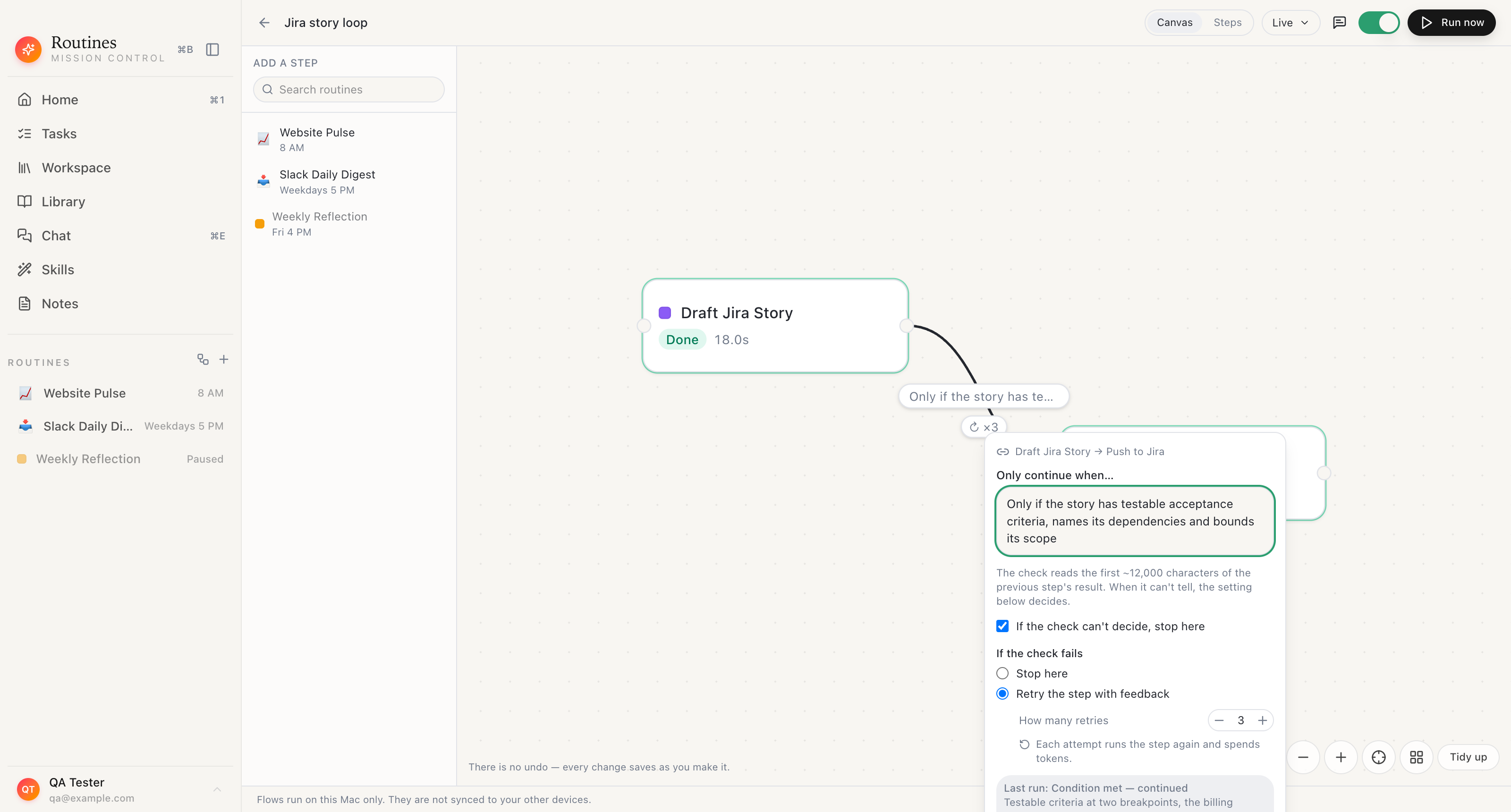 Everything about the loop is on one popover: the standard, what happens on a fail, what happens on an unclear verdict, and how many retries the step gets.
What a retry actually sends back
"Retry with feedback" would be a weak promise if the feedback were vague. It is not vague, and you can read it.
When the check fails cleanly and the connection is set to "Retry the step with feedback", the writer step runs again with the reviewer's critique inserted into its prompt under a fixed heading, ### Reviewer feedback from the previous attempt, followed by an instruction to address the feedback and redo the task, then the check text and the critique itself.
Here is what that looked like on attempt two of the run above, quoted from the prompt snapshot the trace saved:
Your previous attempt did not pass the automated check. Address this feedback, then redo the task:
- Check: Only if the story has testable acceptance criteria, names its dependencies and bounds its scope Feedback: The acceptance criteria are not testable: "works well on mobile" cannot be checked. Name the breakpoints and the expected behaviour at each.
That is a code review comment. It names the failing line, says why it fails, and says what would fix it. Attempt two came back better and still did not pass, because it had not named the dependency on the billing API migration and its scope still covered two screens. Attempt three named both and cleared the bar.
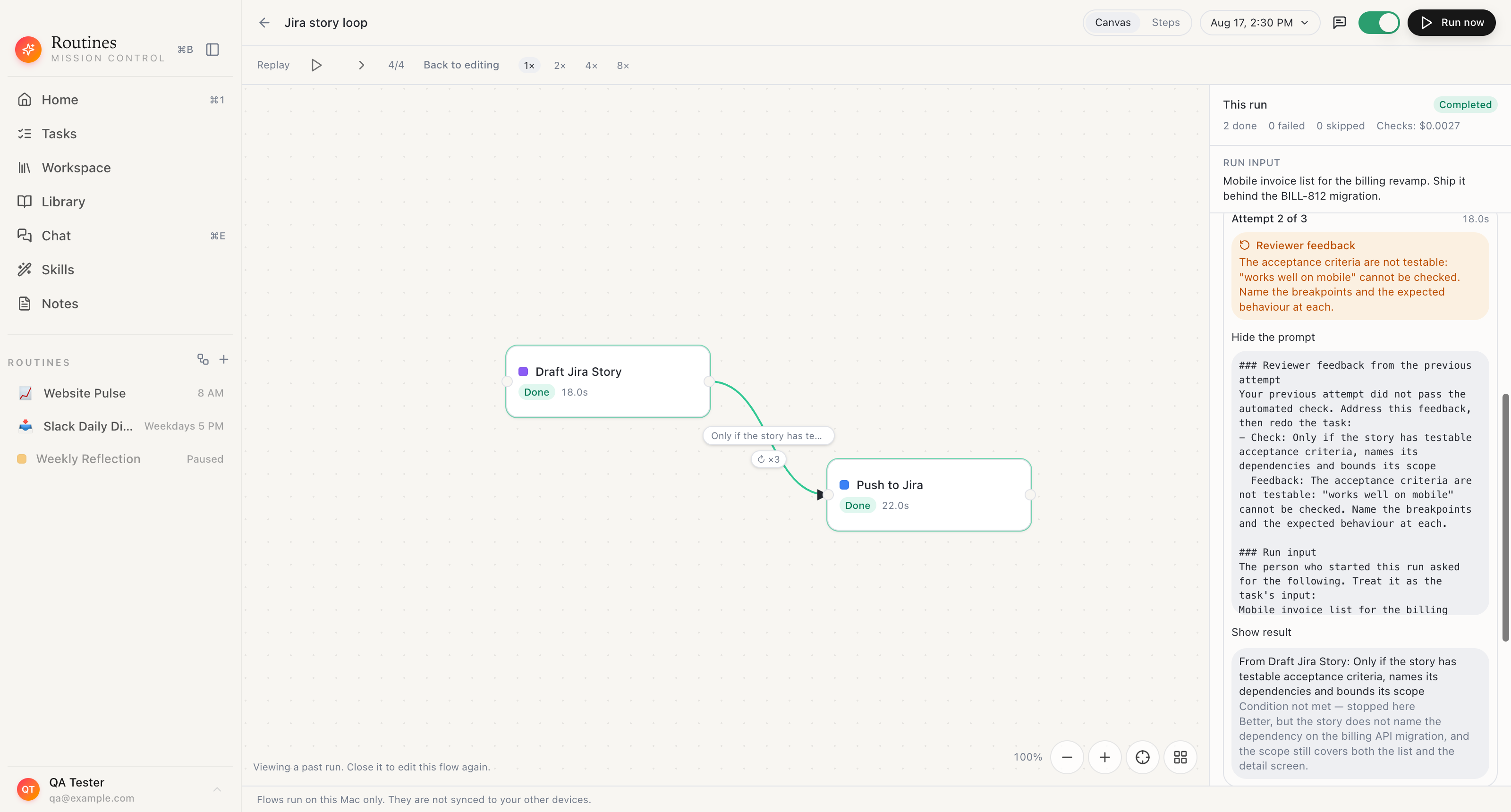 The prompt attempt two received, kept with the run: the reviewer's critique under one heading, the run's own request under the next. Not a description of what the retry did, the prompt itself.
Being able to read that prompt is the difference between an agent you supervise and an agent you hope about. When a loop produces something odd, the question is always which attempt went sideways and what it was told. The trace answers it without guessing.
The budget, and what happens when it runs out
Each connection carries its own retry budget, set on the "How many retries" stepper, and the app accepts one to five. Every retry is a full re-run of the step, which the editor says plainly right under the stepper: each attempt runs the step again and spends tokens.
When the budget is gone, the branch stops, and it stops in a specific way worth recognising in the trace. The writer step itself still finishes. What stops is the connection: the next step is marked "Condition not met" and carries the reason with the attempt count in front of it, in the form "Stopped after 4 attempts:" followed by the critique that rejected the last draft. That count is attempts, not retries, so a three retry budget reads as four. Nothing moves downstream, and the run summary counts that step as skipped rather than failed. That is the behaviour you want from a gate. A loop that gave up and passed the last draft through anyway would be worse than no check at all, because you would have a green run and a bad ticket.
One case deliberately does not retry. If the check comes back unclear, unparseable or errored, the separate setting on the same popover decides, the checkbox reading "If the check can't decide, stop here". Only a clean fail spends a retry. An ambiguous verdict that looped would drain the whole budget without ever telling you anything.
One writer, a different request every run
A checked flow is still a fixed flow. If the writer step's instruction has to be edited before every ticket, you have moved the work rather than removed it.
So the ask travels with the run. Each flow has an "Ask for input when I run this" toggle and a "What to ask for" hint, off unless you turn it on. With it on, pressing Run opens a dialog titled "Input for this run", where you type the request for that run and press Run.
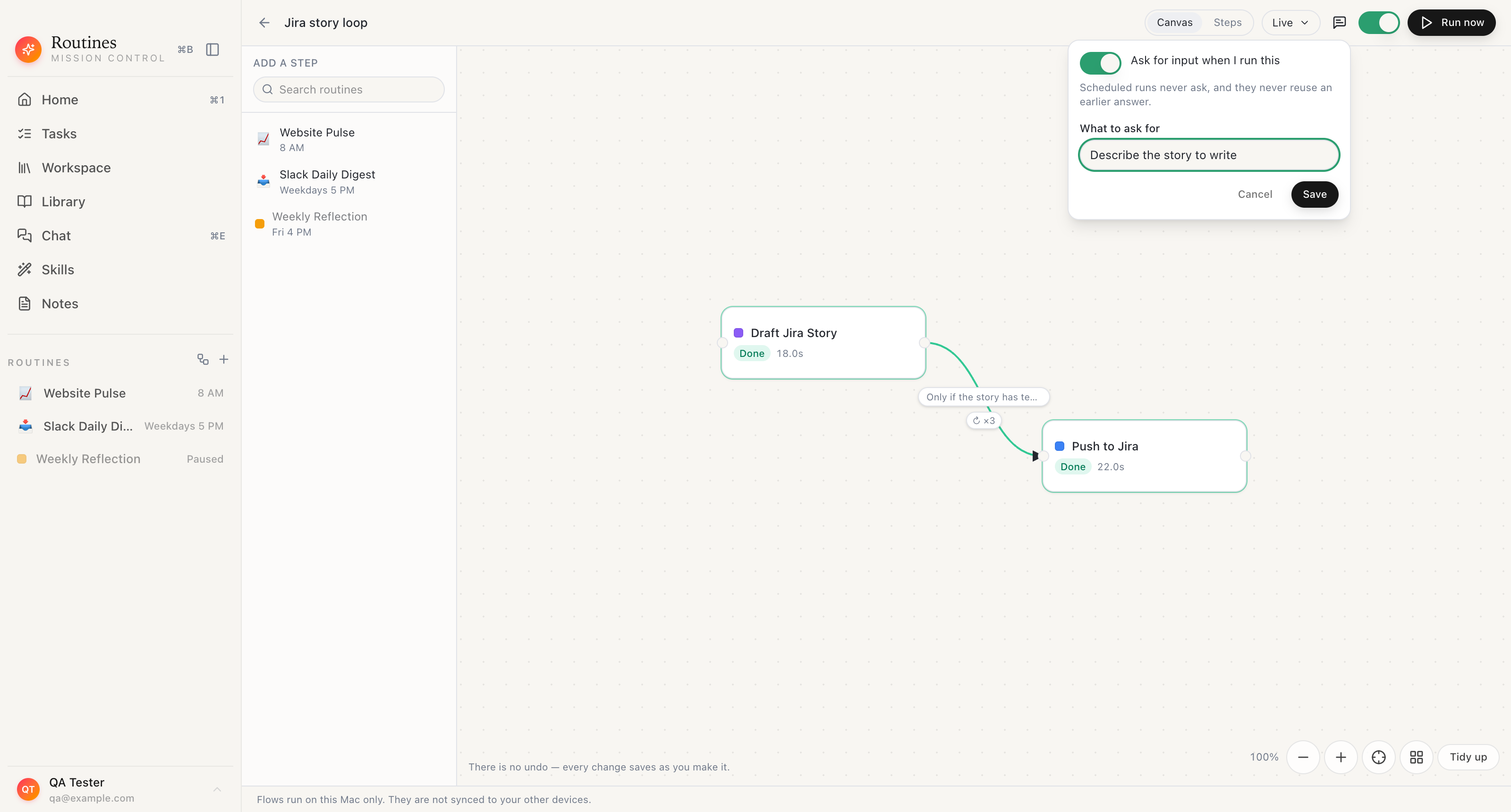 Turning the ask on, and writing the prompt the dialog will show you.
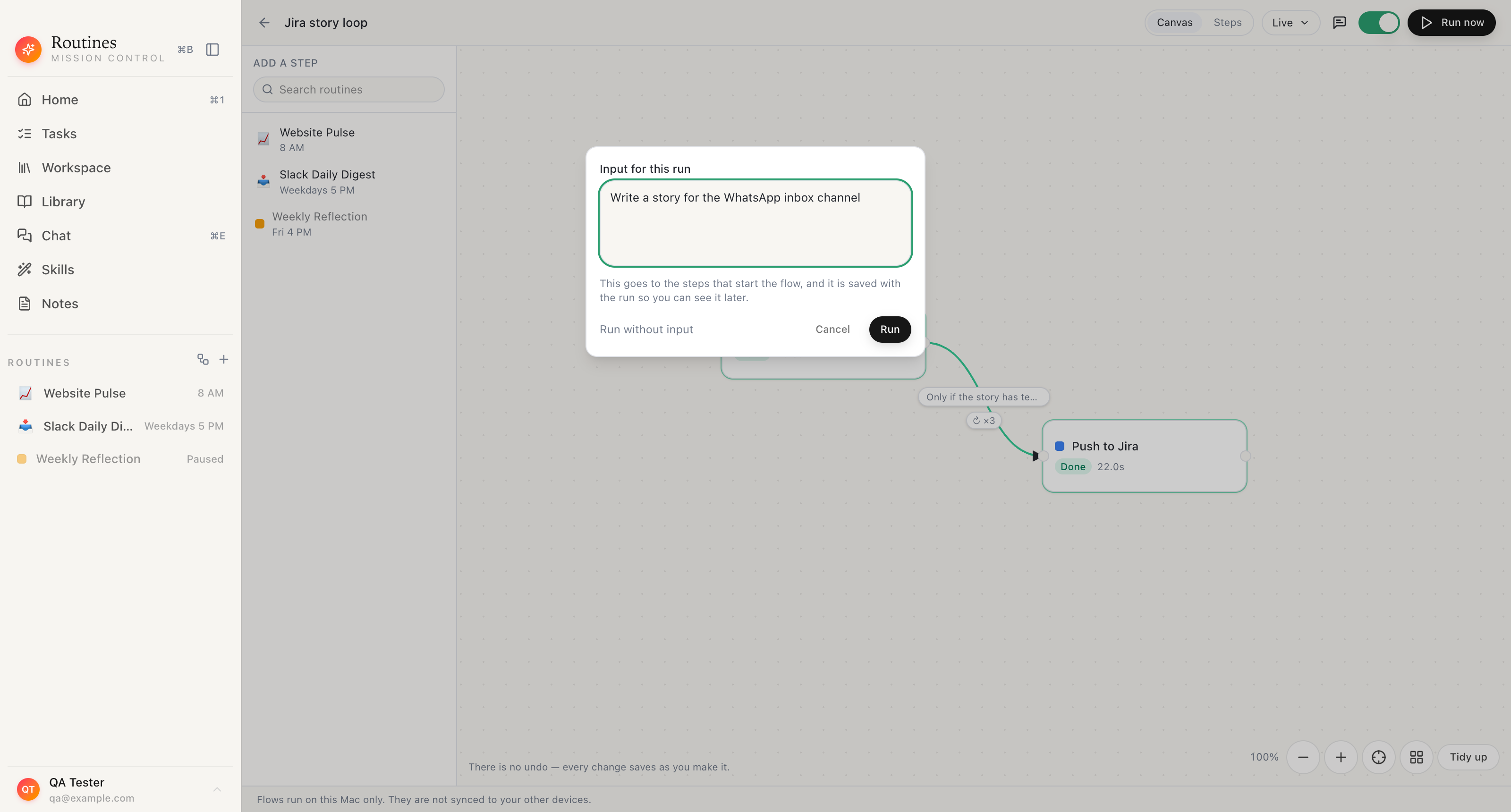 One generic writer flow, a different request each time. Nobody edits the flow to write a different ticket.
The app explains where the text goes: "This goes to the steps that start the flow, and it is saved with the run so you can see it later." It is delivered to the steps with no incoming connection, rendered as labelled markdown above their own instruction, and stored on the run itself, so a run you look at three weeks later still shows what it was asked for.
Scheduled runs are deliberately outside this. In the app's words: "Scheduled runs never ask, and they never reuse an earlier answer." A schedule that popped a dialog at 8am and waited would be a broken schedule, and one that silently reused last Tuesday's request would be worse.
The two features compose. When a checked step retries, the app builds the retry prompt out of both parts: the reviewer's critique under its own heading, then the run's request under its own heading, then the step's base instruction. The prompt snapshot pictured earlier shows the first two of those in exactly that order, the critique's heading and then the run input's. Attempt three is still writing about the thing you asked for on attempt one.
Every attempt is on the record
The run trace is where a founder actually gets value out of this, because it turns "the AI wrote it" into something reviewable after the fact.
Open a finished run and the trace shows the run's own header, the request it was given, and each step with its status. A step that looped carries an attempts chip, and the panel groups the work per attempt: "Attempt 1 of 3", "Attempt 2 of 3", each with the composed prompt behind a "Show the prompt" toggle, the result behind "Show result", and the verdict and critique the check returned.
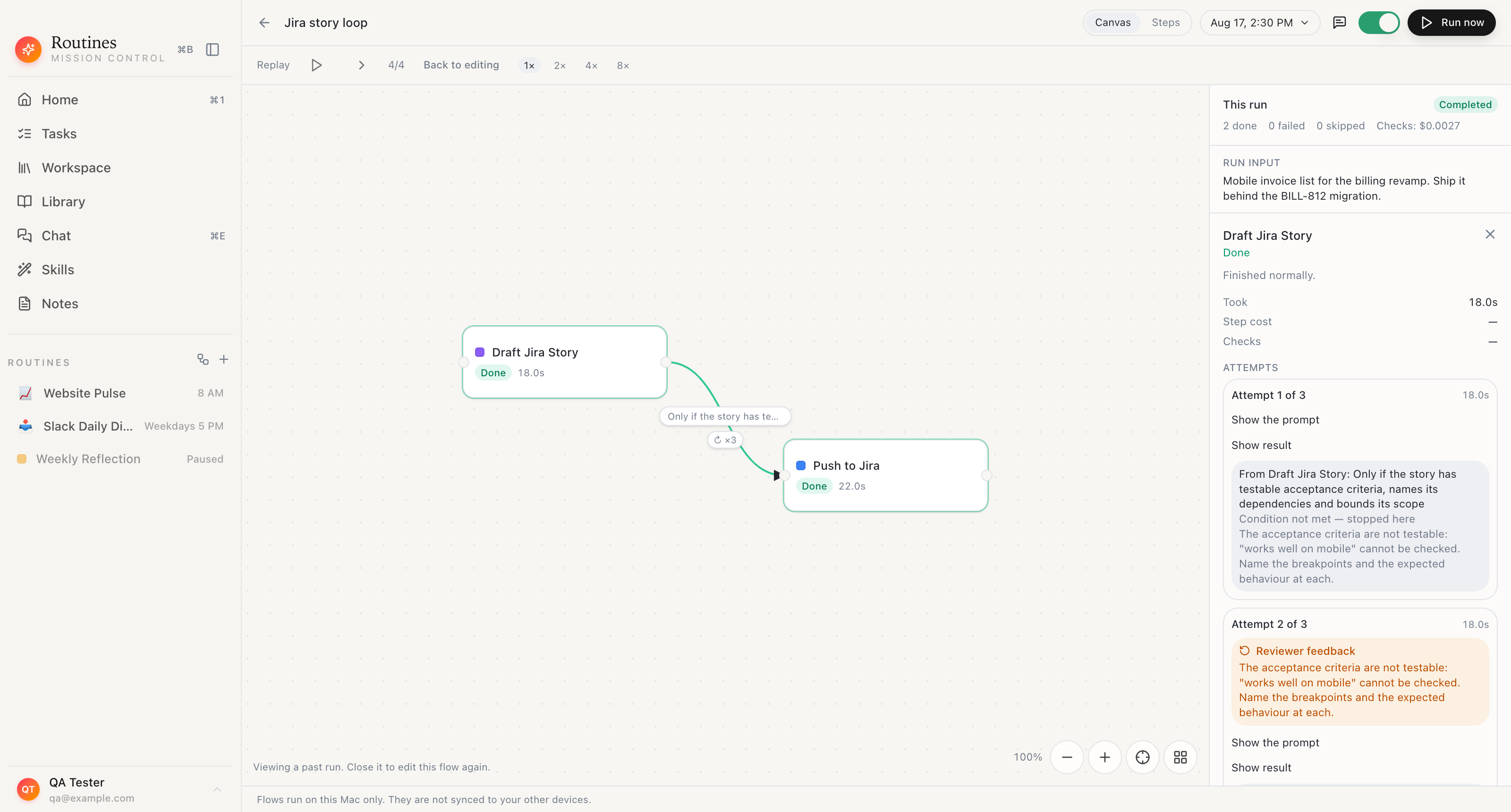 A different run from the dialog above, kept whole: the request it was given, both failed attempts, and the critique that produced each rewrite.
The last step tells you the other half of the story. The Jira step records that it worked from the result of the writer step, shows the condition it had to clear on the way in along with the verdict that let it through, and then the result it produced.
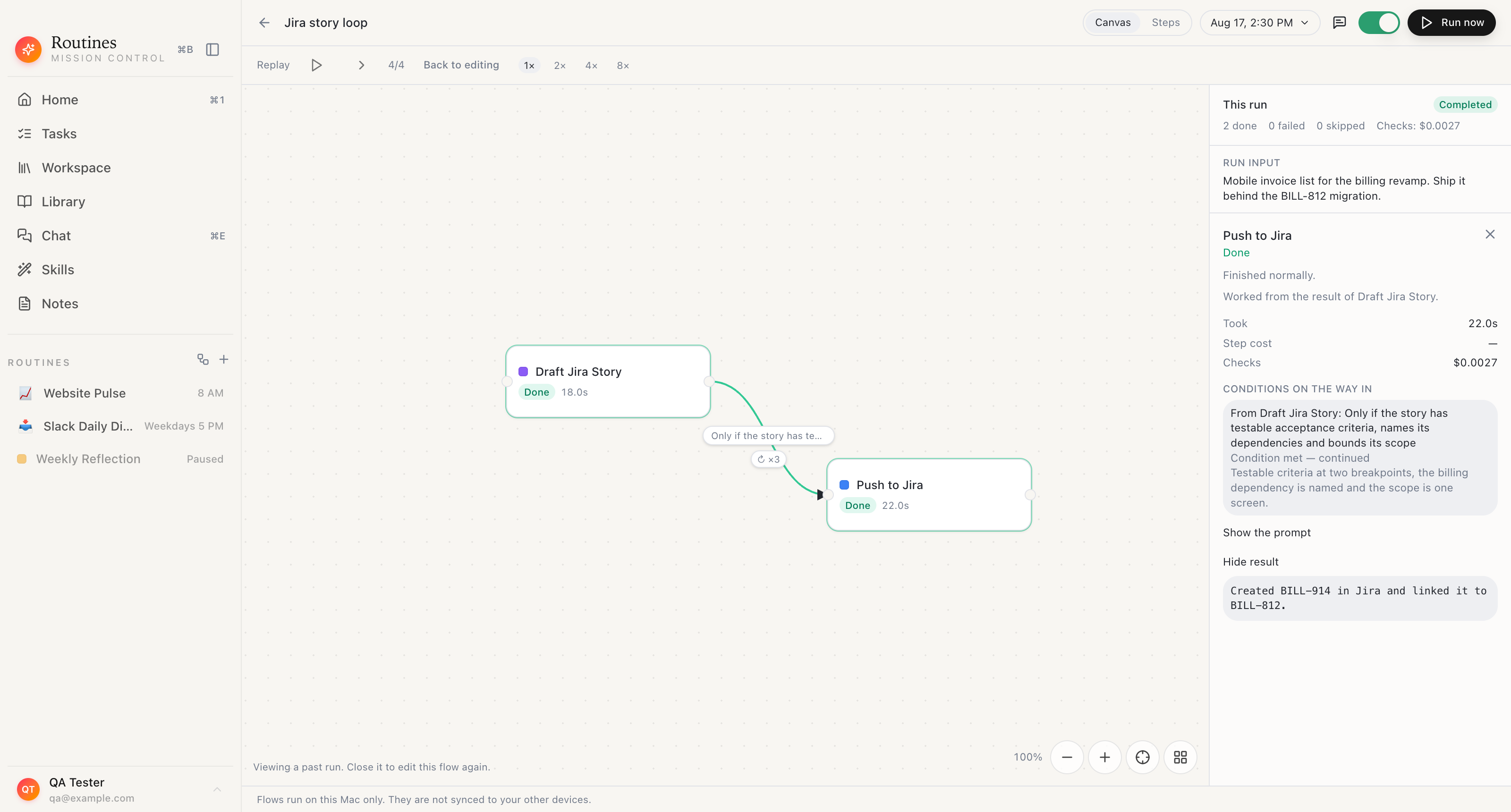 The ticket that was created, and the verdict that earned it the right to be created. Routines ships a Jira connector, so the last step is a real ticket rather than a draft in a text file.
A ticket in the board with a run behind it is a different object from a ticket somebody generated and pasted. If a story turns out to be junk two weeks later, the rubric that passed it is on the record, which means the rubric can be fixed. That is the loop that actually compounds.
What it costs, and where it runs
Checking is not free and the app does not pretend otherwise. Every attempt is a model call and so is every check. The trace prices the checking on its own line, on the run and on each step, and in the two step run above, with three attempts on the writer, that line reads $0.0027.
Who pays for those tokens is a setting with two modes, listed in the app under "Where your AI comes from". On "My own AI" the drafts and the checks go straight from your Mac to the service you connected, and Routines charges you nothing for them. That connection can be a ChatGPT or Claude plan you signed into, Claude Code, or an Anthropic or OpenRouter API key. On "Routines AI", the default for an account with no key of its own, they travel through Routines servers instead, and every attempt and every check is paid from your Routines balance.
Where the pieces live is worth being precise about. The flow itself is not synced anywhere, in the app's own words in the canvas footer: "Flows run on this Mac only. They are not synced to your other devices." The graph, the schedule and the run rows stay on that machine. Plenty still travels, and this flow is a good illustration of it. Each writer attempt and each check is a request to the provider you connected, so drafts and critiques reach that provider the same way any prompt you type does, and the last step exists precisely to send the finished story to Atlassian. Cloud Sync and Backup is off by default; turn it on and every routine output, including each attempt's draft, is copied to your Routines account so your devices share them.
If you have already built ticket automation in an orchestration tool, how Routines compares to n8n covers where a node graph in a browser is the better answer and where a Mac app that already holds your accounts is.
Setting one up
The smallest useful version is two steps and one connection.
- Add the routine that writes the story as the first step, and the routine that pushes to Jira as the second. The Jira connector handles the second one. Switch on "Allow writes (create & update issues)" in the connector's settings, because a freshly connected Jira is read-only until you do.
- Click the connection between them and write the standard under "Only continue when...". Write it the way you would brief a picky reviewer. The rubric in this article is one sentence with three demands, and one sentence is enough to start.
- Set the fail behaviour to "Retry the step with feedback" and the retry count to two or three. Leave "If the check can't decide, stop here" ticked.
- Turn on "Ask for input when I run this" and write the hint your future self will read, something like "Describe the story to write".
- Run it once and open the trace. Read attempt one and the critique it earned. If the critique is wrong, the rubric is wrong, and that is a one line fix.
If you want the reverse direction as well, reading out of Jira rather than writing into it, the daily Jira summary recipe is a ready made routine that reports what moved yesterday.
Routines is a free download for macOS with a seven day trial, and refine loops shipped in v0.94.0.
FAQ
Can an AI agent check its own Jira tickets before they get created?
Yes, if the check is a separate step rather than a line in the same prompt. In Routines, any connection between two steps on the Flows canvas can carry a check written in plain language, framed in the app as "Only continue when...". The check is its own model call with its own verdict and its own written critique, and the result of the previous step only reaches the next step when the check passes. In the example flow shown in this article, the connection between "Draft Jira Story" and "Push to Jira" carries the rubric "Only if the story has testable acceptance criteria, names its dependencies and bounds its scope". A draft that fails it never reaches the Jira step.
What does the check actually read?
The result of the step it hangs off. The app states the limit in the check editor: "The check reads the first ~12,000 characters of the previous step's result. When it can't tell, the setting below decides." So the rubric is graded against the draft itself, not against a summary of it, and a very long result is judged on its opening rather than its end.
How many times will it retry a failed step?
You set that per connection with the "How many retries" stepper, and the app accepts one to five retries. When the check fails cleanly and the connection is set to "Retry the step with feedback", the source step runs again with the reviewer's critique added to its prompt. When the retries are used up, the branch stops, and not by marking the step that looped as failed. That step finishes, and the connection is what stops: the next step is marked "Condition not met" and carries the reason with the attempt count in front of it, such as "Stopped after 4 attempts", which is the first attempt plus a three retry budget. The unapproved result never reaches the next step, and the run summary counts that step as skipped rather than failed.
What happens if the check cannot decide?
It does not retry. A verdict the app cannot read as a clean pass or a clean fail is handled by a separate setting on the same editor, the checkbox "If the check can't decide, stop here". Only a clean fail spends a retry. That split matters for cost, because an ambiguous check that looped would burn the whole budget on nothing.
Can I give the same flow a different request each time I run it?
Yes. Each flow has an "Ask for input when I run this" toggle plus a "What to ask for" hint, off unless you turn it on. With it on, pressing Run opens an "Input for this run" dialog where you type the request for that run. The app describes where it goes: "This goes to the steps that start the flow, and it is saved with the run so you can see it later." One generic writer flow can serve every ticket request, because the request travels with the run instead of being edited into the flow. Scheduled runs are deliberately excluded, in the app's words: "Scheduled runs never ask, and they never reuse an earlier answer."
What does a checked flow cost to run?
More than an unchecked one, and the app says so where you set it up: each attempt runs the step again and spends tokens. Every attempt is a real model call and so is every check. The run trace prices the checking separately, shown as a Checks line on the run and on each step. In the two step run pictured in this article, with three attempts on the writer step, that line reads $0.0027. Who pays it depends on which of the two modes under "Where your AI comes from" you are on. On "My own AI" the attempts and the checks go straight from your Mac to the service you connected, a ChatGPT or Claude plan, Claude Code, or an Anthropic or OpenRouter API key, and Routines charges you nothing for them. On "Routines AI", the default for an account with no key of its own, they travel through Routines servers instead, and every attempt and every check is paid from your Routines balance.
Does the flow run on my Mac?
The flow does, and it is not synced. The app is explicit in the canvas footer: "Flows run on this Mac only. They are not synced to your other devices." The graph, the schedule and the run rows stay on that machine. Work still leaves it. Each writer step and each check is a request to the AI provider you connected, so the drafts and the critiques go to that provider like any other prompt you send it, and a step whose job is to deliver something, such as creating the Jira ticket at the end of this flow, reaches that service too. Cloud Sync and Backup is off by default; turn it on and every routine output, including each attempt's draft, is copied to your Routines account so your devices share them.