
Your notetaker used to slip into the call and start transcribing. Now, on any call that holds guests in a waiting room, it sits there under a warning icon, and if nobody opens the people panel in the first minutes, it never gets in and you end the call with no transcript.
Nothing broke on your vendor's side. Google changed how Meet sorts join requests, starting March 24, 2026, and the change reaches anything Meet decides a host should look at twice. Meeting bots are the obvious population that fits.
The precise shape matters here, because the short version going around is wrong. Google did not ban notetakers. It split the knock queue in two and changed which button is pre-selected.
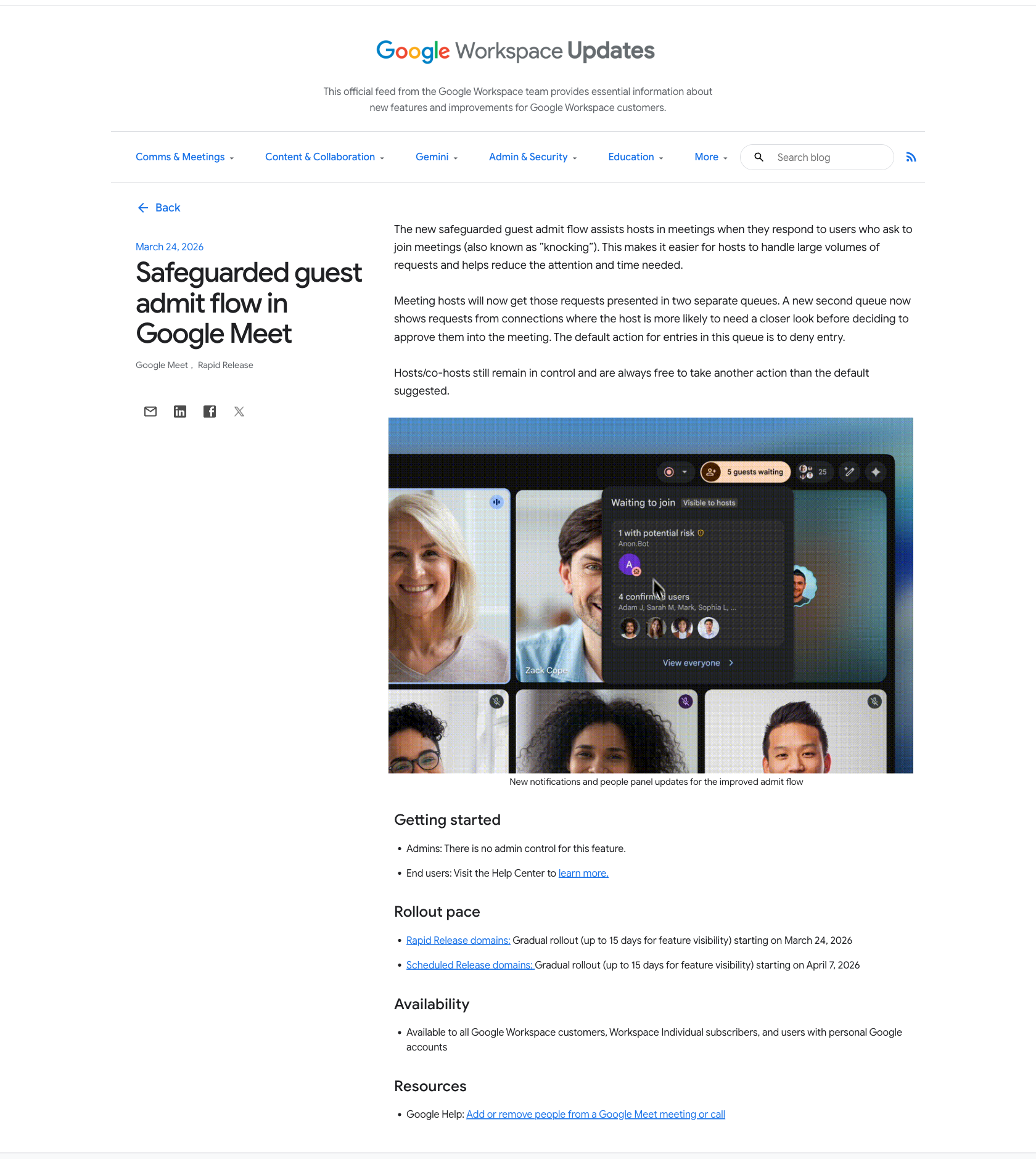 The primary source, captured August 17, 2026: Google's own announcement, its own screenshot, its own wording.
What Google actually changed
The announcement is one short post on the Google Workspace Updates blog, Safeguarded guest admit flow in Google Meet, and it is worth reading in Google's words rather than anyone's summary of them. The first paragraph frames it as a host-workload feature:
"The new safeguarded guest admit flow assists hosts in meetings when they respond to users who ask to join meetings (also known as 'knocking'). This makes it easier for hosts to handle large volumes of requests and helps reduce the attention and time needed."
The second paragraph is the one that stopped your notetaker:
"Meeting hosts will now get those requests presented in two separate queues. A new second queue now shows requests from connections where the host is more likely to need a closer look before deciding to approve them into the meeting. The default action for entries in this queue is to deny entry."
And the third puts the ceiling on it:
"Hosts/co-hosts still remain in control and are always free to take another action than the default suggested."
So: two queues instead of one, a suggested action of deny on the second queue, and a host who can still say yes. That is the whole mechanism.
Two more lines from the same post get skipped and both change how you should plan around this. Under Getting started, Google writes "Admins: There is no admin control for this feature." Your IT team cannot switch the second queue off for the domain. Under Availability: "Available to all Google Workspace customers, Workspace Individual subscribers, and users with personal Google accounts." This is not an enterprise-tier behavior you can price your way out of.
The dates come with a rollout pace, and the pace explains a lot of confused Slack threads from the spring. Rapid Release domains started March 24, 2026, with a "gradual rollout (up to 15 days for feature visibility)". Scheduled Release domains started April 7, 2026 on the same gradual pace. If your notetaker kept working for two more weeks while a colleague at another company lost theirs in late March, that gap is the release track, not a setting either of you changed.
One sourcing caveat, since this article is going to be quoted as evidence by someone: the body text of Google's post never uses the words bot, notetaker or third-party. Google describes "connections where the host is more likely to need a closer look" and leaves the population undefined. The link to notetakers comes from two places. The first is Google's own product screenshot embedded in that same post, where the flagged entry is an avatar named "Anon.Bot". The second is a notetaker vendor telling its own customers what happened: Metaview's help center calls it "a Google-wide change affecting all notetakers, not a Metaview issue".
What the host sees when your bot knocks
Google's screenshot in the announcement is the clearest available picture of the new panel, and it is the product UI rather than a mockup of the concept. A pill at the top of the call reads "5 guests waiting". Opening it shows a panel headed "Waiting to join", marked "Visible to hosts", split into two stacked sections. The upper one reads "1 with potential risk" with a warning icon, and under it a single avatar labeled "Anon.Bot". The lower one reads "4 confirmed users" and lists them by name: Adam J, Sarah M, Mark, Sophia L. Google's own caption under the image calls it "New notifications and people panel updates for the improved admit flow".
Your notetaker sits in there sorted, labeled and pre-set to be turned away, inside a panel somebody has to open. "Potential risk" is the literal string a host reads next to the tool you pay for, which is worth knowing before a client sees it in your meeting.
The Google Meet community has a thread titled "How to prevent custom Google Meet bot from being flagged as 'Potential Risk'?", which at minimum confirms the label is what end users encounter in the product. It is a user forum, so treat the thread as evidence that people are hitting this and nothing more.
What still works
Most of the flow survives. Most of what survives now needs a person paying attention, and one path avoids the new queue entirely.
Meetings nobody has to knock at never reach the second queue. Google scopes the feature to knocking. Its own first sentence says the flow "assists hosts in meetings when they respond to users who ask to join meetings (also known as 'knocking')". If a meeting lets guests in directly, there is no knock, no queue and no default to deny. Metaview spells out the setting for its own customers: with Meeting access type set to Open, "anyone can join directly. There is no waiting room, and the Metaview Notetaker can join automatically". Its recommendation is blunt: "For reliable capture, we recommend setting Meeting access type to Open." Be clear-eyed about what you are trading, though. An open link lets anyone holding it walk in, which is the exact problem Google built the second queue for. Set it per meeting and on purpose, not as a blanket default across your calendar.
Trusted access with the waiting room on, plus your vendor's auto-admit. For teams whose policy rules out Open, Metaview's own guidance is: "If your company policy requires Trusted access, make sure Waiting room is enabled. You can also turn on Bring in automatically so the Notetaker is admitted when a host joins." That is Metaview's product feature and Metaview's claim about it. Google does not document how any vendor's auto-admit behaves against the new flagged queue, so treat this as worth configuring and then verifying on a real call, not as a guarantee.
A host or co-host can still admit the bot. This is the answer to the support ticket, and it is the same click it always was, taken from a panel that now suggests the opposite. Metaview, a notetaker vendor, documents the exact motion for its own bot: "click on 'Admit', or on the three dots (⋮) next to the Metaview Notetaker and select 'Admit entry'". Google's line that hosts and co-hosts "are always free to take another action than the default suggested" is what makes that possible.
Briefing the host beforehand. Since the panel shows a name and a warning icon and nothing else, whoever runs the call needs to know in advance that a notetaker will knock and that it now needs a deliberate admit. A line in the calendar invite does more for your transcript rate than any vendor setting.
Timing, with a vendor-specific catch. Metaview tells its users a host has to admit within 5 minutes of the scheduled start or the bot is removed from the waiting room. That window is Metaview's own behavior, not something Google documents in this post, so check your own vendor's number rather than assuming five minutes everywhere. The general lesson holds: the admit has to happen early, while people are still settling in and least likely to be reading a side panel.
What does not survive untouched is unattended reliability on calls that hold guests in a waiting room, which is most calls at most companies. Before March, a notetaker on a recurring call was a thing you configured once. Now, whenever the meeting sends guests to a waiting room, the call has a step that depends on somebody noticing a panel in the first minutes.
The same Video call options panel has a setting that goes the other way, and that one genuinely blocks rather than queues. Metaview notes that when Meet access is set to "Trusted" or "Restricted" with the waiting room disabled, "external guests, including bots, are blocked instead of held for admission". Unlike the safeguarded queue, that one does have a switch in an admin console. Google's admin help page Manage meeting access settings for your users tells IT teams that "As the IT administrator for your organization, you can create default access settings for meetings within your organization", from Meet safety settings in the Admin console, optionally applied per organizational unit, and adds that "Users can change these settings for meetings they create". So there are two places it gets decided. The org default belongs to an admin, and a host overrides it for a given meeting: Metaview's page says "A Google Meet host or co-host can change these settings", from Google Calendar, by opening an upcoming event and clicking the gear icon for Video call options, where Meeting access type sits under Host controls. When IT has locked the setting down, that override is not the host's to make, and Metaview says so twice, once as a caveat, "If your Google Meet settings are controlled by your IT administrator, you may need to contact them to make these changes", and once as advice, telling users to "ask your Google Workspace admin to set meeting access and host-management defaults so notetakers can be admitted automatically". Check both ends before you blame the second queue: a blocking access type stops your bot no matter how fast somebody clicks admit.
The part that is not going to be fixed by a vendor
Every notetaker that works by joining the meeting has the same dependency: it needs the meeting platform to keep letting a non-human participant in, and it needs a human to approve it when the platform stops doing that automatically. Google changed the default on March 24 with no admin control over the feature itself, and the vendors found out the way you did.
That is a reasonable thing for Google to do. A meeting with an unidentified account in it is a real security question, and a queue that defaults to deny is a defensible answer to it. It is also a permanent structural risk for anyone whose notes depend on being admitted.
The alternative is to stop asking for entry.
Recording the room instead of joining it
We build Routines, a Mac app that takes meeting notes without sending anything to the meeting. It records two local audio streams: your microphone, through an ordinary audio input stream, and the system audio your Mac is already playing, through a Core Audio process tap, which is how the other people on the call get captured. If the system stream cannot start on a given machine, the recording continues on the microphone alone rather than failing outright, which is worth knowing because it is the case where you get your own half of the conversation and not theirs. That tap is also why recording a meeting does not ask you for macOS Screen Recording permission. No account knocks, nothing appears in the participant list, and there is no entry in the admit queue for a default to deny. Google's change has no surface here to act on.
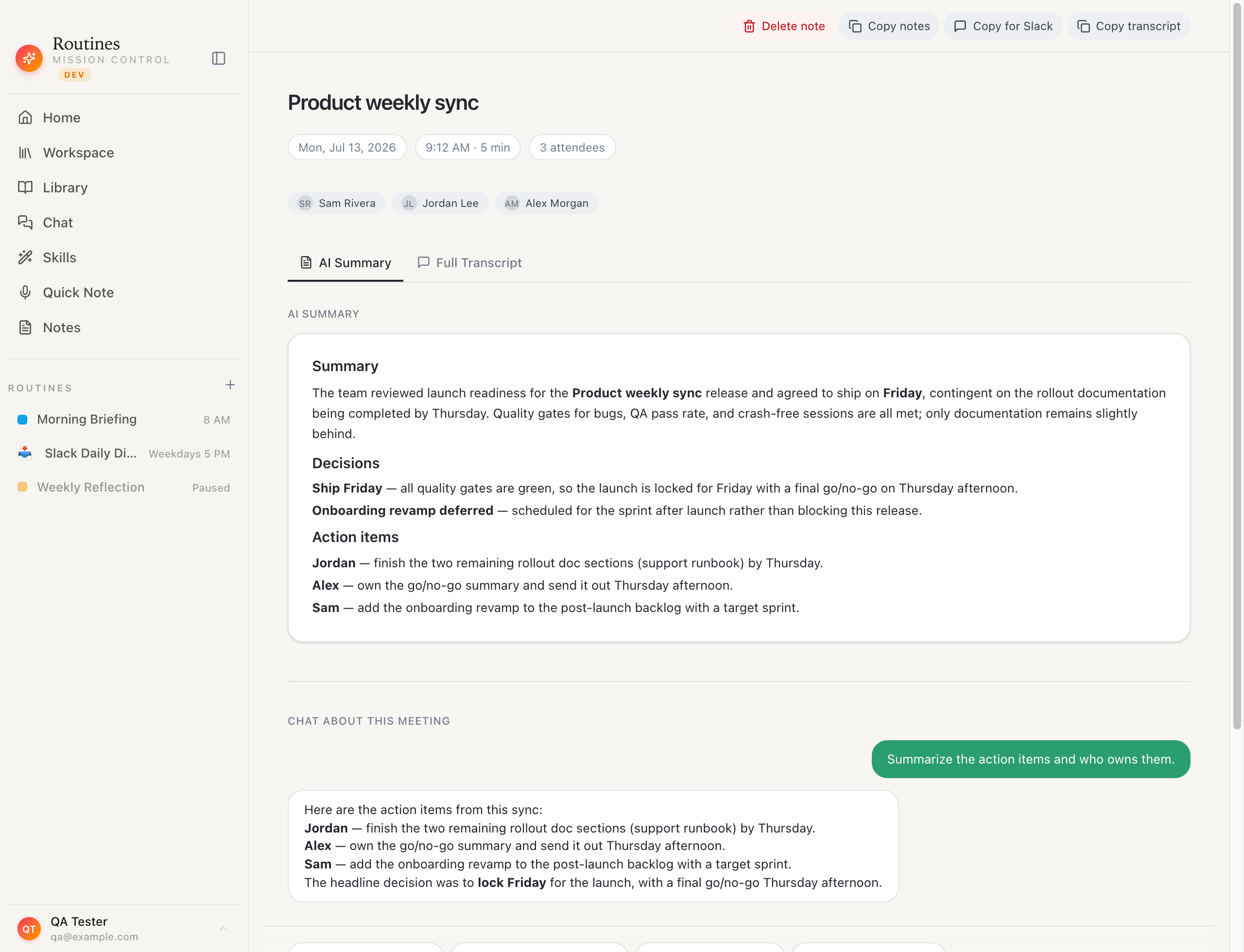 A finished meeting in Routines: summary, action items and transcript, saved as a markdown file in a folder you pick.
That advantage comes with a gap we would rather state than have you discover, and it is already written on our transparency hub in the same words. Routines ships no disclosure watermark, no automatic announcement in the meeting chat, and no prompt that asks the other participants for consent. Telling the people in the room that you are taking notes is your responsibility, and we recommend saying it out loud at the start of the call. A bot in the participant list at least announces itself. A local recorder does not, which makes the announcement your job.
The law agrees with that framing, which is the uncomfortable half. Recording rules turn on consent, not on whether the recorder shows up in a participant list, so a silent local recording faces the same test as a visible bot. In the United States the federal floor is one-party consent and several states, California, Florida, Illinois and Pennsylvania among them, require every party to agree. We checked the statute text on 2026-08-10, and this is general information rather than legal advice.
Where the audio goes is the other thing to be plain about, because "records on your Mac" gets read as a promise it does not make. Capture is local. Meeting audio streams to Deepgram for transcription and speaker separation, on the key we manage if you are on Pro or in the free trial, and on your own Deepgram key on the Free plan. The path is decided by whether a Deepgram key is present, not by a mode you select. The summary and action items are generated by whichever model you connect, so that step needs a connection too. Notes land as markdown in a folder you choose, transcripts sit in the app's local database, and Cloud Sync and Backup is off by default; turn it on and copies are stored in your Routines account so your devices share them.
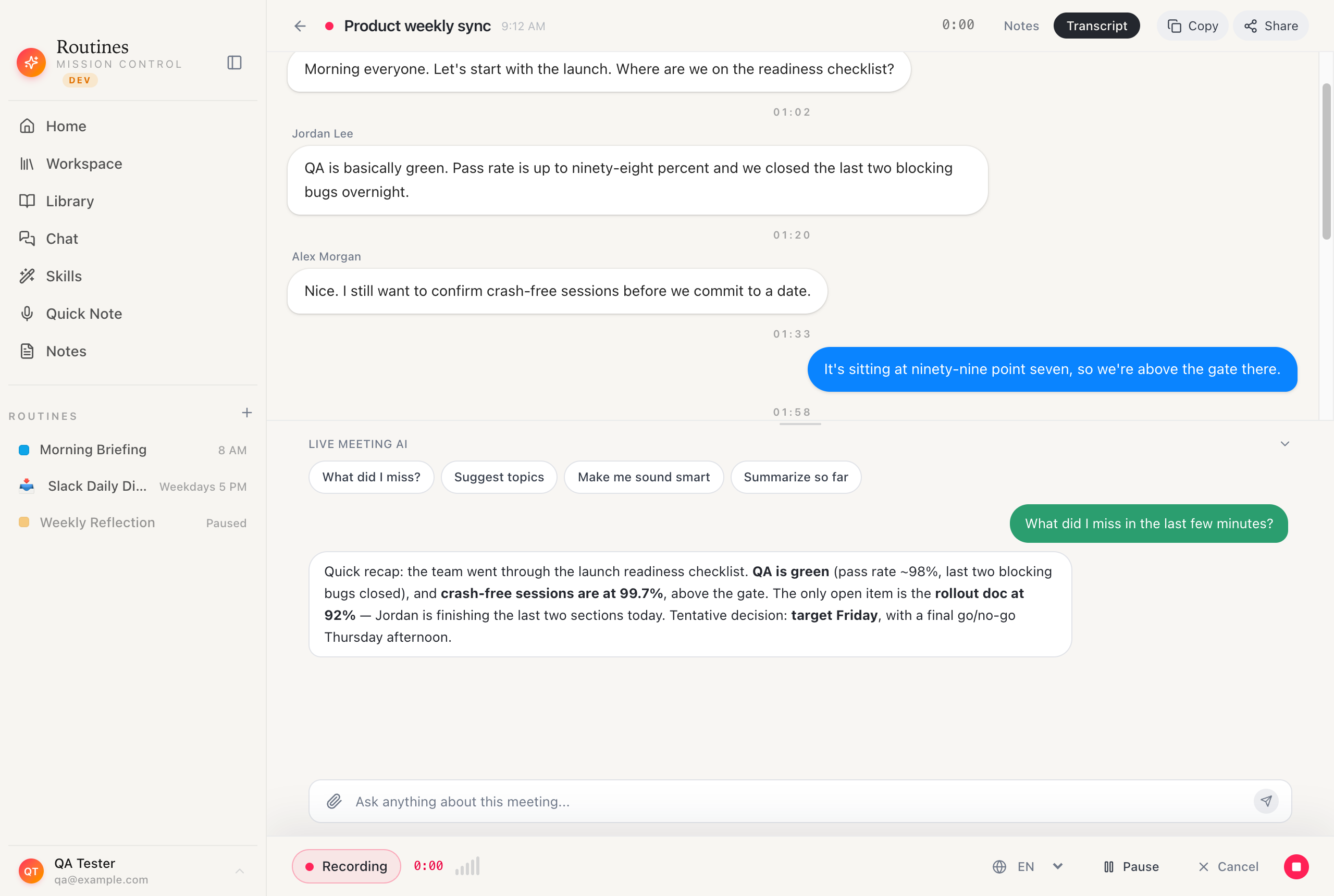 After the call, you can ask questions against the transcript to pull out decisions and follow-ups.
If you are weighing this against the incumbent, Routines against Granola goes through the tradeoffs in detail, including the ones where Granola is the better product. Granola also captures audio on your computer instead of sending a bot, in its own words quoted in our Granola audit, "No bot joins your meeting", so Google's change has nothing to act on there either. The difference is what happens to the notes afterwards, not who gets past the waiting room.
The app is a free download for macOS if you want to test it against your next call.
FAQ
Did Google ban AI notetakers from Google Meet?
No, and it is worth being precise about this because the short version going around is wrong. Google's Workspace Updates post announcing the safeguarded guest admit flow describes a change to how join requests are sorted: "Meeting hosts will now get those requests presented in two separate queues. A new second queue now shows requests from connections where the host is more likely to need a closer look before deciding to approve them into the meeting. The default action for entries in this queue is to deny entry." The same post adds that "Hosts/co-hosts still remain in control and are always free to take another action than the default suggested." A default is not a ban. A host who opens the panel and picks admit still admits the bot.
Why does my notetaker say "potential risk" in the Google Meet waiting room?
Because it landed in the second queue. Google's own product screenshot in the announcement post shows the waiting-to-join panel with a section headed "1 with potential risk" above an avatar named "Anon.Bot", and a separate section reading "4 confirmed users" listing named attendees. At least one notetaker vendor has documented the same behavior for its own bot. Metaview's help center tells its users that starting in late March 2026, Google Meet flags all meeting bots "with a 'potential risks' label in the waiting room", and calls it "a Google-wide change affecting all notetakers, not a Metaview issue".
When did this start, and does it affect every Google account?
Google's post gives two dates and two audiences. Rapid Release domains got a gradual rollout, up to 15 days for feature visibility, starting March 24, 2026. Scheduled Release domains started April 7, 2026 on the same gradual pace. Availability is broad: "Available to all Google Workspace customers, Workspace Individual subscribers, and users with personal Google accounts." If your notetaker kept getting in for two more weeks while a colleague's stopped, that gap is the release track, not your settings.
How do I let my notetaker into a Google Meet now?
The host or a co-host admits it from the people panel, the same as any guest, but they have to pick a different action than the pre-selected one. Metaview's instructions for its own bot are representative of the flow: "click on 'Admit', or on the three dots (⋮) next to the Metaview Notetaker and select 'Admit entry'". Metaview also warns its users that a host has to act within 5 minutes of the scheduled start or the bot is removed from the waiting room, which is that vendor's own timing rather than something Google documents. The practical fix is to tell the host, before the call, that a notetaker will knock and that it needs a manual admit. You can also remove the knock. Google scopes the safeguarded flow to meetings where guests "ask to join", so a meeting with Meeting access type set to Open has no waiting room to be sorted into: per Metaview, "anyone can join directly. There is no waiting room, and the Metaview Notetaker can join automatically", and Metaview recommends exactly that "for reliable capture". The tradeoff is that anyone with the link can walk in. If your policy requires Trusted access, Metaview's fallback is to keep the waiting room enabled and "turn on Bring in automatically so the Notetaker is admitted when a host joins", which is that vendor's own feature and is not documented by Google against the new flagged queue, so verify it on a real call.
Can an admin turn the second queue off?
Not this one. Google's post is explicit under Getting started: "Admins: There is no admin control for this feature." There is a separate, stricter setting that goes the other way, and that one does have an admin behind it. Metaview notes that when Meet access is set to Trusted or Restricted with the waiting room disabled, "external guests, including bots, are blocked instead of held for admission". Meeting access type gets decided in two places. Google's admin help says "As the IT administrator for your organization, you can create default access settings for meetings within your organization", in Meet safety settings, optionally per organizational unit, and that "Users can change these settings for meetings they create". The per-meeting change is the host's, from Google Calendar by opening the event and clicking the gear icon for Video call options, with Meeting access type under Host controls, and Metaview confirms "A Google Meet host or co-host can change these settings". If IT has locked it, the host has to go to them, which is what Metaview tells its own users. It blocks rather than queues, so ask your host, then your admin, before assuming the second queue is what stopped your bot. The same control has an option pointing the other way: with Meeting access type set to Open, per Metaview, "anyone can join directly. There is no waiting room, and the Metaview Notetaker can join automatically", so there is no queue for a default to apply to. Access type is what a host picks per meeting or an admin sets as the org default; the flagged queue is the thing with no admin switch.
Is there a way to get meeting notes without a bot joining the call?
Yes. Recording on the device is the other architecture. Routines captures two local audio streams on your Mac, your microphone and the system audio your Mac is already playing through a Core Audio process tap, so nothing knocks, nothing appears in the participant list, and there is no admit queue entry to deny. Where the audio goes next is worth saying out loud: meeting audio streams to Deepgram for transcription, on the key we manage if you are on Pro or in the free trial, and on your own Deepgram key on the Free plan. The path is decided by whether a Deepgram key is present. The summary step needs a model connection too. One gap belongs in the same breath: Routines ships no disclosure watermark, no automatic announcement in the meeting chat and no consent prompt, so telling the room you are taking notes is your job, not the app's.
Sources
- Google Workspace Team, "Safeguarded guest admit flow in Google Meet", Google Workspace Updates, posted March 24, 2026, accessed August 17, 2026
- Google, "Add or remove people from a Google Meet meeting or call", Google Meet Help, linked as the end-user reference from the announcement above
- Google, "Manage meeting access settings for your users", Google Workspace Admin Help, page states "Last updated 2026-08-14", accessed August 17, 2026
- Metaview, "Google Meet", Metaview help center, accessed August 17, 2026
- Google Meet Community, "How to prevent custom Google Meet bot from being flagged as 'Potential Risk'?", user thread, accessed August 17, 2026
- Routines, "Transparency: consent and recording disclosure", our own audit of what Routines does and does not do, last checked August 10, 2026