
Routines 1.5 for Mac opens on the AI you already have, not on ours. The first-run screen still asks where your AI comes from, and when the Claude Code CLI is on your Mac that question is answered before you reach it. Claude Code comes first and is already picked, and Routines AI, the welcome-credit option that used to open the screen, moved to a quiet last place.
Nine releases between 4 and 9 September make up the 1.5 line: a first run that finds Claude Code on its own, a second brain the setup interview writes for you, an interface in Dutch, and connectors that stopped hiding each other.
Where your AI comes from
First run signs you in, then asks where your AI comes from, then walks three short steps. Signing in takes an email and password, a Google account, or a GitHub account.
The screen after sign-in is the one that matters. Up to five cards, one choice:
- Claude Code, when the CLI is on your Mac. Routines looks for it in the background from the moment it opens, so the card arrives already selected and badged as detected. Its own line reads: use your Claude Code CLI and its Claude subscription, no API key or per-token costs.
- OpenAI, which signs you in with your ChatGPT account. No API key, and it needs a paid plan, Plus, Pro or Team.
- Anthropic, for your own API key and Claude models.
- OpenRouter, for one API key and almost any model.
- Routines AI, last and quiet, for the day you have no key and no plan handy. It starts with a welcome credit.
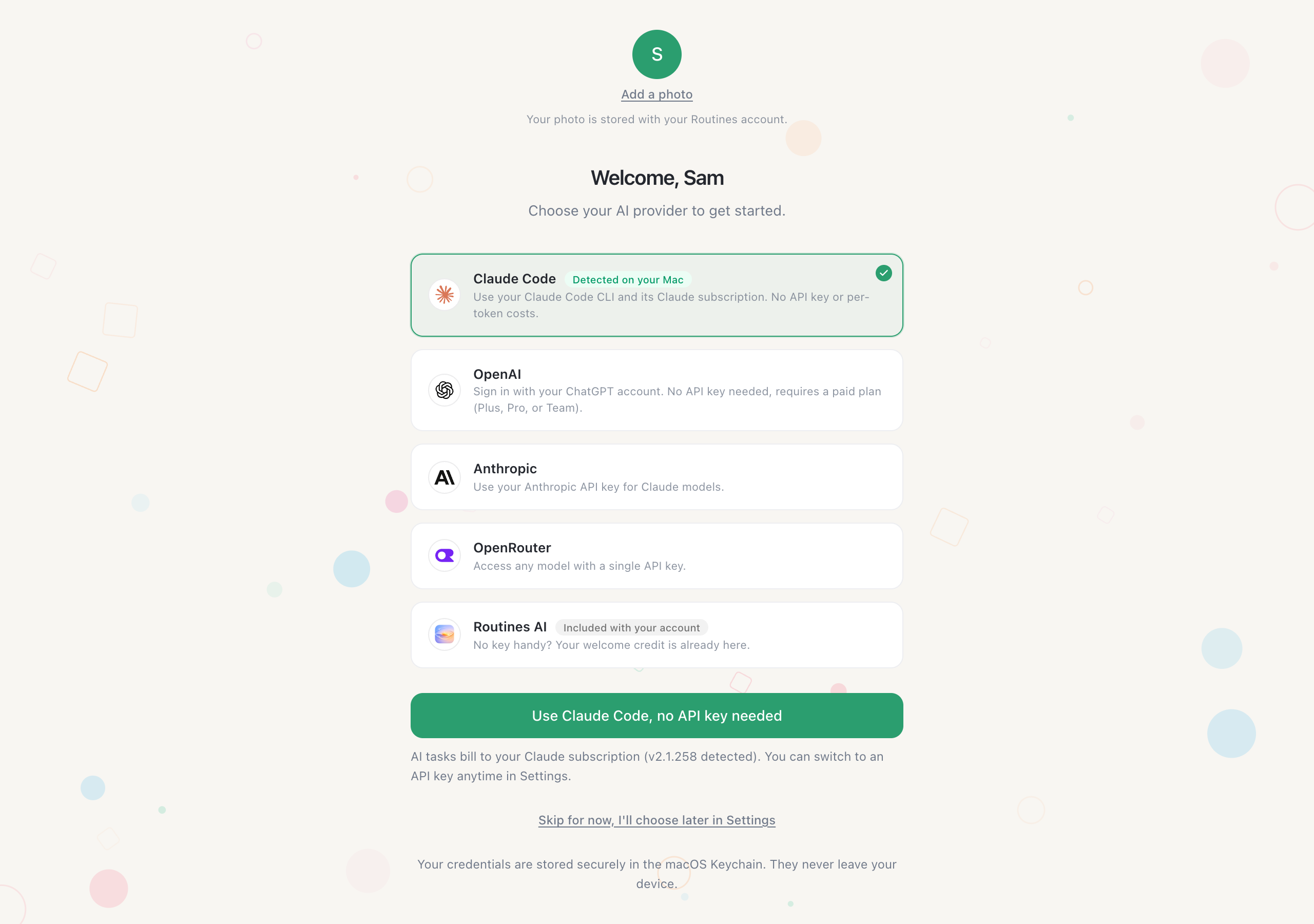 The provider screen of first run. Claude Code is already picked because the CLI was already there.
The three numbered steps come after that choice, and they are about you rather than about plumbing: what to call you and what you do, your assistant's name and personality, and last, where your notes live. Picking a folder on that last step makes it your memory folder right away.
Settings carries the same split. The card is headed "Where your AI comes from" and holds two tiles. On My own AI, the recommended one, you use the Claude or ChatGPT plan you already pay for, or a key from a provider you choose; the request goes from your Mac straight to that service without passing through Routines servers, and Routines adds nothing to your bill. On Routines AI, the request travels through Routines servers to the service that answers it, we keep the numbers and never the words, and each call comes off your balance.
Switching is not destructive. Move to Routines AI and your own setup is parked; move back and it returns as it was. Keys for the services that are not the AI itself, Brave Search, Deepgram, Maton and Windsor.ai, moved out of this pane and into Connections.
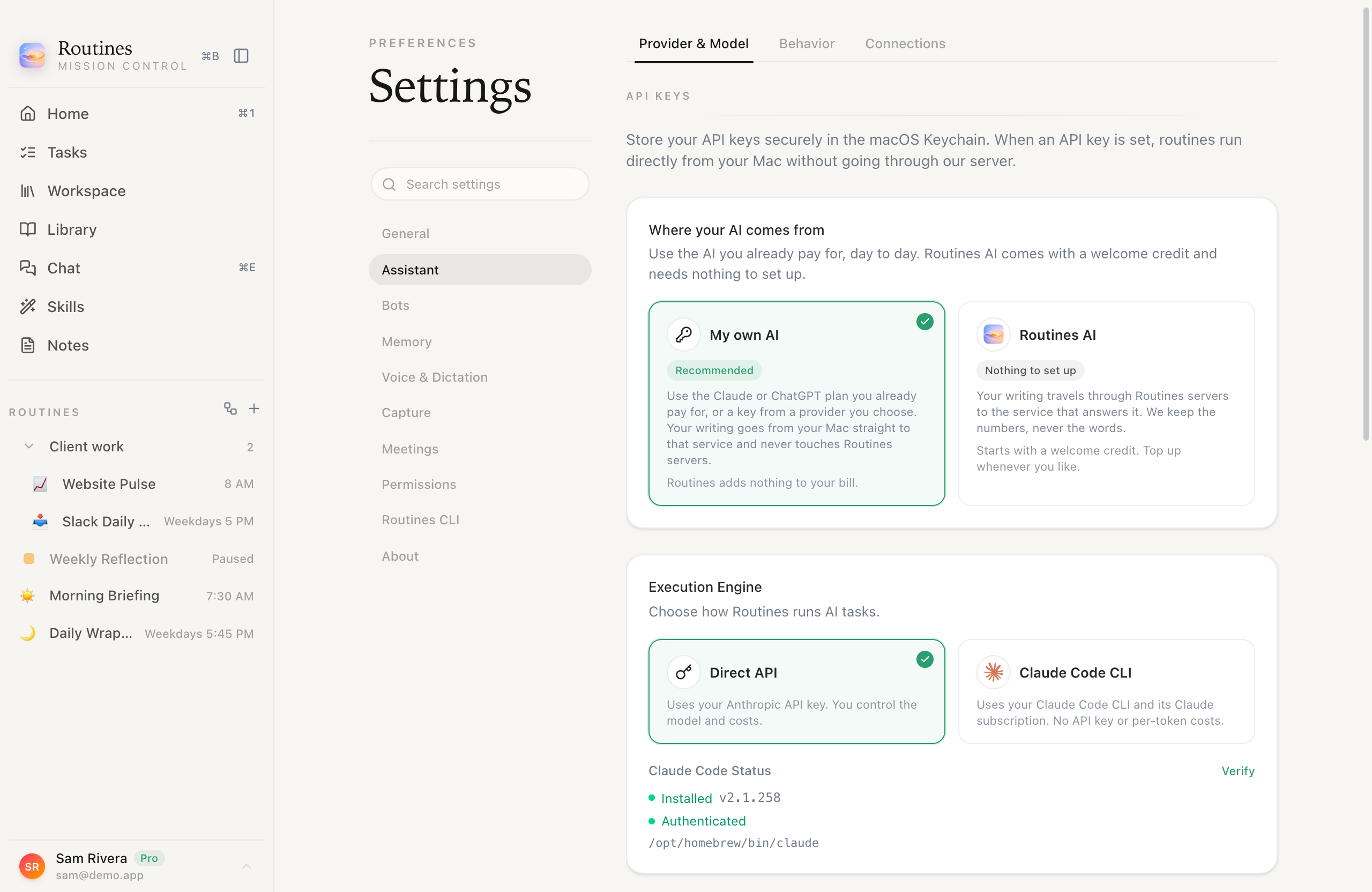 Two tiles, two honest descriptions of where your words go.
The second brain that sets itself up
Ask /setup in chat and your assistant interviews you about your work, shows you the plan it wants to write, and only then writes it. What lands is one note per client, project and lead, named after the thing it is about, with a title, a one-line summary, tags and a created date at the top. Index files appear only in folders that actually hold notes. Nothing you already wrote is overwritten, and the interview closes by listing the exact paths it created, so you can go read them.
The first-run wizard no longer scatters starter folders for you to delete later. It creates an inbox, a skills folder and one MEMORY.md, and the interview fills in the rest. Workspaces set up before this version get a Tidy empty starter folders button in Settings, Memory, which removes only folders holding nothing but a generated index and never touches a folder with notes in it.
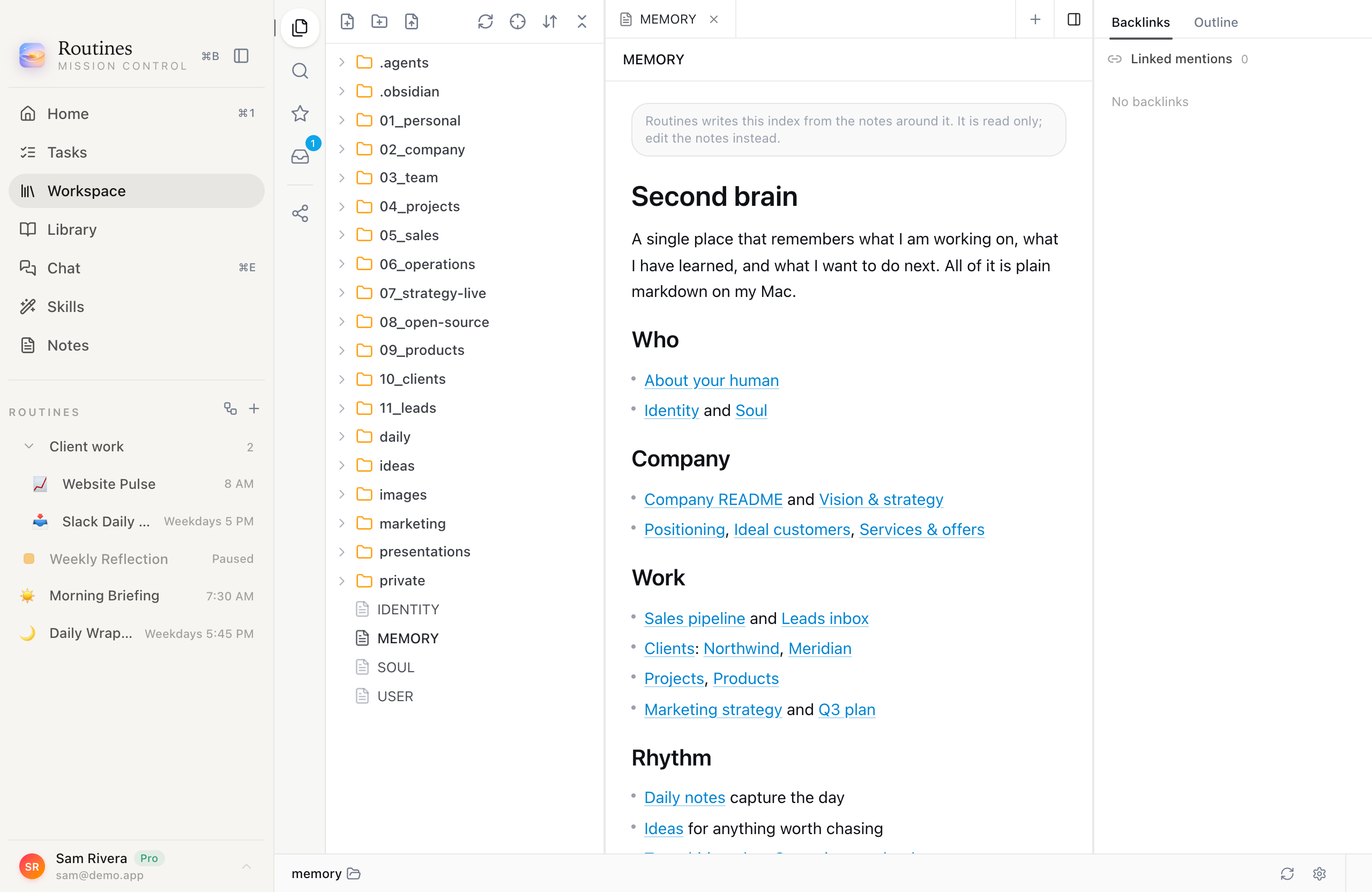 A memory folder that grew over months, and the index Routines keeps writing from the notes around it.
If your context lives in another assistant rather than in files, the first question of /setup, or /import on its own, hands you a prompt to paste into ChatGPT, Claude, Gemini or Grok, and uses what you paste back. We wrote up why that beats retyping in moving your ChatGPT memory to another AI. The paste screen that used to sit inside setup is gone, because the chat does the same job better.
Indexing can also tidy the notes you already have, if you ask it to. Settings, Memory, Memory indexing, Add frontmatter to notes is off by default. Turn it on and indexing adds a title, a one-line summary, tags and a created date to notes that have none, while a note that already has frontmatter keeps every line you wrote.
An interface in Dutch, and in Hebrew
Pick Nederlands under Settings, Language, and the interface changes language: the sidebar, Settings, the buttons, the empty states. Dutch is the third interface language, after English and Hebrew.
Two honest notes about that. Hebrew and Dutch are machine-translated and awaiting native-speaker review, which the app tells you on the same card rather than leaving you to find out. And interface language is not transcription language: the 28 languages Routines can transcribe a meeting or your dictation in are a separate setting with a separate list, which we counted against six other tools in which AI note taker supports which languages.
The same card also sets the language your assistant writes back in, with "Same as the interface language" as the default. Quoted material is never translated: file contents, email and message text, transcripts, code and names come back as they were written. In Hebrew the app also reads right to left, on a 24-hour clock, with day-first dates.
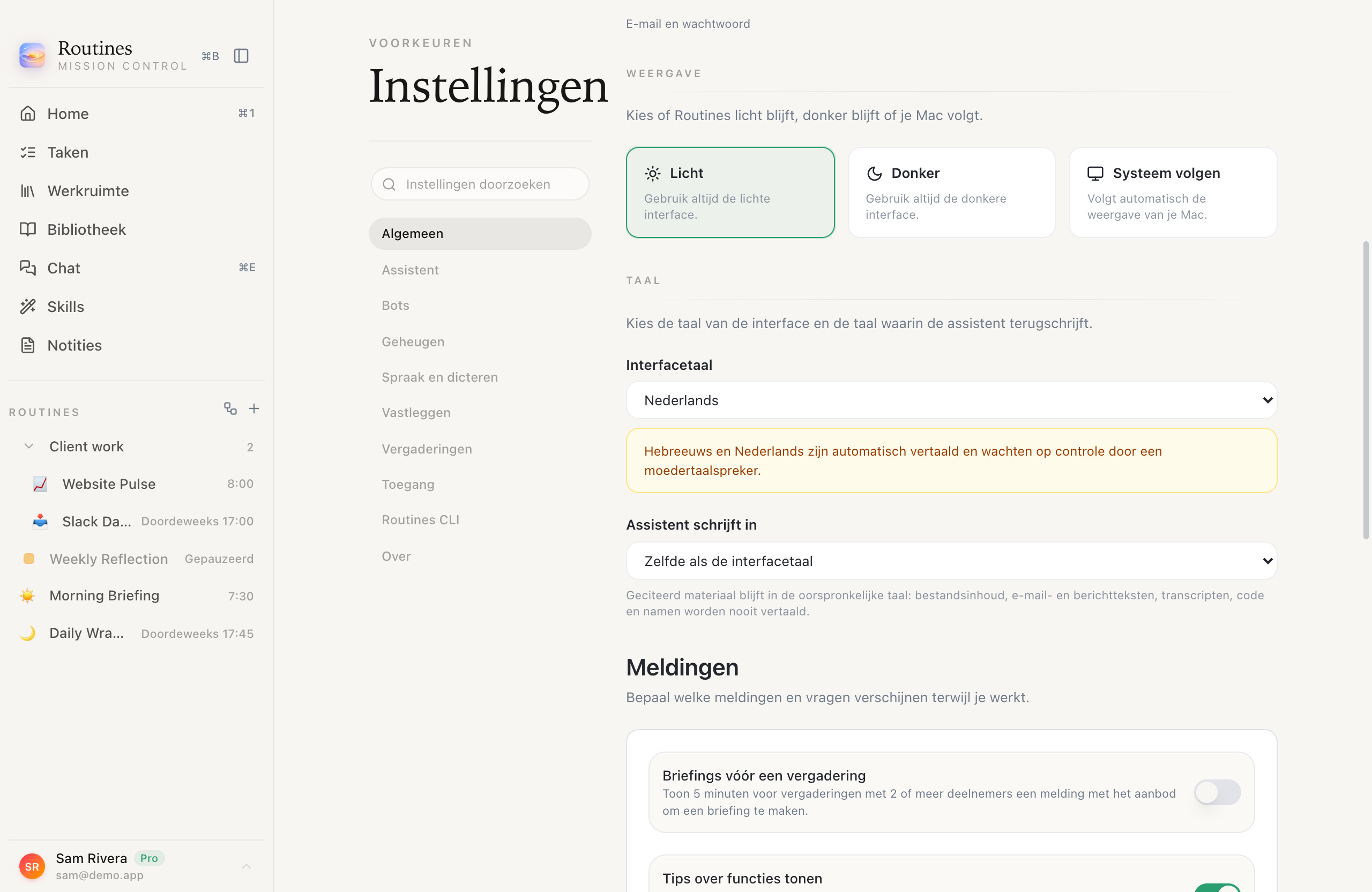 The language card in Dutch, with the review notice the app shows you itself.
Claude Code and ChatGPT, under the hood
Three things got quieter in 1.5.7 and 1.5.8.
A Claude Code chat that continues now sends only your new message instead of replaying the whole conversation, so a long thread no longer means re-sending everything you already said.
ChatGPT sign-in recovers once on its own when a token rotates mid-conversation, and it keeps the model's reasoning between tool steps so a multi-step answer keeps its thread. Switch accounts while a chat is running and that chat stops, rather than quietly carrying on as somebody else.
Connectors stopped stepping on each other. Two connected services that both offer a tool called search no longer hide each other, renaming a server no longer renames its tools, an unreachable connector no longer slows down every other tool call, and reconnecting one refreshes its tools right away.
Your memory folder
Point Routines at the folder of notes you already keep and it takes it immediately. Indexing runs in the background with visible progress, so nothing makes you wait before you can use the app.
Some folders are refused, in plain words and with an offer attached. Your home folder, Desktop, Documents, Downloads and Library themselves, and the root of iCloud Drive, Dropbox, Google Drive or OneDrive, are all too broad to be a memory. Very large folders get the same answer. In each case Routines says so in a sentence and offers to create a Routines folder inside the one you picked. A folder inside a git repository or inside a cloud drive is fine, and that is the one most people actually want.
The folder you choose is the one the Settings card, the workspace explorer and the file tree all show, right away. The card now counts your notes the same careful way the refusal check does, so a big folder no longer stalls Settings, and when it stops counting early it says it found at least that many rather than pretending to be exact. The older folder import into the vault is retired; notes it already brought in stay where they are.
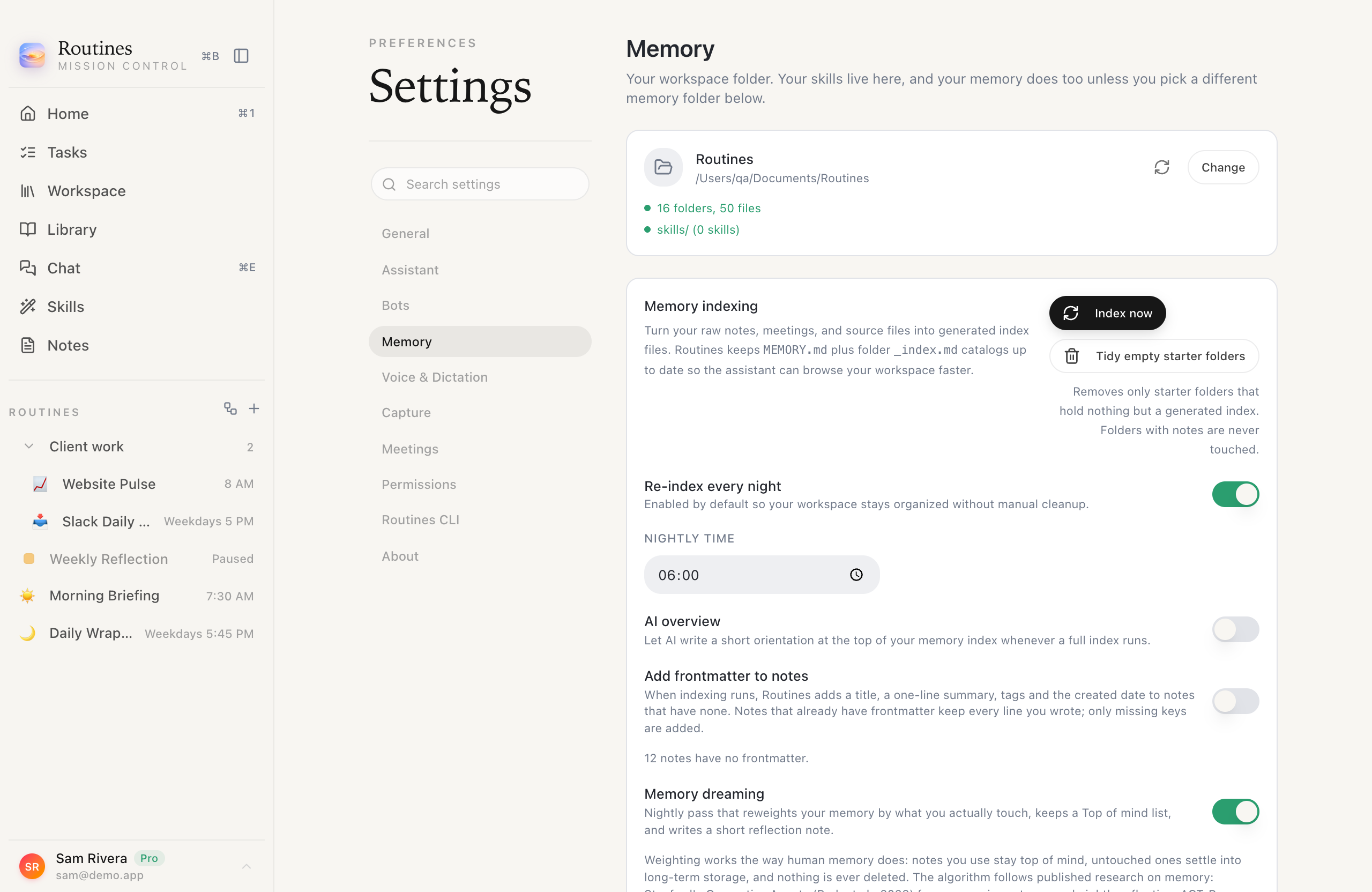 The folder card, the count it found, and the tidy button for workspaces older than 1.5.
Get Routines 1.5
Routines 1.5 is a free download for macOS, free for seven days, and it does not ask for a card. If you would rather see a finished scheduled routine before building one, the Morning Briefing recipe is ready to import: today's calendar with a prep note on each meeting, the email waiting on you, and the commitments you still owe.
Every version in this line has its own notes on the releases page. If you want the backstory of how an app that started as a pasted API key got here, that is Routines 1.0.
FAQ
Do I need an API key to use Routines 1.5?
No. At first run Routines asks where your AI comes from and offers up to five answers: your Claude Code CLI with its Claude subscription, a ChatGPT account sign-in on a paid plan (Plus, Pro or Team), an Anthropic API key, an OpenRouter API key, or Routines AI, which starts with a welcome credit and needs nothing set up. Claude Code is detected on your Mac in the background, so its card arrives already selected when the CLI is there. On any of the own-AI paths the request goes from your Mac straight to that service without passing through Routines servers, and Routines adds nothing to your bill.
Which languages can I use the Routines interface in?
Three: English, Hebrew and Dutch. Dutch arrived in version 1.5.7, and you pick Nederlands under Settings, Language. The app says on that same card that Hebrew and Dutch are machine-translated and awaiting native-speaker review. Interface language is separate from transcription language: the 28 languages Routines can transcribe a meeting or your dictation in have their own setting and their own list.
What does the Routines setup interview actually write?
One note per client, project and lead, named after the thing it is about, each with a title, a one-line summary, tags and a created date at the top. It shows you the plan first and writes only what you confirm, it never overwrites a file you already have, index files appear only in folders that hold notes, and it closes by listing the exact paths it created. The first-run wizard itself creates only an inbox folder, a skills folder and one MEMORY.md.
Can Routines use a folder of notes I already have?
Yes. Choose it as your memory folder in Settings, Memory, or on the last step of first run. The pick is instant and indexing runs in the background with visible progress. A folder inside a git repository or inside a cloud drive works. Routines refuses folders that are too broad to be a memory, meaning your home folder, Desktop, Documents, Downloads or Library themselves, the root of iCloud Drive, Dropbox, Google Drive or OneDrive, and very large folders, and it offers to create a Routines folder inside the one you picked instead.
Does Routines 1.5 add to my AI bill?
That depends on which of the two modes under Where your AI comes from you use. On My own AI you use the Claude or ChatGPT plan you already pay for, or a key from a provider you choose, the request goes from your Mac straight to that service without passing through Routines servers, and Routines charges you nothing for it. On Routines AI the request travels through Routines servers to the service that answers it, we keep the numbers and never the words, and each call is paid from your Routines balance, which starts with a welcome credit.