
A note taker that does not join your meeting captures the conversation somewhere else, and there are three places to do it. A desktop app records the microphone plus the audio your computer is already playing. A browser extension captures the meeting tab, or reads the live captions the platform writes on screen. Or a bot joins the call as a participant, which several tools sold as bot-free keep as a second mode. The table below says which one each tool uses, according to the vendor's own pages, checked 2026-09-10.
Eight third-party tools sit in the first table, one section each, with our own row beside them. Five more tools with a bot-free mode are in a second table further down: four of them lead with a bot on their own sites, and the fifth, Wispr Flow's Notetaker, offers no bot. Of the eight, three also offer a bot and a fourth says both things on the same homepage.
Every cell comes from a page on the vendor's own site, linked in the row, and "not stated" means the page is silent. For a general ranking rather than a mechanism table, there is our AI note taker listicle.
| Tool | How it captures audio | Bot fallback? | Where the transcript is processed | Receipt |
|---|---|---|---|---|
| Granola | Desktop app captures "audio directly from your microphone and system audio" | No bot option on the pages read; the docs say "No bot joins your meeting" | Granola's systems on Amazon Web Services in the United States, audio deleted after transcription | docs.granola.ai FAQs, checked 2026-09-10 |
| Krisp | Desktop app captures "directly at the audio level" on the device | Yes, an optional bot for Zoom: "The choice is always yours" | On-device for English, server-based for 15 additional languages, per the vendor page | krisp.ai/ai-meeting-assistant, checked 2026-09-10 |
| Bluedot | Chrome extension for the browser, a desktop app for Mac and Windows; the capture technique is not stated | The homepage says both; see section | Amazon Web Services, per the security page | bluedothq.com and bluedothq.com/security, both checked 2026-09-10 |
| tactiq | Chrome extension that reads the meeting's live captions; the Companion Mode article says to turn Google Meet captions on | No bot option on the pages read | Not stated | help.tactiq.io, checked 2026-09-10 |
| Fellow | Desktop and mobile apps capture from the device; the page offers "a bot, go botless, or capture conversations in person" | Yes, one of the offered modes | Not stated for processing; the page says recordings and summaries are "securely stored in Fellow" | fellow.app, checked 2026-09-10 |
| Shadow | Mac app, "with no intrusive bots listening in or joining as a meeting participant" | No bot option on the pages read | On the device unless you allow otherwise; the same page names OpenAI's APIs for specific tasks | shadow.do, checked 2026-09-10 |
| Omi | A wearable for in-person, plus "the Mac desktop app or web capture" online | No bot option on the pages read | Not stated | omi.me, checked 2026-09-10 |
| Fathom | Fathom's homepage announces a new desktop app; the audio source is not stated. Bot-free is "(in beta)" and "*Beta feature for Mac" on the pricing page | Yes, bot capture is the other mode | Not stated | fathom.video and fathom.video/pricing, both checked 2026-09-10 |
| Routines | Mac app records two local streams: the microphone, and the system audio the Mac is already playing, through a Core Audio process tap | No bot; recording starts only when you press start | Deepgram for transcription, then whichever model you connect writes the notes | our meetings page |
Granola
Granola's security FAQ states the mechanism directly: "Granola runs locally on your device and captures audio directly from your microphone and system audio" (docs.granola.ai, checked 2026-09-10). No bot option appears on the pages we read. Capture is local, processing is not: the same page says audio "is temporarily cached during the meeting for transcription only", stored on Amazon Web Services servers in the United States.
Granola also documents consent and disclosure in its help center, quoted below. Routines ships no disclosure watermark, no automatic announcement and no consent prompt today, so there Granola has shipped what we have not. Our audit of Granola has the data path, and Routines against Granola the tradeoffs, including where Granola is the better product.
Krisp
Krisp puts capture at the device audio layer: "We capture directly at the audio level, so you get clean transcripts and summaries without a visible bot" (krisp.ai/ai-meeting-assistant, checked 2026-09-10). It keeps a bot as well: the same page offers "a Bot option for platforms like Zoom" and closes with "The choice is always yours."
Processing splits by language: on-device English transcription plus "server-based transcription in 15 additional languages" (krisp.ai/ai-meeting-assistant, checked 2026-09-10). The Krisp help center returned 403, so that page is our only Krisp source, and our audit of Krisp has the rest.
Bluedot
Bluedot's homepage says two things about bots. The FAQ reads "Bluedot never invites a bot to your meeting or asks for calendar access"; a feature strip on the same page reads "With or without bot" (bluedothq.com, checked 2026-09-10). Both were there when we read it, and the vendor is the place to settle which one governs.
The capture surface is clearer: a Chrome extension for Google Meet and browser calls, a desktop app for Zoom, Teams and Slack on Mac and Windows. The technique underneath, tab audio or system audio, is not on the pages. Processing is vendor cloud: data "is stored in AWS with network isolation, least-privilege access, and encryption in transit and at rest" (bluedothq.com/security, checked 2026-09-10).
tactiq
Tactiq in Companion Mode does not capture audio at all. Its homepage FAQ says so plainly: "Tactiq does not record or store the audio from your meetings" (tactiq.io, checked 2026-09-10). The help article says "Companion mode lets you join a meeting from a second screen without connecting your microphone or meeting audio", and the setup step is to "turn on Google Meet live captions" (help.tactiq.io, checked 2026-09-10).
The extension reads text the platform already puts on screen, so the transcript exists only where captions do. No bot option appears on the pages we read, and where the text goes afterwards is not stated.
Fellow
Fellow sells both modes in one line: "Record, transcribe, and summarize meetings wherever they happen, with the flexibility to use a bot, go botless, or capture conversations in person" (fellow.app, checked 2026-09-10). The bot-free path is the desktop app: "Fellow's desktop and mobile apps capture audio directly from your device; no bot joins the call".
So the bot answer is yes, as a mode a user or an admin picks. Processing is not stated on the pages we read, though the page does say recordings and summaries are "securely stored in Fellow" (fellow.app, checked 2026-09-10), and Fellow's separate trust site went unfetched, so read that cell as unread rather than empty.
Shadow
Shadow is a Mac app, and no bot option appears on the pages we read. Its processing claim comes in two parts that belong together. First: "Meeting audio and data never leave your device without your permission." Then, in the same post: "Even when leveraging OpenAI's SOC 2-certified APIs for specific tasks, Shadow ensures zero third-party access to your meeting data" (shadow.do, checked 2026-09-10). Read together: on the device unless you allow otherwise, with a named third-party API for specific tasks.
Shadow also writes a category-level caveat that applies to every row above: "Bot-free describes the capture surface, not where every processing or storage step happens" (shadow.do, checked 2026-09-10).
Omi
Omi is not a plain desktop app. It is a wearable plus software, split by situation: for online meetings, "use the Mac desktop app or web capture, so Meet/Zoom/Teams stays untouched", and for in-person conversations you wear the device (omi.me, checked 2026-09-10).
On the bot question we can report only an absence: no bot option appears on the pages we read, and no page says "no bot" in as many words, so that cell is our reading of silence rather than a vendor claim. Processing is not stated.
Fathom
Fathom's bot-free mode is new, and the pricing page labels it twice: "Choice of bot-free (in beta) or bot capture" on the free plan, and "Choice of bot-free* and bot capture-types (*Beta feature for Mac)" in the feature table (fathom.video/pricing, checked 2026-09-10).
Bot capture is still the other mode, so the bot answer is yes, and bot-free is scoped to a beta on the Mac, so a Windows user reading "bot-free" there is not being offered it today. How the mode captures audio, and where the transcript is processed, are not stated. Our audit of Fathom reached the same point: the page does not describe the mechanism behind the bot-free modes.
Routines, our own row
We build Routines, a Mac app that takes meeting notes. Nothing happens until you press start: no auto-join, no calendar-triggered recording.
Recording captures two local audio streams on the Mac: the microphone, and the system audio the Mac is already playing, through a Core Audio process tap on macOS 14.2 or later. The system stream is how the other people on the call get captured, and if it cannot start on a given machine the recording continues on the microphone alone. No bot joins the call, nothing knocks, and nothing appears in anyone's participant list, which is the same architecture Granola describes.
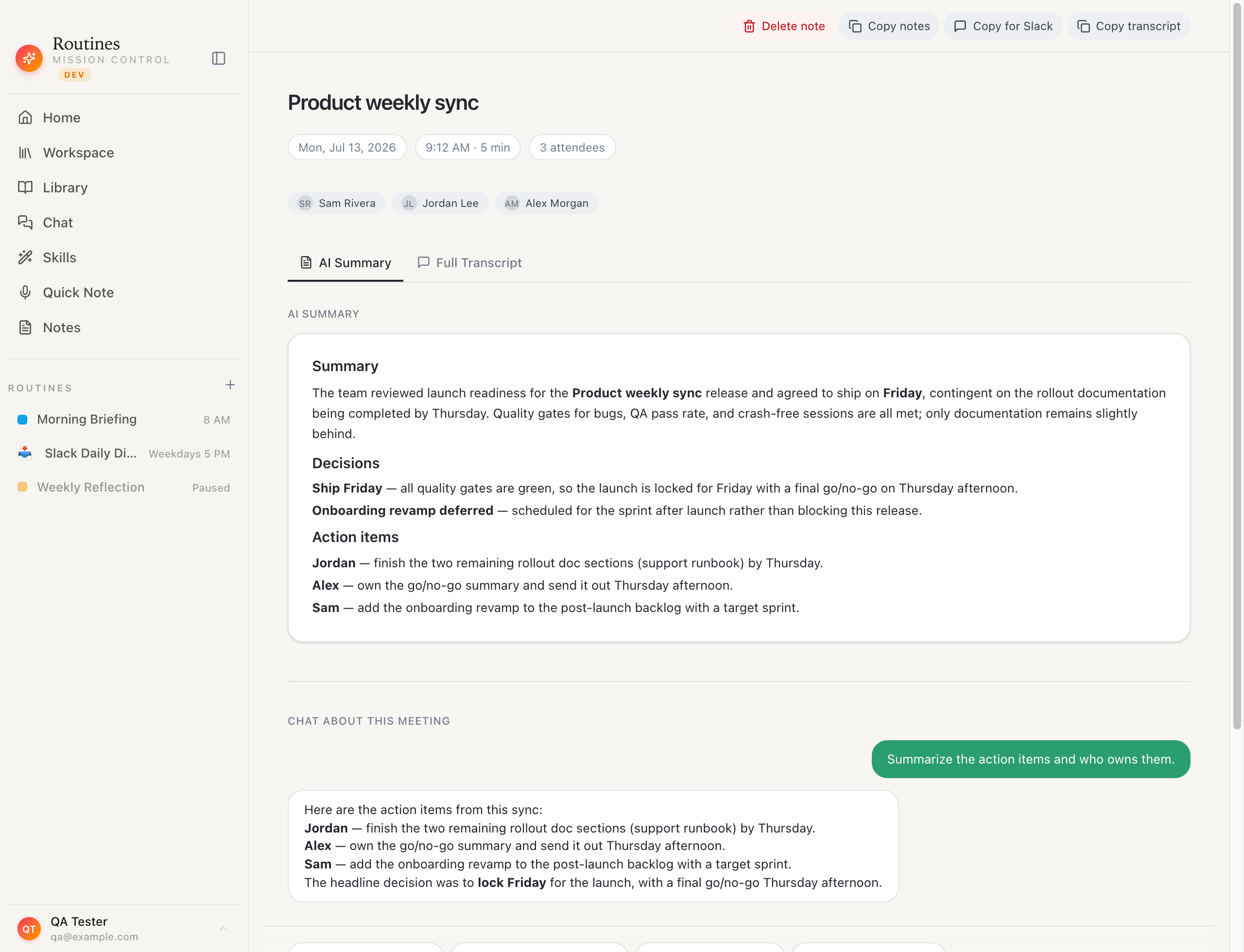 A finished meeting in Routines: summary, action items and transcript, saved as a markdown file in a folder you pick.
Capture is local, and what happens next is not. Meeting audio streams to Deepgram for transcription, on the key we manage if you are on Pro or in the free trial, and on your own Deepgram key on the Free plan. The path is decided by whether a Deepgram key is present, not by a mode you select. The summary and action items are generated by whichever model you connect, so that step needs a connection too. Notes land as markdown in a folder you choose, transcripts sit in the app's local database, and Cloud Sync and Backup is off by default; turn it on and copies are stored in your Routines account so your devices share them. Routines does not use your recordings, transcripts, notes or prompts to train models.
Routines ships no disclosure watermark, no automatic announcement, and no consent prompt today. Telling the people in the meeting is your responsibility, and we recommend saying you record. Our transparency hub says the same thing; the meetings feature page has the setup detail.
Five more tools with a bot-free mode
Four of these five, Otter, Fireflies, tl;dv and Read AI, lead with a bot on their own sites and added a bot-free mode later. The fifth, Wispr Flow's Notetaker, comes from a dictation vendor and its page offers no bot. The rows below describe the bot-free mode.
| Tool | How it captures audio | Bot fallback? | Where the transcript is processed | Receipt |
|---|---|---|---|---|
| Otter | Desktop app: "Record without a bot in the meeting", with Mac and Windows downloads | Yes, the AI Notetaker you "automatically send" is a separate mode | Not stated on the pages read | otter.ai/desktop and otter.ai, both checked 2026-09-10 |
| Fireflies | Desktop app captures "your computer's system audio"; the blog names Chrome Extension Live Assist as a second bot-free method | Yes, and the bot is the first capture method listed on the homepage | Not stated for Fireflies itself; the blog puts the category at "device-level recording with cloud-based AI processing" | guide.fireflies.ai, fireflies.ai/blog and fireflies.ai, all checked 2026-09-10 |
| tl;dv | Desktop app "records directly from your system audio, with no meeting bot required" | Yes, the Chrome extension is the bot path | Not stated | tldv.io/desktop-app and tldv.io/google-meet, both checked 2026-09-10 |
| Read AI | Desktop app for Windows 10+ and macOS 14+, marketed as "Effortless, Botless Capture" | Yes, "Read joins your meetings" is the flagship product | Not stated | read.ai/desktop and read.ai, both checked 2026-09-10 |
| Wispr Flow Notetaker | "captures audio locally on your device rather than joining calls as a visible bot"; Mac today | No bot to invite, per the page | Device-local, and "in some cases, in secure cloud storage", per the vendor | wisprflow.ai/notetaker, checked 2026-09-10 |
Otter's homepage offers both, to "automatically send your AI Notetaker" or "record bot-free on desktop or Chrome" (otter.ai, checked 2026-09-10); our audit. Fireflies lists the bot first (fireflies.ai, checked 2026-09-10) and documents the desktop mode separately (guide.fireflies.ai, checked 2026-09-10); our audit. tl;dv frames the desktop app against Google Meet's handling of third-party bots (tldv.io/google-meet, checked 2026-09-10), which we wrote up in Google Meet and notetaker bots; our audit. Read AI's flagship bot "joins your meetings" (read.ai, checked 2026-09-10) while the Desktop App is sold as botless (read.ai/desktop, checked 2026-09-10); our audit. Wispr Flow's Notetaker captures from the Mac with no bot to invite (wisprflow.ai/notetaker, checked 2026-09-10), and our audit covers Notetaker too, including the Cloud Sync it requires.
What each vendor says about telling the room
Routines ships no disclosure watermark, no automatic announcement, and no consent prompt today. Telling the people in the meeting is your responsibility, and we recommend saying you record. Here is what the others put on their pages.
Granola ships two transparency features, "an automated chat message" and "Granola Watermark", and its own page says you "enable one or both" (docs.granola.ai, checked 2026-09-10). Its security FAQ adds "You are responsible for obtaining consent from participants before using Granola" (docs.granola.ai, checked 2026-09-10).
Fireflies plays a notice in the bot-free mode: "An audio consent message plays through the meeting approximately 10 seconds after you start Take Notes" (guide.fireflies.ai, checked 2026-09-10).
Bluedot puts it under an admin: "Admins can enable consent controls to notify meeting participants that the meeting is being recorded and transcribed" (bluedothq.com/security, checked 2026-09-10).
Fellow puts it under an admin too: "consent capture helps notify participants and document consent before recording begins" (fellow.app, checked 2026-09-10).
Tactiq leaves it manual: transcription "is only displayed for you, but you can notify everyone that you're transcribing during the meeting" (tactiq.io, checked 2026-09-10).
Wispr Flow says it directly: "You are responsible for informing everyone before you begin" (wisprflow.ai/notetaker, checked 2026-09-10).
Krisp offers its bot as the more visible path, "to make recording and consent handling more transparent" (krisp.ai/ai-meeting-assistant, checked 2026-09-10).
Shadow takes the suspicion head on: "Bot-free tools like Shadow aren't for hiding that you're recording. They're for not making the recording technology a participant in your conversation" (shadow.do, checked 2026-09-10).
Omi puts it in one line: "Bot-free does not mean consent-free" (omi.me, checked 2026-09-10).
Fathom, tl;dv, Otter and Read AI state no consent posture on the pages we read.
None of it changes the test. The recording rules turn on consent, not on whether the recorder appears in the participant list, so a silent local recorder faces the same test as a visible bot. This is general information, not legal advice. Which US states require every party to agree is a table in our AI note taker listicle, where we checked the statute text on 2026-08-10.
What the vendor pages do not say
Eight of the thirteen third-party tools in the two tables say nothing about where their own transcript is processed: tactiq, Fellow, Fathom, Omi, Fireflies, tl;dv, Otter and Read AI. Fireflies' blog describes the category as device-level recording with cloud processing, and says nothing more specific about its own app. Bluedot names Amazon Web Services for storage but not the capture technique feeding it, Fathom does not say what its bot-free mode listens to, and Omi never writes "no bot" in as many words, so that cell reads an absence.
Two help centers refused us: help.krisp.ai and help.otter.ai both returned 403, so Krisp and Otter appear here through marketing pages only, and Fellow's trust site went unfetched. If one of those cells decides it for you, the vendor page is linked in the row.
This page was built by reading vendor documentation on 2026-09-10. We did not run these tools against each other, and nothing here ranks them on accuracy, speed or price. When a vendor edits a page this one goes stale, and the link in the row is the fix. Routines is a free download for the Mac if you want to watch the local-capture path on your own next call.
Sources
All pages read on 2026-09-10.
- Granola: https://www.granola.ai/ , https://docs.granola.ai/help-center/consent-security-privacy/security-privacy-data-faqs , https://docs.granola.ai/help-center/consent-security-privacy/transparency-solutions/introduction
- Krisp: https://krisp.ai/ai-meeting-assistant/
- Bluedot: https://bluedothq.com/ , https://bluedothq.com/security
- tactiq: https://tactiq.io/ , https://help.tactiq.io/en/articles/10203613-how-to-use-tactiq-to-transcribe-google-meet-meetings-in-companion-mode
- Fellow: https://www.fellow.app/
- Shadow: https://www.shadow.do/blog/why-we-decided-to-go-bot-free-with-shadow , https://www.shadow.do/blog/best-ai-meeting-note-takers-that-dont-join-as-a-bot-2026 , https://www.shadow.do/blog/best-bot-free-meeting-assistants-in-2026-shadow-granola-jamie-bluedot-compared
- Omi: https://www.omi.me/ , https://www.omi.me/blogs/ai-note-takers/best-doesnt-join-meetings-bot-free
- Fathom: https://fathom.video/ , https://fathom.video/pricing
- Otter: https://otter.ai/ , https://otter.ai/desktop
- Fireflies: https://fireflies.ai/ , https://guide.fireflies.ai/articles/6666374717-how-to-record-meetings-without-a-bot-on-the-fireflies-desktop-app , https://fireflies.ai/blog/bot-free-meeting-recorder
- tl;dv: https://tldv.io/desktop-app/ , https://tldv.io/google-meet/
- Read AI: https://www.read.ai/ , https://www.read.ai/desktop
- Wispr Flow: https://wisprflow.ai/notetaker