
Most AI assistants write your context to a database the vendor controls. Cancel the subscription and the context disappears with it. Routines stores memory differently: every note the app creates is a plain markdown file in a folder you choose, with a SQLite + FTS5 index sitting on your disk next to the files. The app is a layer on top of the files. The files are the thing.
This is the engineering write-up we are posting on Show HN. It covers the storage architecture, the query path, and the trade-offs we made, all as they ship in the current signed, notarized build.
The three layers
The memory stack has three layers:
- Markdown files: the artifact layer. Each note is a
.mdfile. One file per note, in a directory the user chose. - SQLite + FTS5: the index layer. A SQLite database with an FTS5 virtual table mirrors the vault content and supports full-text search.
- Salience weighting: the relevance layer. FTS5 results are reranked before they reach the AI context window.
Every layer is readable with standard tooling. Open the vault folder in Finder and the files are there. Open the SQLite database in any SQLite browser and the index is there. Nothing requires the app to be running.
Layer 1: Markdown files
The vault is a directory the user picks during setup. Routines creates that directory if it does not exist, or the user can point it at an existing folder, an Obsidian vault, or a directory of exported files. Whatever is there gets read.
Each note Routines writes is a .md file with YAML frontmatter. The frontmatter carries the title, the date, any tags the model assigned during ingestion or creation, and a source field for notes that came from a meeting or an imported file. The body is the note content.
The file is the canonical artifact. Routines reads from and writes to the same files that Obsidian, grep, git, and any text editor operates on. No conversion step. No proprietary format.
Your notes are plain markdown in a folder you pick, readable in Obsidian.
When Routines writes a meeting note, it creates a .md file in the vault. When you write a note in the app's editor, it writes a .md file. When you import a PDF, Routines reads the PDF, summarizes it with the connected AI model, and writes the result as a .md file. The mechanism is the same in all three cases.
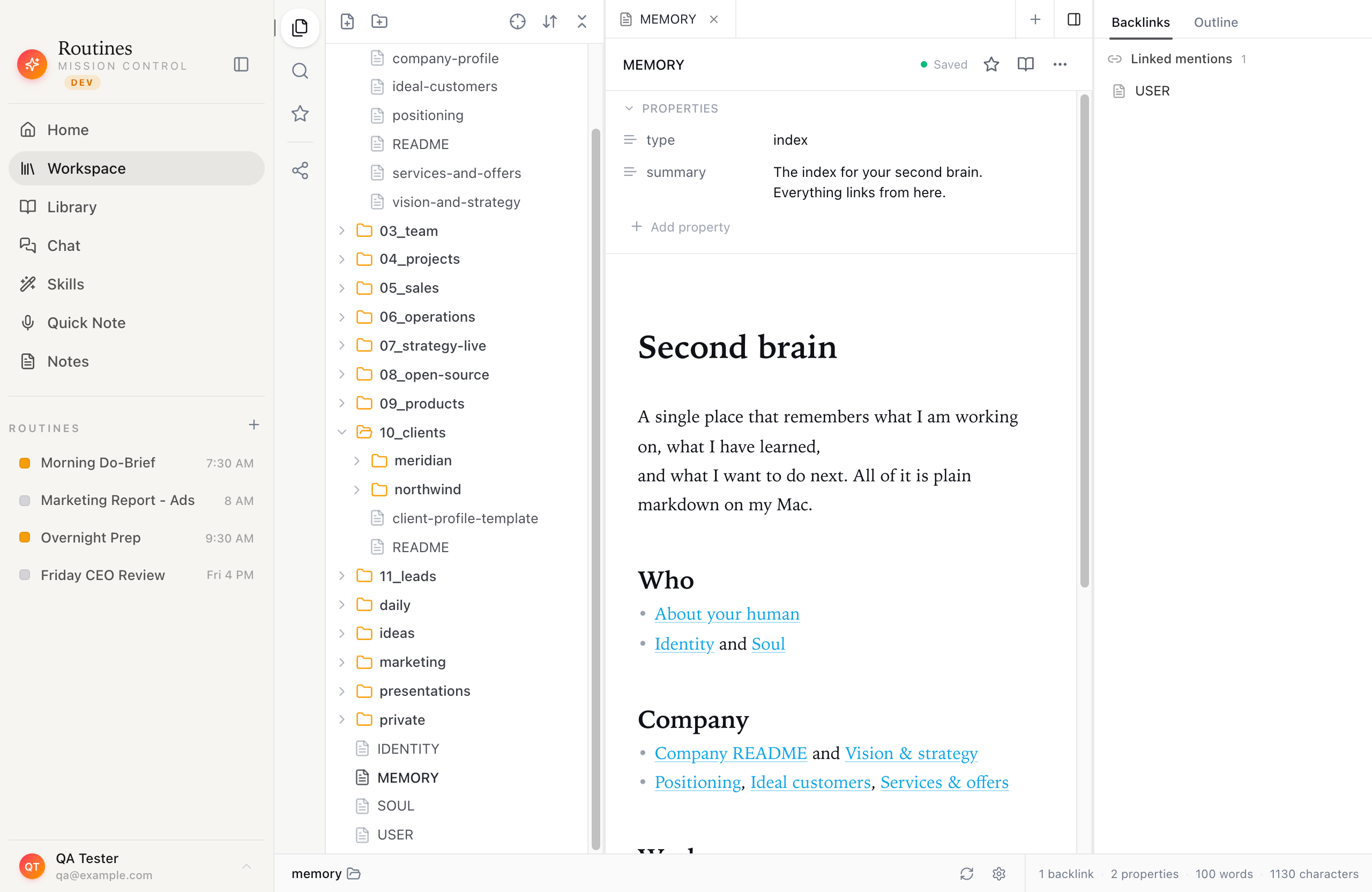
The vault is a directory of markdown files. The sidebar is a file tree, not a proprietary list.
Layer 2: SQLite + FTS5
FTS5 is the full-text search extension built into SQLite. It ships in the standard SQLite distribution and has been available since SQLite 3.9.0, released in October 2015. We did not add a search library. We used the one already present in macOS.
The setup is a CREATE VIRTUAL TABLE statement and a set of triggers that keep the index synchronized with inserts, updates, and deletes. FTS5 tokenizes the document text, builds an inverted index, and supports BM25 relevance ranking. BM25 weighs term frequency against document frequency across the corpus: terms that appear in many documents contribute less to a match than terms specific to a small set of notes.
The SQLite database lives in the vault directory alongside the notes. It is a file on disk. Any SQLite client can open it and run queries directly.
There is a background process we call "dreaming." It runs periodically, walks the vault directory, detects which files changed since the last pass, and updates the FTS5 index for those files. A note the user just wrote or a file the app just imported is searchable within seconds of the pass completing. A deleted file leaves the index on the next dreaming pass.
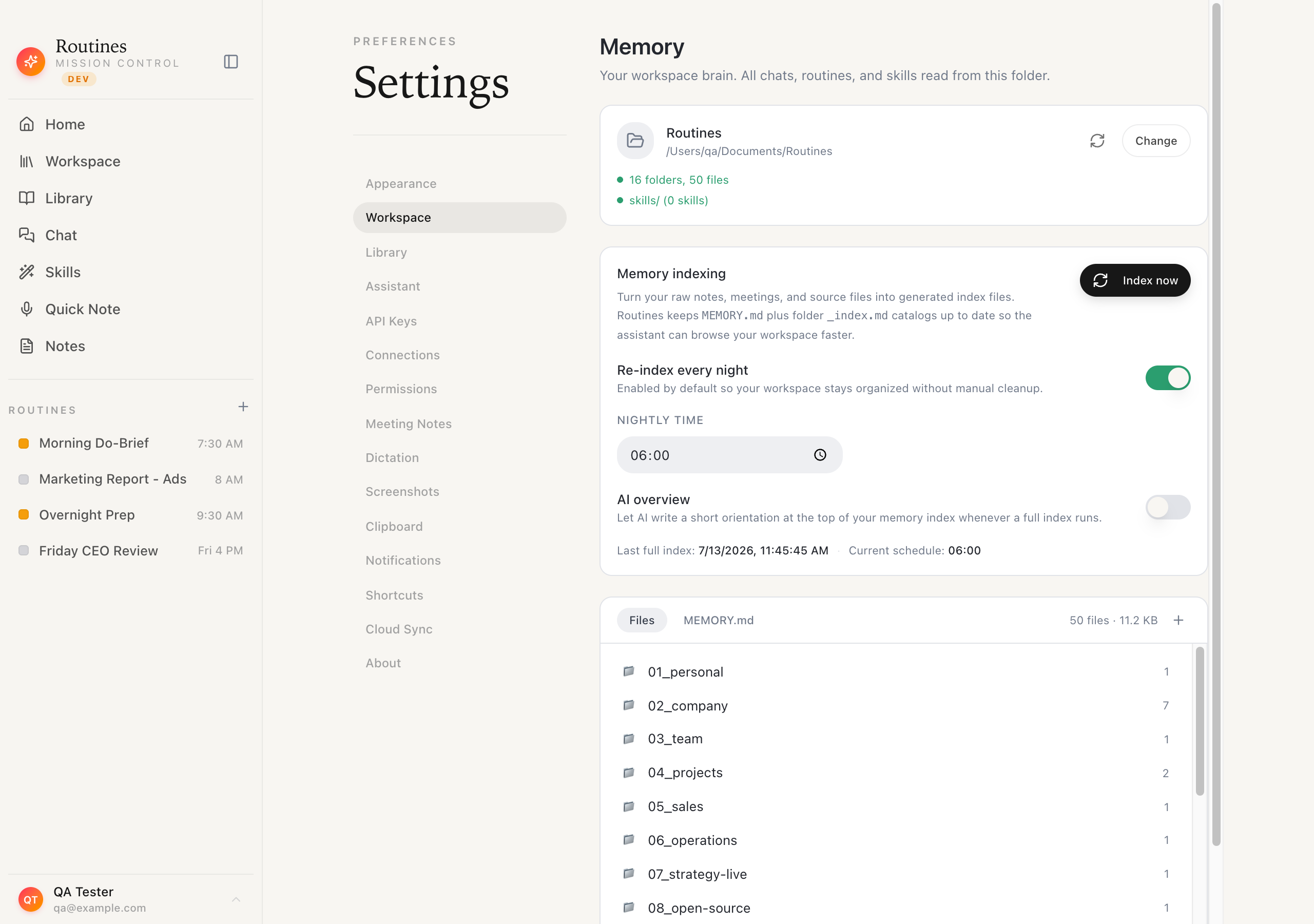
The dreaming pass rebuilds the FTS5 index in the background. The memory panel shows when a pass is running.
The dreaming design means the app does not block on index updates. Writing a meeting note does not require waiting for indexing to finish. The note exists as a file immediately; the index catches up on the next pass.
Layer 3: Salience weighting
FTS5 returns a BM25-ranked list of matching notes. BM25 is good at finding topically relevant text but knows nothing about context: a note from three years ago that contains the exact query phrase will outrank a note from this morning that matches less precisely.
We rerank the FTS5 results before injecting them into the AI context window. The reranking accounts for recency, access frequency, and explicit importance signals. Memory is salience-weighted, and this is a shipped feature. We are still tuning the weights and are not publishing the exact formula, but the direction is stable: recently created and recently accessed notes rank higher; stale notes that have not been touched fall.
The result is a list of notes that is both topically relevant and contextually appropriate. Those notes go into the system prompt as context before the LLM call.
How a query flows
When the user asks the AI assistant a question, or a scheduled routine fires, the path looks like this:
- The question or task text becomes the FTS5 query string.
- Routines runs the FTS5 query against the local SQLite index.
- The top results come back, ordered by BM25 score.
- The salience reranker reorders that list.
- The top-N notes are formatted and injected into the system prompt as context.
- The LLM call goes from the user's Mac to their connected model provider.
Routines is model-agnostic. The user brings an API key for Anthropic, OpenAI, or OpenRouter. The key is stored in macOS Keychain. The request goes from the user's Mac to the provider, with Routines as the local relay.
The knowledge graph
The workspace also shows a graph view of the vault. The graph is built from structural links: wikilinks in the markdown body and frontmatter, plus back-references Routines detected during ingestion. It is not AI-generated and it is not semantic. A node is a note; an edge is a link that exists in the text.
The graph lives in the same SQLite database as the FTS5 index, in a separate table, updated by the same dreaming pass.
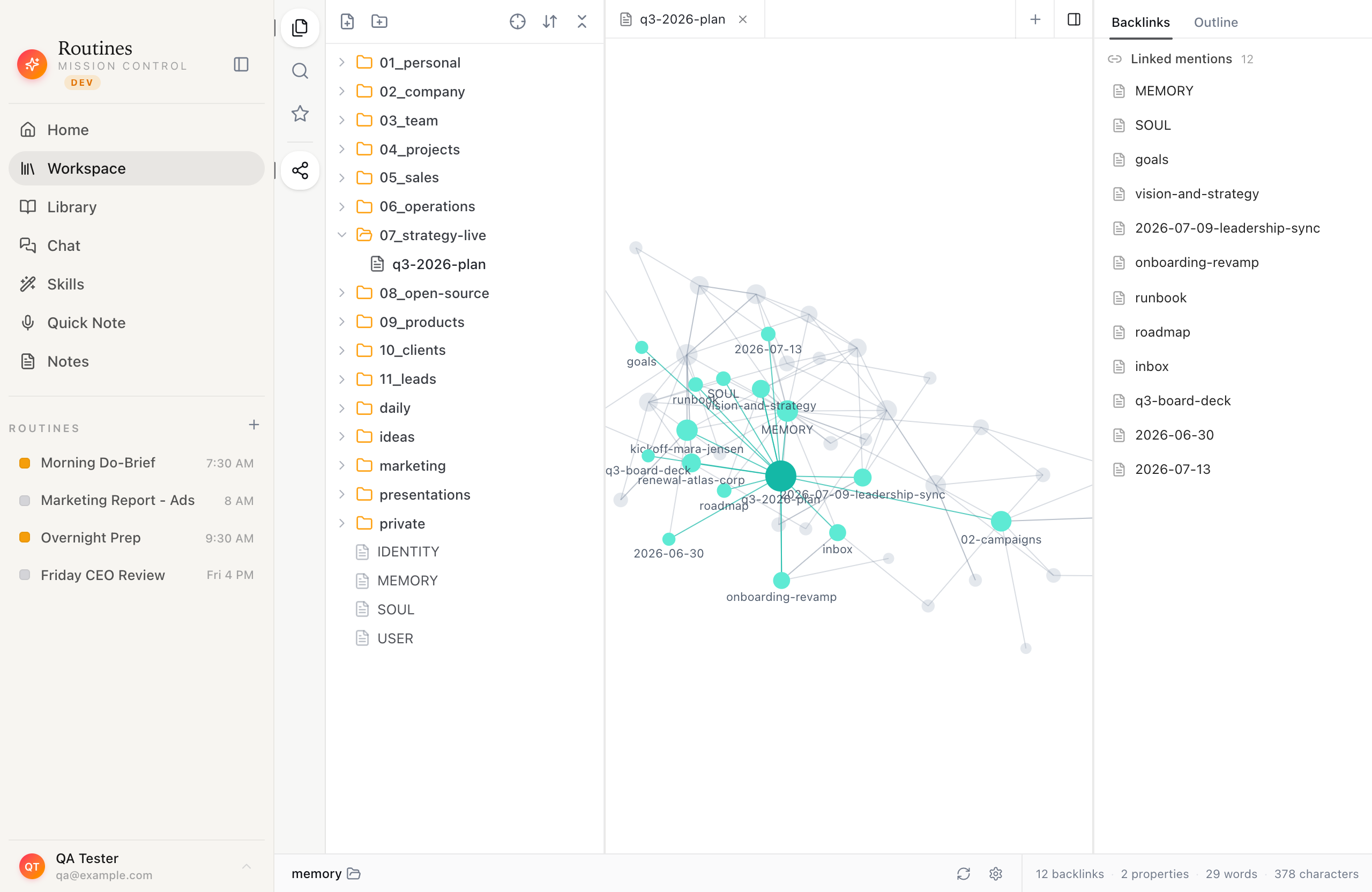
The graph view. Each node is a markdown file; each edge is a link in the text. No AI, no inference, no embeddings.
What happens when you cancel
The vault folder stays where you put it. The markdown files are still there. The SQLite database is still there. Neither requires the app to be running.
Cancel us and the second brain still opens.
Open the vault in Obsidian, search it with grep, track it in git, or move it to any other markdown editor. No export step, because there is no proprietary format to export from. The files were always yours.
Meeting notes and the transcription path
When a meeting ends, Routines writes the transcript and AI summary as a .md file in the vault. The file follows the same naming and frontmatter convention as any other note.
The audio path: meeting and dictation audio goes to Deepgram, a hosted speech-to-text service, with a local Whisper model as the fallback. On Pro, Routines manages the Deepgram relationship and meters usage: 50 hours per month is included, with further hours metered separately. On Free, the user supplies their own Deepgram key. The prompts that produce the meeting summary go to the user's connected model provider via their own API key.
The trade-offs we made
FTS5 is keyword-based, not semantic. There are no embeddings in this architecture. For a single-user personal knowledge base with a few thousand notes, BM25 plus salience weighting returns useful results. The gap is real: FTS5 will not match "client frustrated with the timeline" against a note that says "customer angry about delays" unless one of those phrases appears in the other. We know this and accept it for now. The operational cost of maintaining a vector index alongside the markdown files did not justify the improvement in recall at this scale.
The vault lives on one Mac. If the Mac fails without a backup, the vault can fail with it. We ship cloud sync for users who want redundancy, and the vault is an ordinary folder, so Time Machine, git, rsync, and any backup tool work without app involvement. We do not push sync by default.
The index is a snapshot. The dreaming pass is periodic, not continuous. The AI assistant reads what FTS5 surfaces at query time. For a note-taking and memory use case, this is fine. It would not work for a real-time collaboration tool.
These trade-offs reflect what we think matters for a personal AI assistant on a Mac: artifact ownership first, operational simplicity second, search quality third. The files are the thing. The index exists to serve the files, not the other way around.
Download Routines and try the memory for 7 days free
You can open the vault folder and inspect the SQLite database any time you like. They are on your disk.
See how the memory feature works in the app, read about building a second brain from files you already have, or see the Morning Briefing recipe to watch the memory retrieval running in practice.
Frequently asked questions
What file format does Routines use for notes?
Plain markdown. Each note is a .md file with YAML frontmatter containing the title, date, tags, and source. The body is standard CommonMark. No proprietary format and no binary blobs.
Can I use my existing Obsidian vault with Routines?
Yes. Point the vault path at your Obsidian vault during setup. Routines reads and writes the same .md files. The FTS5 index is an additional .db file in the vault directory. Nothing is converted and nothing is locked in.
What is FTS5 and why did you choose it?
FTS5 is SQLite's built-in full-text search extension. It ships with macOS, supports BM25 ranking out of the box, and kept the vault architecture simple: one directory, one .db file next to the notes, one background pass to keep them in sync.
How often does the index rebuild?
The dreaming pass runs periodically in the background. A new note or imported file is searchable within seconds of the pass completing. The memory panel shows when a pass is running and how many notes it touched.
Does Routines send my notes to a server?
The notes stay in the folder you chose. They do not leave your Mac as part of the indexing process. When the AI assistant retrieves context for a question, the relevant note contents go to your connected AI model provider as part of the prompt. The route is your Mac to that provider directly. Routines does not have its own AI service and does not store your notes on a server.
Meeting and dictation audio goes to Deepgram for transcription, with local Whisper as the fallback. On Pro this is managed by Routines; on Free you supply your own Deepgram key.
What happens to my notes if I cancel?
Nothing changes in the vault folder. The markdown files remain on your Mac, readable in any text editor, Obsidian, or file browser. The SQLite database stays readable with any SQLite client. Cancel us and the second brain still opens.
Can I search the vault without opening the app?
Yes. grep -r "query term" ~/your-vault works. So does Obsidian search, Alfred, Raycast, and macOS Spotlight if the vault folder is indexed. The FTS5 index inside Routines is an additional layer, not a replacement for the file system.
Why not vector embeddings?
For a single-user knowledge base with a few thousand notes, BM25 plus salience weighting works well enough. The gap to embedding-based recall is real but acceptable at this scale, and FTS5 has an advantage: the index is inspectable. You can open the SQLite database and see exactly what it contains. A vector index is not.